Small business website design: A Practical Guide to Planning and Launching

Let's be honest, thinking about small business website design can feel like a massive headache. But it's about creating a powerful, 24/7 digital workhorse, not just sticking a brochure online.
Think of it as your hardest-working employee. The one that never sleeps, never complains, and is constantly working to build credibility and generate leads while you're busy, you know, actually running your business.
Why Your Website Is More Than a Digital Brochure
It's time for a mindset shift. Your website isn't just a digital business card or a static page with your phone number. A well-thought-out website is the sun in your marketing solar system—everything should revolve around it. It’s the foundation of your entire online presence and a direct line to your bottom line.
For loads of potential customers, your website is the very first time they'll "meet" you. A professional, easy-to-use site instantly makes you look credible and trustworthy. It levels the playing field, helping you stand tall against bigger competitors. This is your chance to tell your story, show off what you know, and build a real connection before a customer even thinks about picking up the phone.
The Real Job of Your Website
Forget just looking pretty. A great website is an active tool, built to smash specific business goals. Its impact goes way beyond aesthetics; it's all about performance.
A brilliant site is on the clock 24/7, working tirelessly to:
Generate Leads: With clear calls-to-action ("Get a Quote," "Book Now") and simple contact forms, it captures interest from potential customers even when you're sound asleep.
Build Trust: A genuine "About Us" page, glowing testimonials, and real-world case studies show the people behind the business and provide that all-important social proof.
Educate Customers: It answers the questions you get asked all the time, explains your services clearly, and positions you as the go-to expert in your field.
Drive Sales: For e-commerce businesses, it's the till. But even for service-based companies, it guides people towards booking a consultation or requesting a quote.
Your website isn’t an expense; it’s an investment in an asset that works for you 24/7. It’s the most effective way to turn passive online searchers into active, paying customers.
We get it. For many UK business owners, things like tight budgets, no spare time, and the sheer anxiety of the tech side of things can feel like massive hurdles. That's why we've put this guide together—to be your practical, step-by-step solution, breaking down the whole process into small, manageable actions.
Ready to build a website that actually grows your business? Let's get started on the plan.
Right, let's talk about building your website. It's so easy to get carried away with the fun stuff – picking out cool fonts, playing with colour palettes, and dreaming up a flashy homepage. But hold on. Diving straight into design is one of the biggest mistakes you can make.
A great small business website isn't just a pretty face; it’s a workhorse. It needs a job to do. Before you even think about how it looks, you need a solid plan that’s tied directly to what you want to achieve in your business. This is the bit that separates a digital brochure from a tool that actually makes you money.
You have to ask yourself the big question: What do I actually want this website to do? Without a crystal-clear answer, you're just throwing spaghetti at the wall and hoping something sticks.
What’s Your Website’s Core Job?
Every single decision you make from here on out hangs on this one thing: your main goal. Are you trying to make the phone ring off the hook? Or is it all about getting people to buy your products online? Maybe you just need them to book an appointment without having to call you.
Let’s get specific. Think about how your business operates.
A local plumber in Manchester probably wants one thing: to generate phone calls from people with leaky pipes. Their site needs to scream "call me now!"
A boutique bakery in Brighton is all about showing off delicious-looking cakes, taking online orders for collection, and maybe building a loyal local following on Instagram.
A freelance copywriter needs their website to act as their best salesperson – showing off their portfolio, proving their expertise, and getting potential clients to fill out a contact form.
Once you’ve nailed down that primary purpose, everything else falls into place. Every page, every button, every sentence gets a clear mission: guide the visitor towards taking that one key action. It simplifies the entire process.
A website without a clear goal is like a ship without a rudder. It might look impressive floating in the harbour, but it’s not actually going anywhere useful. Define its purpose first, and the rest gets a whole lot easier.
Get Inside Your Ideal Customer's Head
Here’s a reality check: you're not building this website for you. You're building it for your customers. To do that right, you’ve got to put yourself in their shoes. What problem are they trying to solve when they stumble across your site? What questions are rattling around in their brain?
Think about their immediate needs, or what web designers call "pain points." A visitor searching for an emergency plumber is stressed out and needs a phone number, like, yesterday. Someone looking for a bespoke wedding cake wants to see stunning photos and get a rough idea of pricing. Your website has to give them what they need, fast.
Map Out Their Journey
Okay, so you know your goal and you know what your customer wants. Now you can start sketching out the path you want people to take when they land on your site. This is often called a sitemap – it’s just a simple blueprint of your pages and how they link together.
For a typical service business, a basic sitemap might look something like this: Homepage, About Us, Services, Case Studies, and a Contact page. It’s a logical flow that guides visitors from "hello" to "let's work together."
This structure stops people from getting lost or frustrated. It makes sure they can find what they’re looking for and, ultimately, take the action you want them to. If you want to dive deeper into structuring your thoughts, our article on how to write a website brief is a great place to start.
Now that you have a plan, you’re ready to build something that truly works for your business. Let’s look at the foundations of your site—the platform you'll build it on.
Choosing the Right Website Platform for Your Business
Deciding where to build your website is one of the biggest calls you'll make for your business online. It’s the digital foundation you’ll build everything on, and it impacts everything from how easy it is to post a blog to whether you can scale up later.
Get this right, and you've got a powerful tool in your corner. Get it wrong, and you’re signing up for some major headaches down the road.
The great news is, you've got options. Lots of them. The UK Web Design Services industry now supports over 2,200 businesses, a figure that shot up by 3.5% a year between 2020 and 2025. This boom is partly because brilliant platforms have made professional websites more accessible than ever for small businesses.
Website Builders vs. Content Management Systems
The first fork in the road is choosing between an all-in-one website builder (think Wix or Squarespace) and a more hands-on content management system (CMS) like WordPress.
It’s a bit like buying a flat-pack wardrobe versus hiring a carpenter to build you a custom one.
Website builders are all about simplicity. They package up your hosting, security, and design tools into one user-friendly subscription. They’re fantastic if you want to get online fast without a massive learning curve.
WordPress, on the other hand, is open-source, giving you ultimate control. You pick your own hosting and can customise literally anything with thousands of themes and plugins. It's incredibly powerful, but that flexibility comes with a bit more responsibility for things like maintenance and security.
Your choice of platform should come down to your business goals, how comfortable you are with tech, and where you see your business in five years. A simple, elegant builder is perfect for a portfolio site, but a growing e-commerce brand will need the scalable power of a more robust system.
This decision tree helps visualise how your main goal—selling, informing, or connecting—can point you toward the right type of platform.
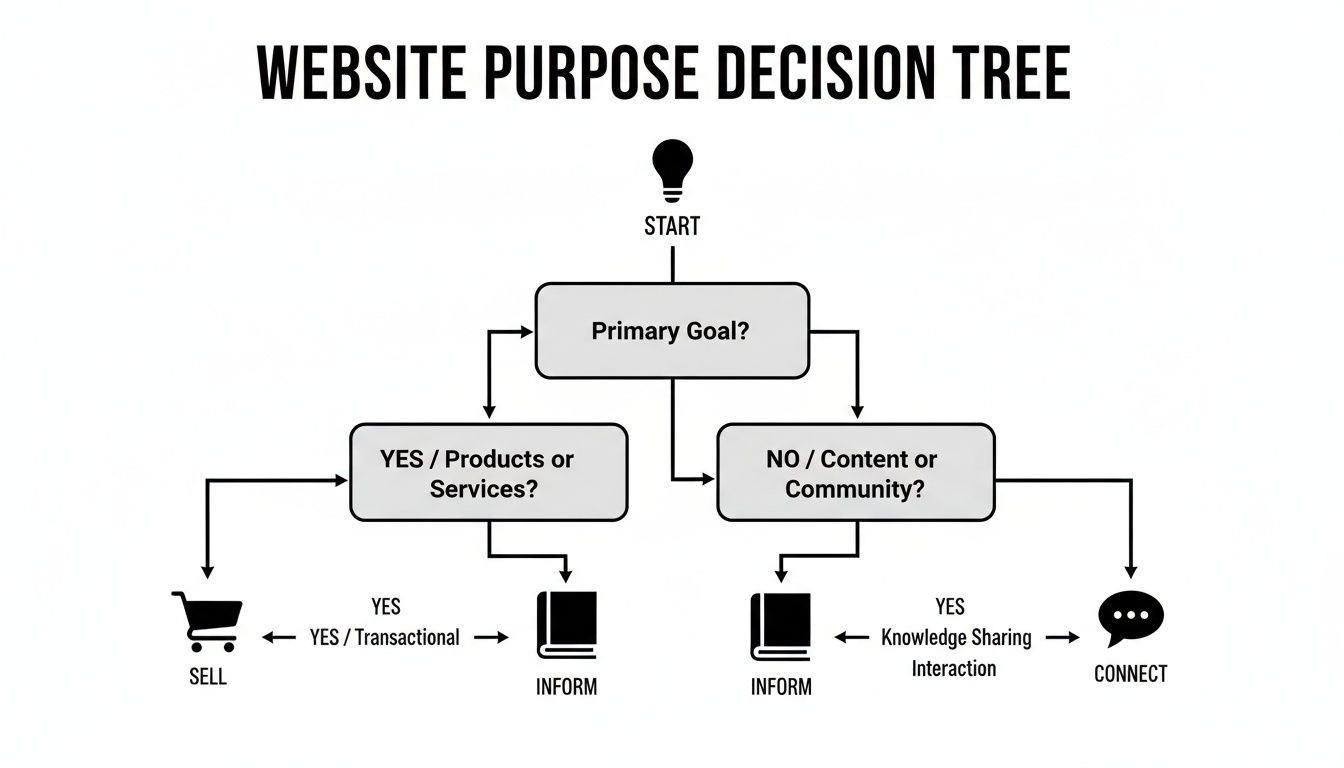
As you can see, if selling products is your number one priority, you absolutely need a platform built with strong e-commerce tools from day one.
Comparing the Top Website Platforms
To make this choice a bit clearer, let's break down the most popular options small businesses in the UK are turning to. Each has its own personality and is built for a different kind of user.
Website Platform Comparison for Small Businesses
Platform | Best For | Ease of Use | Cost (Typical Range) | Customisation |
|---|---|---|---|---|
WordPress | Bloggers, complex sites, full control | Moderate to Advanced | £10 - £50+/month | Extremely high |
Wix | Beginners, small businesses, portfolios | Very Easy | £11 - £30/month | High (within templates) |
Squarespace | Creatives, portfolios, visual brands | Easy | £12 - £35/month | Moderate (template-based) |
Shopify | E-commerce (from start-ups to large scale) | Easy | £25 - £250+/month | High (e-commerce focused) |
This isn't an exhaustive list, but it covers the main players. WordPress offers limitless potential if you have the time (or help) to manage it, while builders like Wix and Squarespace prioritise getting you online quickly and beautifully. Shopify is the undisputed king if your primary goal is to sell products.
Real-World Scenarios: Which Platform Fits?
Let's make this practical. Imagine a couple of typical UK small businesses:
The Local Plumber: Their main goal is getting phone calls. They need a straightforward, professional site that shows their contact details, lists their services, and ranks well in local Google searches. For them, Wix or Squarespace would be a perfect, low-fuss solution.
The Growing Online Boutique: This business is all about sales. They need rock-solid e-commerce features, inventory management, and the freedom to add new functions as they grow. Shopify or WordPress with WooCommerce would give them the power and flexibility they need to scale up. Finding the best ecommerce platform for small business is their critical first move.
If you’re still weighing your options, our UK website builder guide comparing WordPress, Wix, and Squarespace dives into even more detail.
Ready to build a website on the right foundation for your business goals? Get in touch with Baslon Digital today for a free consultation and let's discuss the perfect platform for you.
Design Elements That Turn Visitors into Customers
Let's be brutally honest: effective small business website design isn’t about winning art awards. It's a calculated process of guiding visitors to do something specific – and valuable. Every single choice, from your colour scheme to the text on your buttons, needs to work together to turn a casual browser into a loyal customer.
Think of your website's design like its body language. A clean, uncluttered layout feels open and easy to understand. A chaotic, messy one? It’s stressful and confusing. Your mission is to create a digital space where visitors feel comfortable, confident, and totally clear on what to do next.
Creating an Intuitive User Experience
A visitor's journey through your site should feel completely effortless. If someone has to hunt for your services page or your contact details, they won't stick around. It's that simple.
Your main menu needs to be painfully obvious, using straightforward language like "Services," "About," and "Contact" – not confusing industry jargon. This smooth, predictable flow is the absolute heart of a positive user experience (UX). To really get this right, you'll want to master the key user experience design principles. It’s all about making your site easy and predictable, which builds trust with every single click.
Harnessing the Power of Brand Consistency
Your website is the digital face of your business, and if you want to be memorable, consistency is everything. Using your brand’s colours, fonts, and logo on every single page reinforces who you are and builds subconscious trust with your visitors.
Picture a local coffee shop's website. If it uses a warm, earthy colour palette and a friendly, handwritten-style font from the homepage to the checkout, it creates a cosy, recognisable vibe. That visual harmony makes the brand feel professional and reliable, nudging visitors to trust them enough to place an order or pop in for a visit.
The Mobile-First Imperative
I'm just going to say it: your website must work flawlessly on a mobile phone. This is no longer up for debate. More people will likely visit your site on a small screen than a desktop, and if the experience is rubbish—requiring pinching, zooming, or endless scrolling—they’ll be gone in a flash.
Statistics show that by 2025, around 74% of small businesses in the UK will have a website. Here's the kicker, though: a lot of them get it wrong. A massive 84.6% suffer from crowded designs, and a critical 38.5% are missing clear calls-to-action. Getting mobile right is your secret weapon, as a well-optimised site can hang onto 74% of users who would otherwise leave.
A mobile-first design isn’t just another feature; it’s the entire foundation of modern web design. If your site doesn’t prioritise the mobile user, you are actively turning away most of your potential customers before they’ve even seen what you offer.
Crafting Calls-to-Action That Actually Convert
Finally, you have to tell people what you want them to do. A Call-to-Action (CTA) is just a fancy term for a button or link that prompts a user to take the next step, like "Buy Now," "Get a Quote," or "Book a Consultation."
Effective CTAs are:
Visually Striking: They should use a contrasting colour that makes them pop right off the page. No one should have to search for it.
Action-Oriented: The text needs a strong verb telling the user exactly what happens when they click. "Download Your Free Guide" is worlds better than a vague "Submit."
Strategically Placed: Put them where users are most likely to make a decision, like right after your list of services or a glowing testimonial.
Combine these elements, and you're not just building a website; you're building a seamless path from arrival to action.
Ready to design a website that not only looks incredible but also drives real results for your business? Contact Baslon Digital today for a free, no-obligation chat about your project.
How to Budget for Your Small Business Website
Let's talk money. It can feel a bit awkward, but honestly, setting a realistic budget is one of the smartest things you can do on your small business website design journey. A clear budget stops nasty surprises in their tracks, helps you make savvy decisions, and makes sure your investment actually pays off instead of becoming a massive headache.
The cost of a website isn't just one big number; it’s a mix of initial setup costs and ongoing expenses. Getting your head around these different parts is the secret to planning properly and dodging the hidden fees that catch so many business owners out.
Breaking Down the Core Costs
Your website budget is really split into two main pots: the one-time setup costs and the recurring fees that keep it running. You absolutely have to account for both to see the full picture of what you’re spending.
Here are the essential bits you need to factor in from day one:
Domain Name: This is your website’s address on the internet (like ). It’s a small but crucial annual fee, usually around £10–£20 per year.
Website Hosting: Think of this as the digital plot of land where your website lives. If you're using a platform like Wix or Squarespace, this cost is bundled into your monthly plan. For a WordPress site, you'll need to buy it separately, which typically costs £10–£50 per month for decent small business hosting.
Platform or Design Costs: This is the big one and will be the largest slice of your initial budget. It could be a monthly subscription for a DIY builder, a one-off fee for a pre-made theme, or the cost of hiring a professional web designer or an agency to build it for you.
Setting a Realistic Budget Range
So, what should you actually set aside? Well, research shows that UK small businesses are pretty strategic with their web spending. A chunky 19.7% spend between £2,501 and £5,000 each year, while another 18.9% land in the £501–£1,000 range.
A basic but professionally built small business website often falls somewhere in the £1,000–£5,000 bracket, which covers the essential design and setup.
Don't just see your website as a cost to be slashed at every opportunity. Think of it as an investment in your single most powerful marketing asset. A cheap website that doesn't bring in customers is way more expensive than a well-planned one that generates leads 24/7.
Thinking about more budget-friendly routes? We've put together a guide on affordable website design for small businesses that convert with some really practical tips.
Ultimately, your budget has to line up with your business goals. A simple online brochure site will cost a lot less than a complex e-commerce shop with all the bells and whistles. By understanding the different costs and typical price ranges, you can walk into your website project with total financial confidence.
Ready for a clear, no-fluff quote for your website? Contact Baslon Digital for a free consultation and a detailed cost breakdown with zero hidden fees.
Right, you’ve hit the big green "go live" button. Champagne corks are flying. It feels like the finish line, but honestly? You've just started the race.
Flicking the switch on your new website is a huge moment, but the real work in small business website design starts now. This is where you transform that shiny new site from a pretty online brochure into a machine that actually grows your business.
What you do in these first few weeks is crucial. It's all about making sure people can find you, figuring out what they do when they get there, and giving them a reason to come back. Don't worry, you don't need to become a tech wizard overnight. It’s about building a few simple, repeatable habits.
Your Post-Launch Game Plan
Think of this as your immediate to-do list. Ticking these off ensures your website starts pulling its weight from day one.
Submit Your Sitemap to Google: This is non-negotiable. It’s like handing Google a map to your new digital home so it can explore and list your pages way faster. You can get this done for free through a Google Search Console account. Seriously, do it now.
Set Up Google Analytics: If you do nothing else, do this. Google Analytics is a free tool that shows you who's visiting, where they came from, and what they’re looking at. Without this data, you’re just guessing. You’re flying blind.
Sketch Out a Simple Content Schedule: A website that never changes is a dead website in the eyes of visitors and search engines. Just commit to something small, like adding one new blog post, a case study, or a few project photos each month. Consistency beats frequency every single time.
Going live is just the beginning. The most successful websites are those that are consistently tested, updated, and refined based on real user data and clear business objectives. Your launch is permission to start learning.
By nailing these basic tasks, you create a powerful feedback loop. SEO helps people find you, analytics tells you what they do, and fresh content gives them a reason to care. This simple cycle is the secret to turning your website into your most valuable business asset.
Ready to stop guessing and start growing? Contact Baslon Digital today for a free consultation and let's build something that works.
Your Burning Questions Answered
Look, diving into the world of small business website design can feel like trying to learn a new language. You've probably got a million questions swirling around. Let's tackle some of the most common ones we hear from UK business owners, shall we?
How Long Will This Whole Website Thing Take?
Ah, the million-dollar question. The honest answer? It depends.
If you’re after a simple, clean brochure-style site using a slick template, we could be looking at a turnaround of 1-4 weeks. But if you're dreaming bigger—say, a full-blown e-commerce machine with custom features or a complex booking system—you'll need to be more patient. A custom project like that typically takes 6-12 weeks, sometimes even longer.
The real secret to speeding things up? You. Having a clear idea of what you want and giving your designer prompt feedback is the magic ingredient that keeps things moving.
Do I Actually Need to Know How to Code?
Absolutely not. Thank goodness, right?
Modern website builders like Wix, Squarespace, and Shopify were built for normal humans, not tech wizards. They use simple drag-and-drop editors, so you can see exactly what you’re building as you go.
Even a powerhouse like WordPress can be tamed without a single line of code, thanks to all the amazing themes and visual page builders out there. You can create something seriously professional with zero technical background.
Let’s be clear: the skill isn't coding. It's knowing your business inside out and understanding what your customers are desperate for. A good platform handles the geeky stuff, leaving you to focus on building a site that actually helps people and, you know, makes you money.
Web Design vs. Web Development – What’s the Difference?
Think of it like building a house.
Web design is the architect and the interior designer. It's all about the visuals—the layout, the colours, the fonts, and the overall vibe that makes someone feel welcome. It’s the user experience (UX) that decides if visitors stick around or click away in frustration.
Web development, on the other hand, is the builder. The developer takes that beautiful design and writes all the clever code to bring it to life, making sure every button works and every page loads perfectly. Many of us (including our team) handle both, so you get the whole package without the hassle.
Ready to get a stunning website that drives results, without pulling your hair out over the technical bits? The team at Baslon Digital lives and breathes this stuff, creating custom Wix websites that help small UK businesses punch above their weight. We handle the design, the development, and the strategy so you can focus on running your business.
Don't let another day go by with a website that isn't working for you. Get your free, no-obligation quote today at baslondigital.com and let's start building a site that makes a real difference.

Comments