Shipping Cost Calculator a Wix Guide for 2026

You're probably in one of two situations right now. Either you're charging too little for delivery and eating the cost on every order, or you're charging too much and watching customers disappear at checkout. Both problems usually come from the same place. Guesswork.
A proper shipping cost calculator fixes that. It replaces rough estimates with rules based on what changes delivery cost, then turns those rules into prices your customers can understand. For a UK small business selling through Wix, that matters twice. You need rates that protect margin, and you need a checkout that doesn't feel unpredictable.
If you've ever tried to piece this together using carrier sites, product weights, free shipping offers, and a few half-finished Wix settings, you'll know how quickly it gets messy. The good news is that the setup becomes much simpler once you understand the pricing models, the role of zones, and the difference between a basic store setup and one that's ready for real orders.
Table of Contents
Why Your E-commerce Store Needs a Shipping Cost Calculator - Four common ways stores price shipping
Understanding Common Shipping Pricing Models - What a shipping cost calculator is really doing - The four pricing models that matter most - Shipping Pricing Model Comparison
Implementing Shipping Rules and Zones in Wix - Start with regions and zones - Use Wix built-in shipping rules first - Add live rate apps when you need carrier pricing - Use custom logic only when the rules get unusual
Testing Your Shipping Setup to Avoid Costly Mistakes - Run real checkout scenarios - Use benchmark prices as a sense check
UX Best Practices and Troubleshooting Common Issues - Show shipping information before the final checkout step - Troubleshoot rates systematically - Why duties and taxes break otherwise good setups
When to Partner with a Wix Expert - DIY works well up to a point - The handoff point is usually margin, time, or complexity
Why Your E-commerce Store Needs a Shipping Cost Calculator
A shipping cost calculator is the part of your store that turns package details into a delivery price your customer can accept and your business can afford. Without it, most shops fall back on flat guesses, broad averages, or whatever “feels about right”. That usually works until product sizes vary, destinations widen, or a customer orders multiple items in one basket.
The practical reason to use one is simple. Shipping is not one fixed fee. It changes by item weight, parcel size, destination, service level, and any add-ons you choose to include. If your site doesn't calculate that properly, your checkout becomes the weakest point in the buying journey.
For owners launching their first online store, this often sits alongside other setup questions like product listings, payments, and store structure. If you're still sorting out the basics, this guide on how to sell your stuff online helps frame where shipping fits in the wider ecommerce picture.
Four common ways stores price shipping
Most small stores use one of these approaches:
Flat rate: Charge one delivery price for everyone in a region. Easy to manage, but risky if your products vary a lot.
Weight-based rates: Charge more as parcel weight increases. Better than flat rate for mixed catalogues.
Order value rules: Offer free or reduced shipping once a basket reaches a certain value. Good for nudging larger orders.
Carrier or live rates: Pull pricing based on actual shipment details. Most accurate, but also the most technical.
Practical rule: If you sell products with very different sizes or weights, simple flat rates usually stop working faster than owners expect.
A useful way to think about it is the same way people approach moving costs. A local flat quote might work for a small, predictable move, but once distance, item size, urgency, and extras are involved, you need a more customized estimate. That's why tools like a Perth relocation cost estimate feel familiar. The principle is the same, even though the shipment type is different.
The goal isn't to build a perfect logistics engine on day one. It's to stop charging blindly, show customers realistic delivery costs, and give your Wix store rules that can grow with the business.
Understanding Common Shipping Pricing Models
Shipping prices look random until you know what sits underneath them. In practice, most calculators use the same core ingredients. Weight, dimensions, distance, service speed, and extras like insurance or tracking all affect the final rate, and dimensional weight comes into play when a box is large but light, so the carrier charges by volume rather than actual weight, as explained in this overview of how shipping calculators work.
That matters because the cheapest-looking setup often fails in edge cases. A candle business, a clothing shop, and a framed print store can't safely use the same logic, even if all three are on Wix.
What a shipping cost calculator is really doing
At checkout, the calculator is asking a short series of practical questions:
How heavy is the parcel?
How big is the parcel once packed?
Where is it going?
How fast does it need to arrive?
Does this order need extras such as tracking or cover?
If any of those inputs are missing or wrong, the output is wrong too.
A simple example makes this easier. A folded T-shirt in a compact mailer may price cleanly on actual weight. A lightweight cushion in a large box may trigger dimensional pricing instead. The second parcel doesn't weigh much, but it takes up more van and aircraft space, so the carrier charges differently.
The four pricing models that matter most
Carrier live rates
This is the most accurate model. Your store sends order details to a carrier or shipping app and returns available services and prices.
It suits shops with changing basket sizes, mixed product dimensions, or regular international orders. The trade-off is setup complexity. If an app connection fails or a product has incomplete weight data, the customer may see the wrong option or no option at all.
Table rates
Table rates use rules you define. You might charge one amount for parcels up to a certain weight, another for heavier baskets, and a separate amount for remote areas.
This works well for stores with a manageable product range. It's less precise than live rates, but it gives you more control and often produces cleaner checkout choices.
Dimensional weight logic
This is less a standalone model and more a pricing rule you must respect. If you ignore it, large low-weight items become margin traps.
Think of shipping a lampshade versus shipping a dense small tool. The lampshade may weigh less, but the carrier may charge more because of the box size. That's why measuring packed dimensions matters just as much as weighing the item.
Choose the model that matches your catalogue, not the one that sounds most advanced.
Flat and conditional rates
Flat rate shipping is the easiest for customers to understand. Conditional rates build on that by saying things like “free UK delivery over a set basket value” or “express shipping only for certain regions”.
This approach is excellent for simple catalogues and strong average order values. The downside is obvious. If your assumptions are wrong, your margin absorbs the difference.
For larger transport decisions, the same pattern shows up in other industries. If you've ever compared options for how much to ship a car, you'll have seen that the quote depends on route, vehicle size, speed, and service type rather than one universal rate. Ecommerce shipping works the same way, just on a smaller scale.
Shipping Pricing Model Comparison
Model | How It Works | Best For | Potential Downside |
|---|---|---|---|
Carrier Live Rates | Pulls current carrier prices using order data | Mixed catalogues and international shipping | More setup points that can fail |
Table Rates | Uses store-defined rules by weight, value, or region | Small to mid-size shops with predictable orders | Can become hard to maintain |
Dimensional Weight | Prices by parcel volume when size matters more than weight | Bulky but lightweight products | Easy to miss if you only track weight |
Flat or Conditional Rates | Applies fixed delivery charges or offer-based rules | Simple catalogues and clear offers | Can overcharge or undercharge |
Implementing Shipping Rules and Zones in Wix
Wix gives you enough flexibility to build a reliable shipping setup, but only if you treat it like a system rather than a form to fill in. The strongest setups start with packaging decisions, product data, and delivery geography before anyone touches the rate rules.
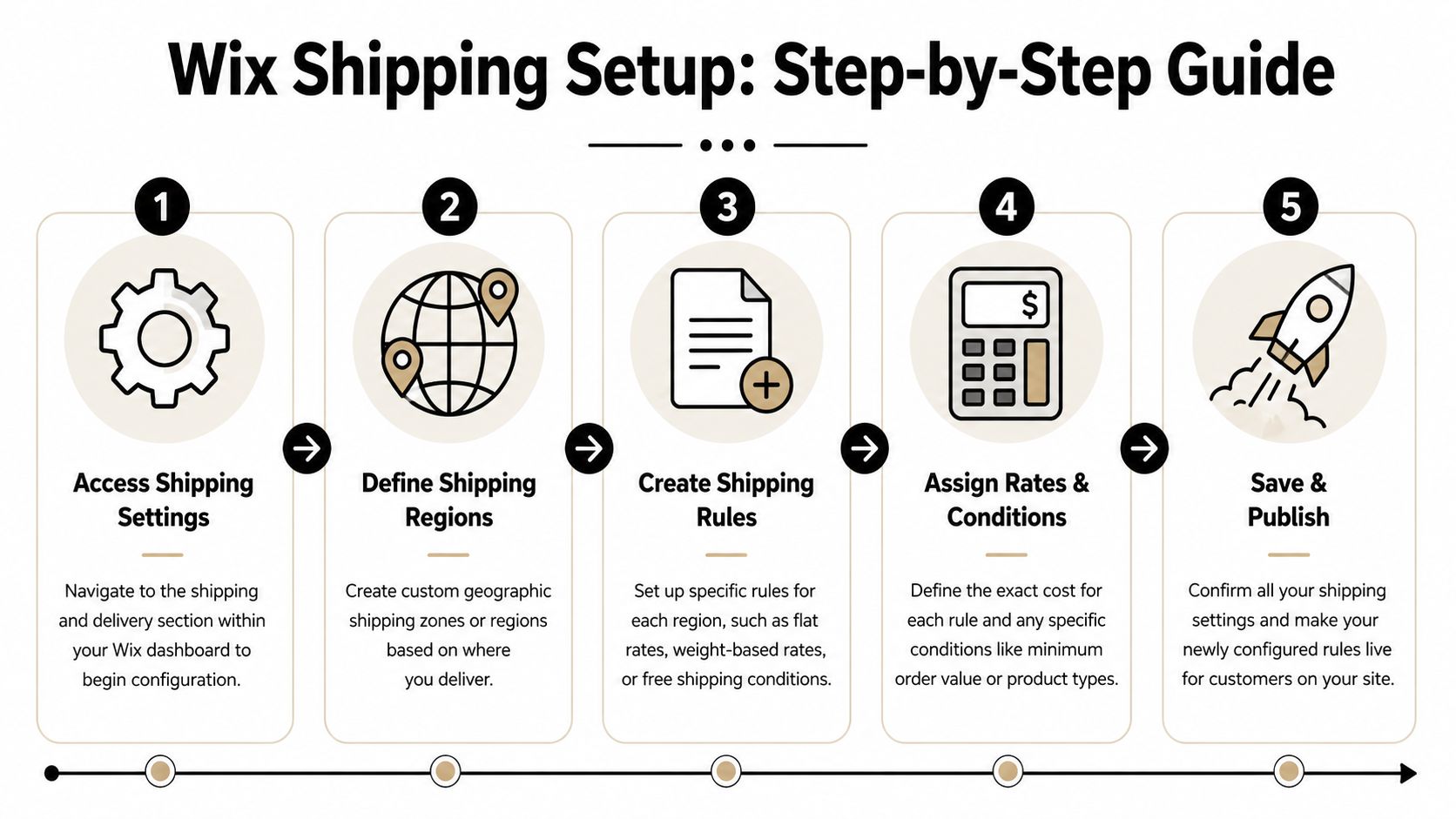
A sensible workflow includes selecting packaging materials, calculating package dimensions and weight, choosing a carrier approach, defining shipping classes, and applying profiles to products. Common mistakes include ignoring DIM weight and setting the wrong shipping zones, as outlined in this guide to calculating shipping rates.
If you want a broader store-level foundation before adjusting shipping, this guide to ecommerce on Wix for UK stores is a useful companion.
Start with regions and zones
In Wix, begin in your shipping and delivery settings and define where you ship before deciding how much to charge. Keep the structure practical.
For a typical UK store, that often means separating:
Mainland UK
Highlands and islands
Northern Ireland
Europe
Rest of world
Don't lump everything into “United Kingdom” and “International” unless your catalogue is tiny and your shipping policy is deliberately broad. Region grouping affects which methods appear at checkout. If the zone logic is messy, the rates won't make sense even if the numbers themselves are fine.
Use Wix built-in shipping rules first
Wix's native tools are enough for many small businesses. Start there before adding apps.
Use built-in rules if your store fits one of these patterns:
Consistent products: Similar size and weight, such as skincare, stationery, or apparel.
Simple domestic strategy: One standard rate, one express rate, and maybe free shipping above a basket value.
Predictable packaging: You already know the box or mailer types you'll use.
A practical setup inside Wix usually looks like this:
Create a region.
Add one or more shipping methods for that region.
Decide whether each method is flat-rate, rule-based, or free above a condition.
Test with a real product basket.
For example, a clothing shop might use a standard UK rate, a next-day option, and a free shipping rule for higher-value baskets. A ceramics store might use weight tiers because the difference between one mug and four mugs changes the risk and cost of shipping.
What works: Start with fewer rules than you think you need. You can always add refinement later. Too many overlapping rules make troubleshooting harder.
Add live rate apps when you need carrier pricing
Some stores outgrow built-in rules quickly. If you ship internationally, have varied parcel sizes, or want rates that reflect current carrier pricing, a shipping app from the Wix App Market can help.
That route makes sense when:
your products vary sharply in packed dimensions
you want customers to choose from service speeds
you need more precise international logic
manual table updates are becoming a chore
The trade-off is that app-based setups depend on clean product data. If one item is missing a weight or has unrealistic dimensions, the quote returned to the customer may be incomplete or inflated.
Later in your configuration process, it helps to see a dashboard walkthrough in action:
Use custom logic only when the rules get unusual
Velo by Wix and API-based setups are for stores that need bespoke behaviour. That might include different shipping methods by product type, custom fulfilment cut-offs, or more advanced international handling.
Use custom code if your business needs logic like:
items from one collection can't ship with another
bulky products require a separate courier method
trade customers see different delivery options
location and basket mix affect fulfilment handling
Owners often lose time here. The coding itself isn't always the problem. The main difficulty is keeping the shipping logic understandable when products, promotions, and carriers all change over time.
For most small businesses, the right path is simpler than it seems. Start with clear regions. Add straightforward rate rules. Only move to apps or custom logic when a real limitation appears.
Testing Your Shipping Setup to Avoid Costly Mistakes
A shipping setup can look correct in the Wix dashboard and still fail in checkout. That's why testing needs to mirror the way customers buy.
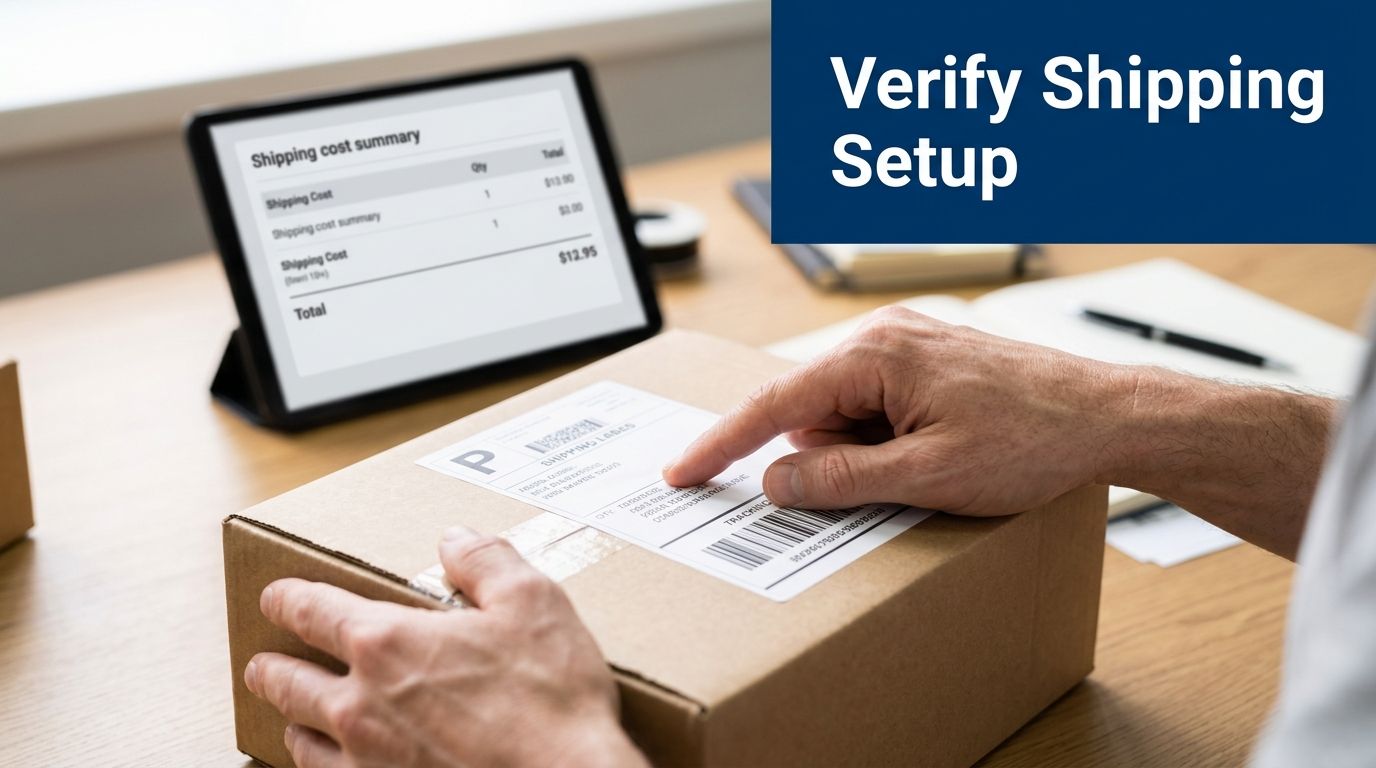
The safest way to test is to build a small set of fake orders that reflect your most common and most awkward real-world scenarios. Don't stop at one single-item purchase. A store usually breaks on the unusual basket, not the easy one.
Run real checkout scenarios
Create test orders for cases like these:
Single lightweight item: Checks whether your lowest band or basic flat rate is triggering properly.
Heavier order: Useful for products that should move into a different pricing tier.
Multi-item basket: Reveals whether combined weight or conditional rules behave as expected.
Local UK address: Confirms your default domestic zone is firing.
International order: Verifies whether customers outside your main market can see the right methods.
As you test, look for three things. First, does the correct shipping method appear? Second, is the price what you intended? Third, does a promotion or free delivery condition override the rule in the right way?
Use benchmark prices as a sense check
Benchmark ranges are helpful because they catch obvious errors quickly. For example, in the UK, the average shipping cost for a small parcel under 1 kg sent domestically ranges between £3.50 and £5.00, while international shipping to the USA for the same weight typically ranges between £12.00 and £25.00, according to this UK to USA shipping calculator reference.
If your setup quotes far outside those ranges for a plain small parcel, that doesn't automatically mean it's wrong, but it does mean you should investigate. The issue may be a mistaken weight, an oversized package dimension, the wrong service level, or a zone mismatch.
Before launch, place test orders the way a confused customer would. Try different postcodes, different basket mixes, and every promotional condition you've enabled.
That extra hour of checking is usually cheaper than refunding shipping errors after your store goes live.
UX Best Practices and Troubleshooting Common Issues
Shipping isn't only a pricing problem. It's a trust problem. Customers don't mind paying for delivery nearly as much as they mind being surprised by it late in the process.
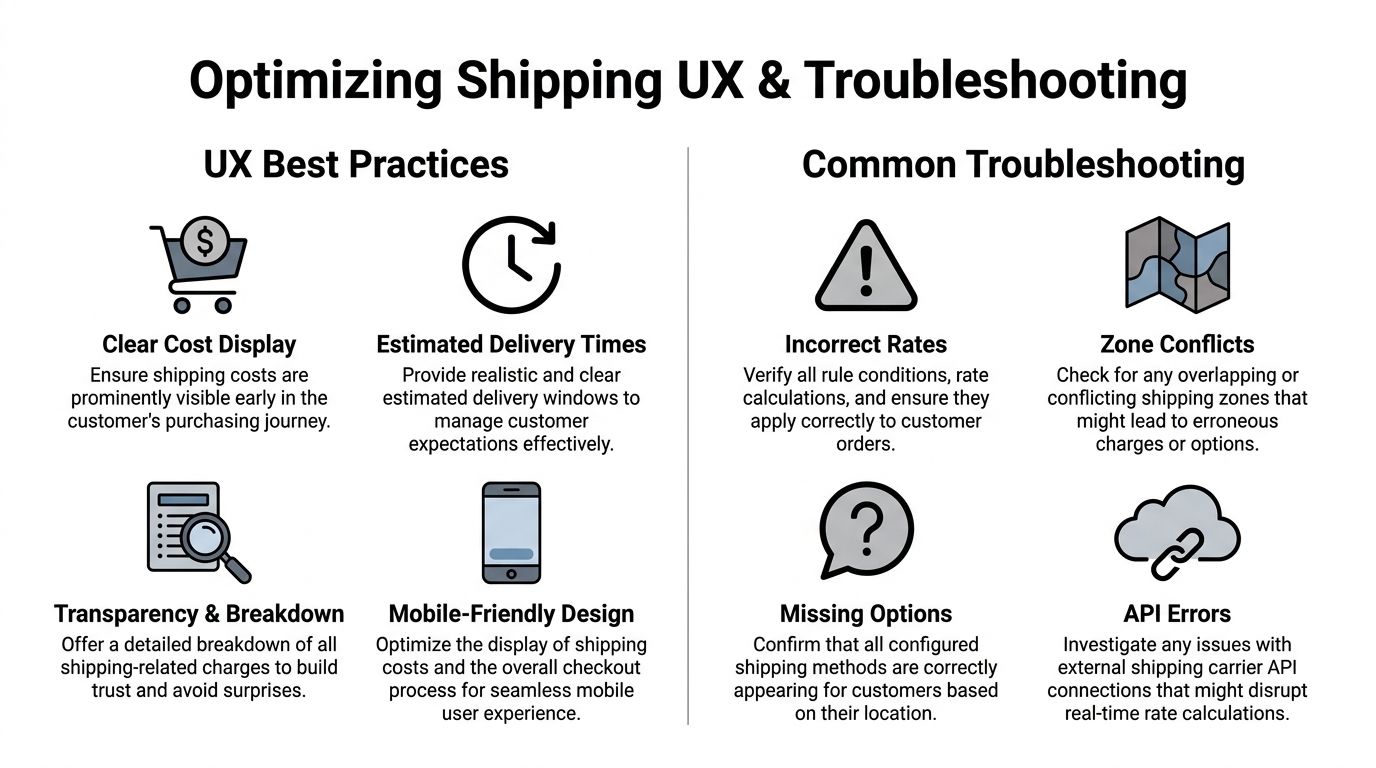
A smooth checkout depends on clear delivery information appearing early enough for the customer to make a decision. If you leave all shipping details until the final step, shoppers start to feel the order total is moving under their feet. For stores also deciding whether to simplify the path to purchase, this article on checkout as guest is worth reading because shipping friction and account friction often stack together.
Show shipping information before the final checkout step
The best UX pattern is simple. Surface enough delivery information before payment so the customer can judge total cost and timing with confidence.
That usually means:
Show delivery methods clearly: Standard, express, tracked, or local options should be easy to compare.
Set expectations on speed: If one method is slower but cheaper, say so plainly.
Explain thresholds: If free shipping applies above a basket value, make that visible in the cart.
Keep the mobile view tidy: Shipping options need to be readable on smaller screens.
Customers don't need a lesson in logistics. They need clarity. If your store uses broad labels like “Shipping calculated later”, many buyers will assume the final fee will be worse than it is.
Troubleshoot rates systematically
When shipping goes wrong in Wix, the cause is usually one of a few repeat offenders.
Incorrect rates appearing: Check product weights, dimensions, and which rule should have priority.
Zone conflicts: Overlapping regions can produce odd behaviour, especially if one zone is too broad.
Missing shipping options: Confirm that the destination is included and the order matches the method conditions.
App or API errors: If you use live rates, verify the app connection and any required data fields.
Troubleshooting works best when you isolate one variable at a time. Don't change zones, prices, product weights, and app settings all at once. Change one thing, test again, and note what improved.
Small shipping errors rarely announce themselves. They show up as abandoned baskets, support emails, and refunds.
Why duties and taxes break otherwise good setups
International shipping after Brexit adds a layer many calculators still handle poorly. According to this UPS shipping quote reference, most existing calculators fail to integrate real-time, dynamic duty and tax calculations for the UK's post-Brexit trade environment, contributing to 68% of UK online shoppers abandoning carts due to unexpected import fees and 42% of small UK businesses issuing refunds due to incorrect shipping cost quotes.
That's the point where a technically correct transit charge still creates a bad checkout experience. The parcel cost may be right, but the buyer sees extra import costs later and feels misled.
For UK stores selling across borders, good UX means being explicit about what the shipping fee includes and what it doesn't. If duties or taxes may apply separately, say that in plain English near the shipping choice or product page. Silence here creates more friction than a clear warning.
When to Partner with a Wix Expert
A DIY shipping setup is completely realistic for many small stores. If you have a tidy product range, clear delivery regions, and a straightforward domestic strategy, Wix gives you enough to build something dependable. The problem starts when the store grows faster than the rules behind it.
DIY works well up to a point
You can usually manage shipping yourself when:
your products use a small number of package types
you ship mainly within one country
your delivery methods are limited
your promotions don't create complicated exceptions
In that stage, the main job is discipline. Weigh products properly, set clean zones, and test your checkout before every major change.
The handoff point is usually margin, time, or complexity
Expert help becomes worthwhile when shipping setup starts pulling time away from the work that grows the business. That often happens with mixed-size catalogues, multiple fulfilment rules, international delivery, or custom logic that standard settings can't express neatly.
There's also the wider cost issue. Shipping calculators often focus only on the transit fee, while the actual business cost includes packaging, handling, and fulfilment overhead. As a result, existing calculators can ignore the full Total Cost of Fulfilment, and 57% of UK micro-businesses lose over 15% of profit margin due to under-calculated fulfilment costs beyond transit fees, according to this fulfilment cost calculator discussion.
That's usually the clearest sign that the problem is no longer just “what should I charge for postage?” It becomes “how do I build a shipping system that protects margin, supports growth, and doesn't confuse customers?”
If your store has reached that point, the smartest move isn't adding another patch. It's stepping back and rebuilding the logic properly.
If your Wix store needs cleaner shipping rules, better checkout clarity, or a more reliable ecommerce setup overall, Baslon Digital can help you turn a messy delivery setup into a store that's easier to manage and easier for customers to trust.
Comments