What Is Wix and How Does It Actually Work?
- Baslon Digital

- Dec 22, 2025
- 14 min read
In a nutshell, Wix is an all-in-one website builder that lets you create a professional-looking website without ever touching a line of code. It’s a complete package deal: a cloud-based platform that bundles your hosting, design tools, and security into one straightforward, user-friendly system.
So, What Exactly Is Wix and Who Is It Really For?

Think of Wix as your digital toolbox for getting online. Instead of hunting down separate tools for hosting, design, security, and then trying to make them all work together, Wix puts everything you need in one organised place. It’s a game-changer that makes building a website accessible to just about anyone, taking away the technical headaches that used to be part of the process.
At its heart, Wix is built for people who want to get things done themselves. It’s perfect for:
Small business owners who need a sharp, professional site to bring in local customers.
Artists, photographers, and freelancers looking for a beautiful way to show off their portfolio.
Entrepreneurs ready to launch an online shop or a service-based business from scratch.
A Powerful Platform for UK Businesses
Wix has really made a name for itself in the website builder world, and it’s especially popular here in the United Kingdom. In fact, the UK is its second-largest market, making up 5.7% of its entire global user base.
That translates to roughly 93,600 live Wix e-commerce stores right here in the UK, which says a lot about its appeal to British entrepreneurs. The all-in-one approach is a massive draw for anyone who just wants a straightforward solution that works.
The real magic of Wix for many is how it demolishes the technical barriers. You can pour all your energy into your content and design, knowing that the complicated stuff—the hosting, the security, the updates—is all handled for you. This is a world away from platforms where you have to juggle all those things separately.
This integrated system means you can get a website up and running incredibly quickly. But it’s important to realise how it stacks up against other popular builders. For a proper deep dive, have a look at our guide comparing Wix vs WordPress vs Squarespace to figure out which one is the best fit for you.
To give you a quick snapshot of what you’re working with, here’s a breakdown of the key bits and pieces inside Wix.
Wix at a Glance: Key Features and Concepts
Component | What It Is | Best For |
|---|---|---|
Wix Editor | A drag-and-drop interface for designing your website visually. | Beginners and users who want total creative freedom without code. |
Wix ADI | An AI-powered tool that builds a custom website for you after asking a few questions. | Anyone needing a website up in minutes with minimal design effort. |
Wix Studio | An advanced platform for agencies and freelancers to build complex client sites. | Professionals who need collaborative tools and full design control. |
App Market | An extensive library of add-ons to extend your site's functionality (e.g., bookings, forums). | Business owners wanting to add specific features without custom development. |
Wix eCommerce | A complete toolkit for building and managing an online shop, from inventory to payments. | Entrepreneurs and retailers looking to sell products or services online. |
Ascend by Wix | A suite of business tools for marketing, CRM, and customer management. | Small businesses aiming to grow their audience and manage client relationships. |
This table just scratches the surface, but it gives you a good idea of the power packed into the platform. Each component is designed to solve a different problem, whether you're a complete novice or a seasoned pro.
Ready to see if Wix is the right tool for your project?
Exploring the Core Website Building Tools

Right, so you’ve decided to give Wix a go. The first thing you'll notice is that it doesn't just shove you into a one-size-fits-all editor. Instead, you're presented with two very different ways to build your site.
Think of this as your first major decision: do you want to be the architect with full creative control, or do you need a brilliant designer to get you 90% of the way there in minutes? This choice is all about balancing how much you want to tinker versus how fast you need to launch.
Your first option is the classic Wix Editor. This is your digital playground. It’s a proper drag-and-drop system where you can grab any element—a picture, a chunk of text, a button—and place it exactly where you want it, down to the last pixel. No restrictions, no funny business.
This is perfect for anyone with a crystal-clear vision in their head who wants to get every little detail just right. If you're curious how this stacks up against the competition, have a look at our roundup of the best drag-and-drop website builders for 2025. The whole point here is creative freedom, without needing to touch a single line of code.
The Power of Choice: Wix ADI vs The Editor
The second route is Wix ADI, which stands for Artificial Design Intelligence. If the Editor is a blank canvas and a set of brushes, ADI is like having a design assistant who builds the first draft for you. It starts by asking a few simple questions: what your business does, the style you're after, and what features you'll need.
Then, like magic, it generates a complete, professional-looking website in minutes. We're talking text, images, and a layout that actually makes sense for your industry. It's hands-down the fastest way to get online, and the best part is you're not locked in. You can always jump over to the full Editor later to fine-tune things.
Wix ADI is a brilliant solution for business owners who are short on time or feel overwhelmed by design choices. It removes the guesswork and delivers a solid foundation that you can build upon as your confidence grows.
Whichever path you take, you’re never starting from a completely blank page. Wix has a massive library of over 900 professionally designed templates. These are all neatly sorted by industry, from online shops and restaurants to consultants and photographers, giving you a fantastic visual head start.
Each template is fully customisable. You can tweak the colours, swap out the fonts, and shift the layouts around until it feels completely and utterly yours.
Expanding Functionality with the Wix App Market
A website is more than just pretty pages; it needs to do things. This is where the Wix App Market comes into its own. Think of it as an app store for your website, packed with hundreds of tools that add powerful new features with just a couple of clicks.
You can easily plug in apps to supercharge your site. For example:
Wix Bookings: Let clients book appointments or sign up for classes right from your website.
Wix Blog: A fantastic tool for sharing content, engaging with your audience, and giving your search engine rankings a boost.
Online Forums: Create a community where your customers or followers can connect and chat.
Event Calendars: Promote your events, sell tickets, and manage RSVPs without any fuss.
These apps don't feel bolted on; they integrate seamlessly, turning a simple website into a proper interactive hub for your business.
Building Your Business with Wix E-commerce
Wix is so much more than just a place to build a pretty, static website; it's a full-blown engine for running a proper business online. For entrepreneurs, this is where the platform really comes alive, turning what could be a simple online brochure into a bustling commercial hub. The heart of it all is Wix Stores, its dedicated e-commerce toolkit.
With Wix Stores, you can tackle all the essentials of selling online. You get to create stunning product galleries, keep a close eye on your inventory down to the very last item, and take secure online payments from customers. It even packs a punch with more advanced features like abandoned cart recovery, which cleverly sends out automatic reminders to shoppers who bailed without checking out—a seriously handy tool for clawing back sales.
For those wanting to get into a specific business model, you'll find guides that show you how to master dropshipping with Wix and really hit the ground running.
More Than Just Physical Products
But what if you don't sell physical goods? No problem. Wix has you covered there, too. The platform’s business tools reach far beyond tangible products, offering a brilliant app called Wix Bookings for service-based businesses. This is an absolute game-changer for consultants, personal trainers, or yoga studios who need an effortless way for clients to schedule appointments and pay for sessions right on their website.
Let's picture a local bakery. The owners could use Wix Stores to sell their artisan bread and pastries online for local delivery. Brilliant. But at the same time, they could use Wix Bookings to let customers sign up and pay for weekend baking classes. Both streams of income are managed from the very same dashboard, creating a slick, efficient system. This all-in-one approach is a big part of what makes Wix so attractive for small business owners.
Wix cleverly combines different business tools under one roof, allowing a single website to serve multiple commercial functions. This means a business can sell products, book services, and manage clients without needing separate, disjointed platforms.
Connecting with Customers Using Ascend
Getting customers is one thing, but keeping them hooked is a whole different ball game. This is where Ascend by Wix steps in. Ascend is a suite of marketing and customer management tools built to help you forge lasting relationships with your audience.
It bundles several key features together, including:
Email Marketing: Design and send professional email campaigns to shout about new products or special offers.
Social Posts: Whip up eye-catching graphics for your social media channels directly from your Wix dashboard. No need to fire up another program.
Live Chat: Pop a chat box onto your site to answer customer questions in real time, which can do wonders for service and sales.
For our bakery example, this means they can send out a weekly newsletter announcing the "bread of the week" and then create a matching post for Instagram, all from the same place. This unified strategy helps them stay front-and-centre in their customers' minds, turning one-off buyers into loyal regulars.
Ready to see how these tools could spark your own business idea?
Untangling Wix SEO and Marketing
There's an old myth that still does the rounds online: "Can a Wix site actually rank on Google?" Let's put that one to bed, shall we? The idea that Wix websites are somehow bad for search engine optimisation (SEO) is a relic from a bygone era. Today, the platform gives you a seriously solid foundation to start climbing the search rankings.
Wix has clearly poured a lot of effort into giving its users the tools they need to get found. You’re not left fumbling in the dark. The Wix SEO Wiz, for instance, is like having a personal guide. It whips up a customised checklist based on your business and keywords, showing you the exact steps to get your site ready for Google.
But that checklist is just the beginning. Wix gives you full-on control over the technical nuts and bolts of on-page SEO. You can easily tweak all the crucial bits that search engines pay close attention to.
Your SEO Toolkit in Wix
You get direct access to fine-tune things like:
Meta Tags: Write your own title tags and meta descriptions. This is your chance to convince someone scrolling through Google that your link is the one they should click.
URL Structures: You can customise your page URLs to be clean, readable, and packed with relevant keywords. It helps both people and search engines understand what your page is all about in a flash.
301 Redirects: If you ever change a page's URL, you can set up a 301 redirect. It’s like telling Google, "Hey, that page moved over here now," so you don't lose any valuable "link juice" or leave visitors staring at a broken link.
Structured Data: This is a bit more advanced, but you can add schema markup to your pages. It gives search engines extra context about your content, which can lead to those fancy "rich results" in search, like star ratings or event details.
These aren't just fluffy, nice-to-have features; they are the essential controls you need to implement a proper, grown-up SEO strategy.
Wix has successfully shaken off its old reputation as just a simple design tool. It’s now a powerful platform with all the technical SEO capabilities you need to compete. It gives you proper control, but in a way that doesn't make you want to pull your hair out.
Weaving in Marketing for a Bigger Punch
Getting a great rank on Google is only half the battle. A successful online presence is about what you do with that traffic once it arrives. This is where Wix cleverly connects the dots between SEO and marketing. Getting found is step one; keeping them coming back is step two.
The platform has a built-in marketing suite that works hand-in-glove with your SEO efforts. For example, you can use the Wix Blog to publish articles targeting specific keywords, pulling in a steady stream of organic traffic. Then, with the integrated email marketing tools, you can automatically ping your subscribers every time you publish something new, keeping your audience hooked and driving repeat visits.
You can even whip up some eye-catching social media posts right from your dashboard to shout about your latest blog or product. It all comes together to create a cohesive plan where your SEO brings new people in, and your marketing tools help turn them into a loyal community.
Ready to see how these powerful tools could help your business grow?
Choosing the Right Wix Pricing Plan for You
Figuring out which Wix pricing plan is right for you can feel a bit like trying to order from a menu with way too many options. Let's cut through the noise and break it down, starting with the one that won't cost you a penny.
Wix has a completely free plan, which is brilliant for dipping your toes in the water. You can play around, get a feel for the editor, and see if it’s a good fit without reaching for your wallet. But, and it's a big but, there are some serious limitations. Your website will have Wix ads on it, and you can't connect your own domain name. Instead, you'll be stuck with something like – not exactly the professional look you're going for. It's perfect for a personal project or just for learning, but it's a non-starter for a real business.
Website vs. Business Plans
Once you're ready to get serious, Wix splits its paid plans into two main camps.
The Website Plans are for anyone who needs a professional site but doesn't plan on selling anything directly through it. Think of a photographer’s portfolio, a writer's blog, or a local plumber's informational site. These plans get rid of the Wix branding, let you connect your own custom domain, and give you a lot more storage for your images and content.
Then you have the Business & E-commerce Plans. As the name suggests, these are built for anyone who wants to accept payments online. They include everything from the website plans plus a full suite of e-commerce tools. We’re talking secure online payments, inventory tracking, customer accounts – the whole works.
No matter which paid plan you go for, Wix arms you with a solid set of SEO tools right out of the box.
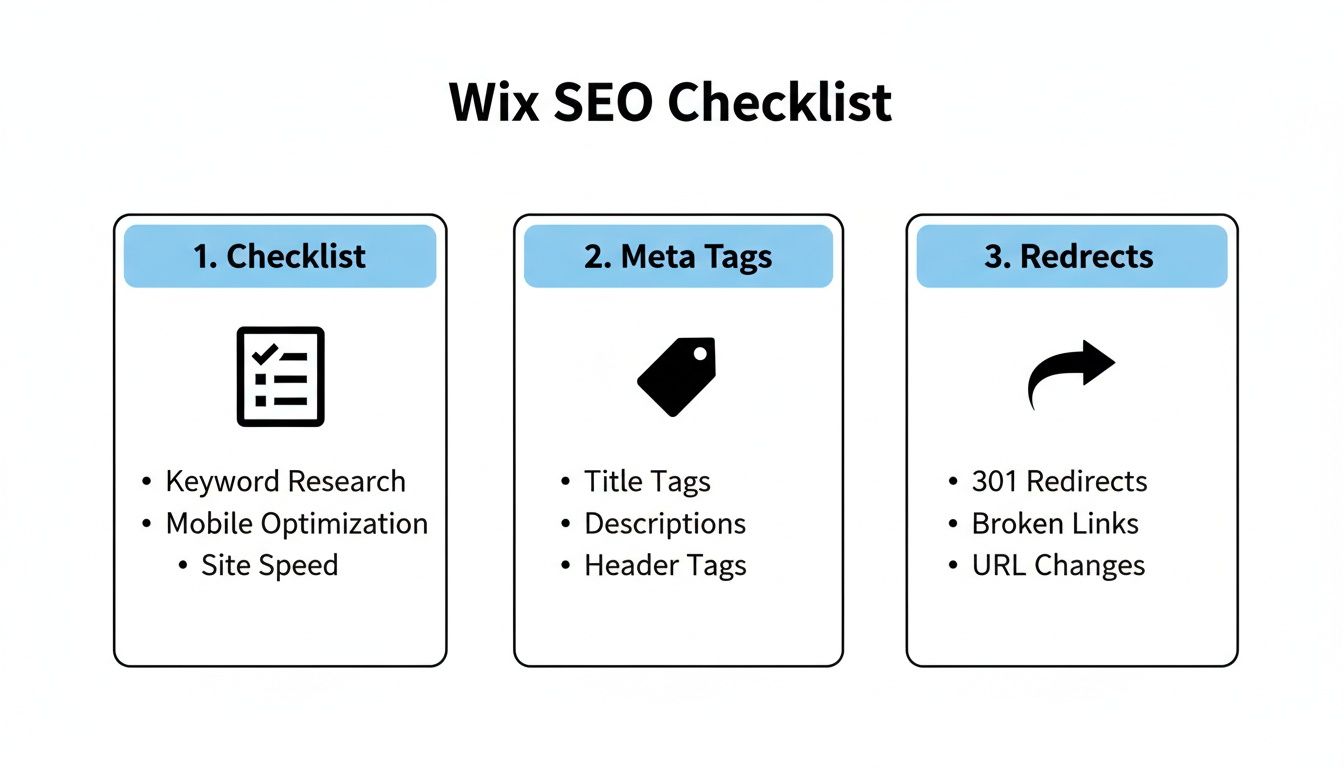
This checklist shows that even on a basic plan, you have the essentials needed to start getting your site noticed by Google.
Choosing the right plan is all about matching it to where you are now and where you want to go. There’s no point paying for a full-blown online shop if you’re a freelance copywriter who just needs a slick portfolio. Start with what you need, and remember, you can always upgrade as your business grows.
A Quick Look at the Business Plans
For businesses ready to sell, choosing the right e-commerce plan is crucial. It’s not just about cost; it’s about having the right features to support your growth without overpaying for things you won’t use. Here’s a simple breakdown of what you get with each of the main tiers.
Feature | Business Basic | Business Unlimited | Business VIP |
|---|---|---|---|
Online Payments | Yes | Yes | Yes |
Storage Space | 50 GB | 100 GB | Unlimited |
Abandoned Cart Recovery | Yes | Yes | Yes |
Sell on Social Media | Yes | Yes | Yes |
Sell Subscriptions | No | Yes | Yes |
Multiple Currencies | No | Yes | Yes |
Automated Sales Tax | 100 transactions/month | 500 transactions/month | Unlimited |
Product Reviews by Kudo | No | 1,000 reviews | 3,000 reviews |
Dropshipping by Modalyst | Up to 25 products | Up to 250 products | Unlimited products |
Priority Customer Care | No | No | Yes |
As you can see, the Business Basic plan is a solid starting point for new online stores. But as you grow, features like subscriptions, multiple currencies, and more generous dropshipping limits in the Unlimited and VIP plans become incredibly valuable. The VIP plan is really for established businesses that need top-tier support and have no room for limits.
Getting the best value can be tricky, especially since prices and features can be updated. For a really detailed look at every single tier, check out our complete UK guide on how much Wix costs. It'll help you pinpoint exactly which plan offers the best bang for your buck.
An Honest Look at the Pros and Cons of Wix
Let's be honest, no website builder is the perfect fit for absolutely everyone, and Wix is no different. To really get what Wix is all about, you have to weigh its genuine strengths against its limitations. This balanced view is the only way to figure out if it's the right long-term partner for your project.
On one hand, the platform's biggest draw is how ridiculously easy it is to use. The drag-and-drop editor gives complete beginners the power to create a visually stunning website without ever having to peek at a line of code. This all-in-one approach—bundling hosting, security, and design tools into one package—just melts away countless technical headaches.
The Upsides of Using Wix
For many people, especially small business owners and creatives who need to get online without a fuss, the advantages are hard to ignore.
Massive Design Flexibility: With over 900 templates and a true drag-and-drop editor, you have a staggering amount of creative control. You can make your site look exactly how you picture it in your head.
All-in-One Convenience: Everything, from your domain and hosting to your marketing tools and e-commerce shop, is managed under one roof. This simplicity is a massive time-saver.
Powerful App Market: Need to add online bookings, a community forum, or slick photo galleries? The ability to add new features with a single click is a huge plus, allowing your site to grow right alongside your business.
Potential Drawbacks to Consider
However, it's just as important to understand the things that might make you tear your hair out. Wix runs as a closed ecosystem, which basically means you have less freedom than you would with an open-source platform like WordPress.
The biggest limitation is the lack of portability. Once you build your site on Wix, you can't just pack up your website files and move to another hosting provider. You are committed to the Wix platform for the life of that website.
Another common sticking point is that you can't switch your template once your site is live. You can customise it to your heart's content, but you can’t swap it for a completely new one without starting from scratch. This makes choosing the right template from the get-go absolutely critical.
Deciding if these trade-offs are worth it is a key step. The convenience is undeniable, but it comes at the cost of ultimate control and flexibility further down the road.
Feeling confident about your choice?
Ready to Get Started?
By now, you should have a pretty solid idea of what Wix is all about. We've walked through its core features, peeked under the bonnet at its business tools, and seen what it can do for your search engine rankings. You know the pricing, the good bits, and the not-so-good bits.
Ultimately, the right choice boils down to what you actually need. Are you a photographer who needs a stunning, visual portfolio that pops off the screen? Maybe you're finally taking the plunge and launching that online shop you've been dreaming about? Or perhaps you're running a small business and just need a reliable, all-in-one website that works without any fuss.
Think back to the pros and cons we covered and have a real think about where you see your project heading in the long run. If Wix's straightforward, user-friendly approach and its neatly packaged features feel like the right fit, then the only way to be certain is to give it a whirl. Why not just jump in and start playing around? You’ll probably be surprised at how quickly you can turn that idea in your head into something real on the screen.
Ready to see for yourself? Explore the platform and start building your website today.
Of course, if you'd rather skip the learning curve and get a professionally designed, results-focused website right from the get-go, our team at Baslon Digital is ready to help. Find out more about our custom Wix website design services and let's have a chat.
Comments