How to Transfer Domain Name: The Definitive UK Guide

Before you even think about moving your domain, there are a few crucial checks you need to make. Getting this groundwork right from the start is the difference between a smooth, painless transfer and a complete headache.
Think of it as a pre-flight checklist. Taking a few minutes now will stop the entire process from stalling out later. Honestly, most transfer failures aren't down to some complex technical glitch—it's usually because a simple box wasn't ticked.
Your Pre-Transfer Checklist for a Smooth Move
This preparation has become even more important as the web expands. The UK domain registrar market is booming, directly fuelling the need for seamless domain transfers as small businesses and independents scale their online presence. Valued at USD 35.41 million in 2024, it's projected to soar to USD 58.79 million by 2033.
This growth is reflected in the jump from 10.9 million .uk domains in 2016 to a massive 13.6 million by February 2021. With more businesses online than ever, knowing how to manage your digital assets is crucial. You can explore more data on the UK domain market to see these trends for yourself.
Confirm Your Domain Is Eligible for Transfer
First things first: can your domain actually be moved right now?
There’s a common rule that catches a lot of people by surprise: the 60-day transfer lock. ICANN (the organisation that oversees all domain registrations) has a rule that a domain cannot be transferred within 60 days of:
Initial registration: Just bought your domain? You'll have to wait two months before you can move it.
A previous transfer: If you recently moved your domain to its current home, it's locked in place for another 60 days.
This is a security measure designed to prevent dodgy, unauthorised transfers. It’s a firm rule, so if you fall within this 60-day window, your only option is to wait it out.
Verify and Update Your WHOIS Contact Information
Your WHOIS information is the official contact record for your domain. The administrative email address listed here is everything. This is where all the transfer confirmation and authorisation emails will be sent.
If that email address is outdated or you can't access it, you simply won't be able to approve the transfer.
Key Takeaway: Always, always check your administrative contact email before starting a transfer. If it points to an old employee's address or an email account you no longer use, the process will fail. Update it immediately in your current registrar's dashboard and maybe wait a day or two before proceeding.
Find and Disable the Registrar Lock
By default, most registrars apply a "registrar lock" or "transfer lock" to your domain. This is another layer of security that stops your domain from being transferred without you explicitly saying it's okay.
To move forward, you’ll need to log into your current registrar's control panel and switch this lock off. It's usually a simple toggle switch in your domain management settings, often labelled something like "Domain Lock: On/Off."
For a deeper dive into the foundation of your online brand, check out our guide on how to choose a domain name for a winning brand.
If you’ve ticked off these three checks, your domain is primed and ready for the next steps. Taking ten minutes to verify these points is genuinely the single best thing you can do to ensure a flawless transfer.
Getting Your Auth Code and Starting the Transfer
Right, with your domain unlocked and contact details sorted, you’re ready for the main event. It’s time to get the unique password for your domain—this is the key that lets you move it.
This password goes by a few names, most commonly an EPP code or authorisation code. Think of it as the digital PIN for your domain; it proves you're the owner and gives the green light for the transfer to go ahead.
Securing Your Authorisation Code
You'll need to grab this code from your current registrar. The process can differ a bit from one provider to the next, but you can usually find the option tucked away in your domain management dashboard.
For instance, with popular registrars like GoDaddy or Namecheap, you'll often find it under a "Transfer Out" or "Domain Settings" section. They might make you click through a few pop-ups trying to convince you to stay (registrars really don't like losing customers!), but eventually, the code will be sent to the admin email address on file.
Just to recap, here are the essential jobs you need to tick off before you even think about requesting that code.
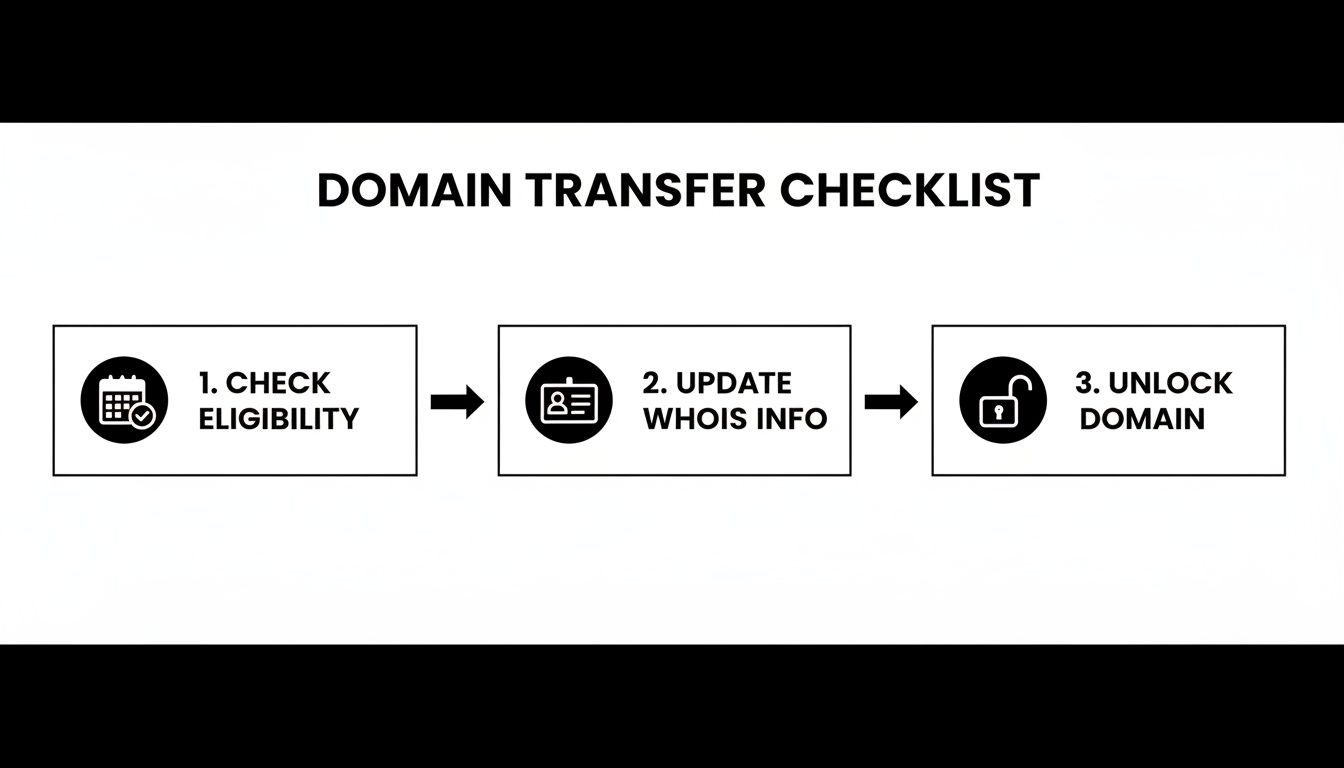
This flow chart nails it: check eligibility, update your WHOIS info, and unlock the domain. Get these three things done, and the rest is a walk in the park.
Auth code in hand? Brilliant. Now you can kick things off with your new registrar. Just log into their platform, find their "Transfer a Domain" page, and pop in your domain name along with the auth code you just received.
Pro Tip: Auth codes are usually a messy jumble of letters, numbers, and symbols. To save yourself the headache of a typo, always copy and paste the code directly from the email into the transfer form.
The Special Case for .uk Domains
Hold on a minute. If you're moving a domain ending in , , or , you can forget everything I just said about EPP codes. The process is completely different—and thankfully, much faster.
These domains are managed by Nominet, the official UK domain registry. Instead of an auth code, they use something called an IPS tag.
An IPS tag is just a unique identifier for every registrar Nominet has approved. To transfer a .uk domain, all you do is change the IPS tag from your old registrar's to your new one's. Simple as that.
Here’s the breakdown:
Find the new IPS tag: Your new registrar will give you their tag. It’ll look something like (just an example, obviously).
Update the tag: Log into your current registrar's dashboard, head to the domain management area, and find the option to change the IPS tag.
Enter the new tag: Type in the new registrar's tag and hit save.
Once you submit the change, the transfer is usually done and dusted within a couple of hours, not days. It's a remarkably slick system that’s unique to UK domains.
Whether you're using an EPP code or an IPS tag, the logic is the same: you're officially authorising the move. Now that the transfer is underway, the next critical step is to make sure your website and email settings are ready to handle the change without any disruption.
If you’d rather have an expert handle the nitty-gritty of your website and domain, that’s what we’re here for. Contact Baslon Digital to make sure your online presence is in safe hands.
Managing DNS and Email to Avoid Costly Downtime
The single biggest fear when moving a domain is that your website will suddenly vanish off the face of the earth. It’s a valid worry, but with a little prep work, you can make the switch so seamless your customers won't notice a thing.
The secret lies in the relationship between your domain, its DNS records, and your website hosting. Think of DNS (Domain Name System) as your website’s personal address book. When someone types your domain into their browser, DNS tells them exactly where to find your website files on the internet. Get this wrong during a transfer, and it's curtains.
A misstep here can lead to downtime, which hits your reputation and your wallet. Studies have shown that even a brief outage can cause up to 50% of users to abandon a site, sometimes for good.
Prepare Your DNS Records for the Move
Before you even think about starting the transfer, you need to lower your DNS records' TTL values. TTL stands for Time To Live, and it basically tells servers how long to cache (or remember) your DNS information before checking for an update.
Often, this is set to 24 or 48 hours by default. A day or two before the transfer, you want to drop this to something short, like 300 seconds (five minutes). This simple change means the internet will pick up your new settings much, much faster once the move is complete. It’s one of the most effective tricks in the book for minimising downtime.
Next, take a 'snapshot' of all your current DNS settings. This is non-negotiable. Log into your current registrar and screenshot or write down every single record. Pay close attention to these:
A Records: The big one. This points your domain to your website’s hosting server.
CNAME Records: These are essentially aliases, often used for subdomains like .
MX Records: Absolutely critical for your email. These direct incoming messages to your email provider, like Google Workspace or Microsoft 365.
TXT Records: Used for all sorts of verification tasks, like proving you own the domain to services such as Google Search Console.
Replicating Your Settings and Protecting Email
As soon as the transfer to your new registrar is finished, your first job is to replicate that DNS snapshot perfectly in their control panel. Any typos or missed records will break parts of your online presence—your website, subdomains, or worse, your email.
For any business where email is the lifeblood of operations, getting the MX records right is paramount. Losing email access, even for a few hours, can mean lost leads and seriously unhappy customers. It’s not just about moving the domain; it's about making sure your whole communication system lands safely. For a detailed guide on this, it's worth learning about setting up business email with your new domain.
Real-World Tip: Don't delete your domain or account from your old registrar until you've confirmed everything is working perfectly at the new one. This gives you a fallback and a reference point if you need to troubleshoot any DNS issues post-transfer.
Making sure your new setup is a perfect mirror of your old one is the secret to a zero-downtime domain transfer. For more advice tailored to local businesses, our UK hosting guide offers additional insights.
If managing DNS records feels a bit daunting, you’re not alone. At Baslon Digital, we handle these technical details for our clients every day, ensuring their websites remain stable and professional. Get in touch with us if you'd prefer an expert to manage your online presence.
Navigating Costs, Timelines, and Post-Transfer Steps
Once you’ve kicked off the transfer, two big questions usually pop up: how much is this going to set me back, and when will it actually be finished? Getting a handle on these details upfront helps set clear expectations and makes sure there are no unwelcome surprises down the road.
Let's talk money first. You might see some registrars advertising "free" transfers, but that almost always applies only to .uk domains. That's because changing the IPS tag is a simple, no-cost update managed by Nominet. For pretty much everything else, like .com or .org domains, you can expect a fee.
This fee isn't just for the admin, though. In nearly every case, the cost to transfer your domain includes a mandatory one-year extension of your registration. So, if your domain was set to expire next June, after the transfer, it will be valid until June of the following year. You're essentially just paying for your next renewal a bit early.
For a full breakdown of what goes into this pricing, our article on understanding domain name costs for your website provides a much deeper dive.
Setting a Realistic Timeline
So, how long does this all take? The honest answer is: it depends entirely on your domain's extension.
.uk Domains: Thanks to that efficient IPS tag system, these transfers are incredibly fast. Once you update the tag with your old registrar, the move is usually done and dusted within a few hours. Easy peasy.
Generic TLDs (.com, .org, etc.): This is more of a slow burn. The standard waiting period is five to seven days. This window gives your old registrar time to process the "transfer out" request and allows you to confirm the whole thing via email.
Some registrars offer an option to manually approve the transfer from your old dashboard, which can sometimes speed things up a bit. Still, it's always wise to budget for the full week, just to be safe.
Your Final Post-Transfer Checklist
Right, your new registrar has just confirmed the transfer is complete. You're on the home stretch, but not quite done yet. There's a brief but crucial final phase to navigate.
The first thing to account for is something called DNS propagation. This is the period it takes for servers across the globe to update with your domain's new information. It can take anywhere from a few minutes to 48 hours, although it's often much quicker if you managed to lower your TTL values beforehand.
After the transfer is officially marked as complete, give it a full 24 hours. Then, thoroughly check that your website is loading correctly and that you can send and receive emails without any issues. This final check is your green light that everything went smoothly.
Beyond the immediate technical setup, maintaining your domain's online presence is crucial. You might want to explore topics like understanding Domain Authority, which is a key metric for your website's performance in search engines.
With these final checks complete, you can confidently close out the project. If managing these details feels a bit much, Baslon Digital is here to help. We specialise in handling the technical side of your online presence so you can focus on what you do best.
How to Solve Common Transfer Problems and Disputes

Even with the most careful preparation, a domain transfer can sometimes hit a bump in the road. The good news? Most of these issues are surprisingly common and, more importantly, completely fixable. Knowing what to look for means you can sort things out quickly without breaking a sweat.
One of the most frequent hurdles is an invalid auth code. If your new registrar rejects it, don't panic. Auth codes are often case-sensitive and can be a jumble of tricky characters that are easy to mistype. Always copy and paste the code directly. If it still fails, just pop back to your old registrar and request a fresh one.
Another classic problem is the missing confirmation email. If that crucial transfer authorisation email never shows up, it’s almost always because the administrative contact info on your WHOIS record is out of date. You'll need to log back into your old registrar's dashboard, update the email address, and then kick off the transfer process again.
Common Transfer Errors and Their Solutions
Let's break down a few other typical glitches you might run into. Each one has a pretty straightforward fix once you know what you’re dealing with.
Transfer Rejected by Current Registrar: Nine times out of ten, this happens because you forgot to switch off the registrar lock. Head back to your old provider's control panel and make sure the domain is explicitly unlocked for transfer.
Domain is Ineligible: Remember that 60-day lock we talked about? If you’ve recently registered the domain or transferred it, you simply have to wait until that period is over. It’s an ICANN rule, so there are no shortcuts.
"Pending Transfer" Status for Days: This usually just means you need to be patient, as the standard window is five to seven days. However, you can sometimes give it a nudge by logging into your old registrar and manually approving the transfer out. Not all providers offer this, but it's worth a look.
Dealing with Domain Disputes in the UK
But what happens when the problem is bigger than a simple technical error? For UK businesses, you might occasionally face a domain dispute—for instance, if someone has registered a domain that tramples on your trademark.
Taking someone to court can be a long, drawn-out, and expensive battle. Fortunately, for domains, there's a much smarter way forward: Nominet's Dispute Resolution Service (DRS).
The DRS is an independent mediation and adjudication service designed to resolve domain disputes fairly and affordably, without needing to involve solicitors.
In the UK, this service is a genuine game-changer. In 2024 alone, Nominet handled 608 domain dispute complaints, saving businesses an estimated £8.15 million in potential court costs. Crucially, 45% of these cases resulted in a successful domain transfer to the rightful owner. You can read more about these findings from Nominet to see the impact for yourself.
To use the DRS, you’ll need to show evidence that you have rights to the name (like a registered trademark) and that the current owner registered it abusively. While a win isn't guaranteed, it provides a structured and cost-effective path to reclaiming your digital identity.
If troubleshooting feels overwhelming or you need an expert eye on your website's technical health, Baslon Digital is here to help. Reach out to us today for friendly, professional support.
Your Domain Transfer Questions Answered
Even with the best-laid plans, a few questions always seem to pop up during a domain transfer. It’s a process full of jargon and specific steps, so it's completely normal to feel a bit unsure. Let's tackle the most common queries we hear to get you feeling confident again.
Will Transferring My Domain Name Affect My Website's SEO?
This is the number one worry for most business owners, and honestly, it’s a good question to ask. The short answer is no, transferring your domain won't hurt your SEO—if you do it correctly.
Think of the transfer itself as just a bit of admin, like changing the name on a utility bill. Search engines like Google know that domains move between registrars all the time. The real danger to your hard-earned rankings is downtime. If you make sure your DNS settings are perfectly copied over to your new registrar, your website and emails will carry on as normal. No downtime, no SEO drama.
How Long Does a Domain Transfer Really Take?
This really depends on the type of domain you're moving. There's no single answer.
For generic domains (.com, .org, .net): The standard wait time is between five and seven days. This window isn't just for show; it gives both your old and new registrar time to complete the handover securely.
For .uk domains (.co.uk, .org.uk): It's a much quicker affair. The UK system uses something called an IPS tag, which is managed by Nominet. Once you update this tag, the transfer can be done and dusted in just a few hours.
Can I Transfer an Expired Domain Name?
It’s a sticky situation, but the general rule is you can't transfer a domain that has already expired.
When a domain expires, it usually goes into a "grace period" (often around 30 days), where you can still renew it with your current registrar. After that, it might fall into a much more expensive "redemption period." You must renew and reactivate the domain with your current provider before you can even think about starting a transfer. A good rule of thumb is to start the transfer at least two weeks before the expiry date looms.
Key Insight: Think of it like selling a car. You can't sell it if the registration has lapsed. You need to get it road-legal (renewed) first before you can hand over the keys.
What Is the Difference Between Transferring a Domain and Changing Nameservers?
This is a classic point of confusion, so let's clear it up.
Transferring a domain means you are moving the entire management of your domain from one company (Registrar A) to another (Registrar B). From that point on, you'll pay Registrar B for all your future renewals.
Changing nameservers, however, is just pointing your domain to a different web host. Your domain registration stays exactly where it is. For example, you might have your domain registered with GoDaddy but your website is built and hosted with Wix. In that scenario, you just tell GoDaddy to point the nameservers to Wix—no transfer needed.
Still have questions or feeling a bit overwhelmed by the process? At Baslon Digital, we live and breathe this technical stuff so you don't have to. Get in touch with us and let our experts handle it for you.
So, Ready to Make Your Move?
Transferring your domain doesn't have to feel like you're defusing a bomb. Honestly, it's a pretty straightforward process once you know the steps. Following this guide gives you a clear road map to move your digital address without any drama.
Just remember the golden rules: get everything in order before you start, keep both your old and new registrars in the loop, and always, always double-check your settings. Getting this right puts you firmly back in the driver's seat of your most important online asset.
And if you’d rather have an expert handle the technical bits so you can get back to, you know, actually running your business, we’re here for that too. Get in touch with us today and let our team of experts manage your domain transfer, ensuring a smooth, secure, and seamless transition.
Comments