How to Fix website not showing up on google for UK businesses

Updated: Jan 5
When your website is nowhere to be found on Google, it usually boils down to one of two things. Either Google hasn’t indexed your site at all (meaning, it doesn't even know you exist), or it has, but you're ranking so far down the list you’re practically invisible.
The very first thing to do is a quick "site:" search. Just type into Google. If your pages show up, you have a ranking problem. If nothing appears, you have an indexing problem.
First Steps to Diagnosing Your Google Visibility Problem
You’ve poured your heart and soul into building a website, so it’s incredibly frustrating when it doesn’t show up in Google search. Before you start tearing your hair out and diving into complicated technical fixes, you need to figure out what's actually wrong.
Is your site truly invisible to Google, or is it just lost in a massive crowd? This initial check separates a simple indexing issue from a much more complex ranking issue.
An indexing issue means Google either doesn’t know your site exists or something is actively blocking it from being added to its huge digital library. A ranking issue, on the other hand, means Google knows you're there but doesn't think you’re relevant or authoritative enough to show for the searches you care about.
Is It an Indexing or a Ranking Issue?
Getting this right is critical because the solutions are completely different. You can't fix an indexing block by improving your content, and you can't improve a low ranking by repeatedly asking Google to index a page it already knows about.
This decision tree helps simplify the process, pointing you in the right direction from the get-go.
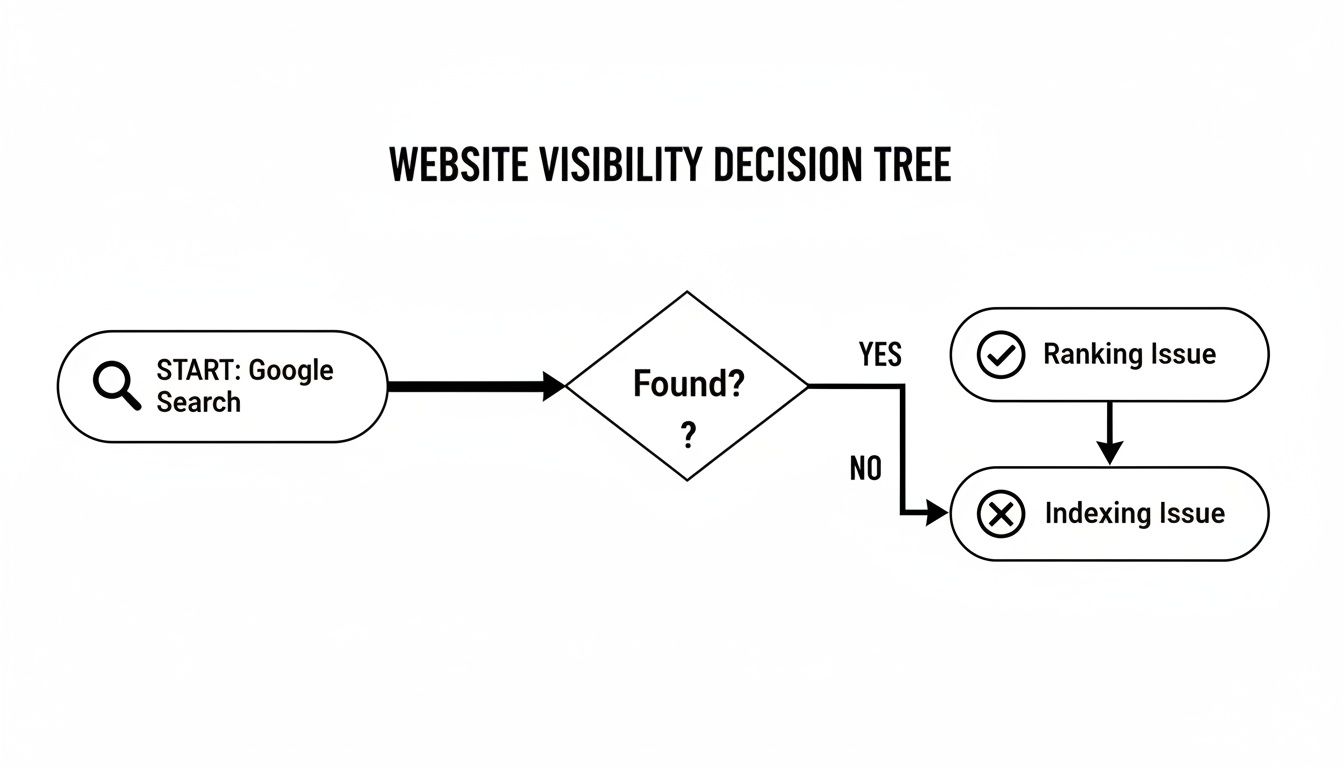
As the flowchart shows, it all starts with that simple search. If you find your site, you’ve got a ranking problem. If not, you’re dealing with an indexing problem, which is exactly where we’re going to start.
Quick Diagnostic Checklist: Is Your Site Indexed?
Before we go any further, let's run a few quick checks to see if Google can even find your website in the first place.
Check | How to Perform | What It Reveals |
|---|---|---|
"site:" Search | Go to Google and search for (replace with your actual domain). | If results appear, your site is indexed. If not, it’s likely an indexing issue. |
Brand Name Search | Search for your exact business name in quotes, like . | If your homepage doesn't appear on the first page, there's a serious visibility problem. |
Exact URL Search | Copy the full URL of your homepage (e.g., ) and paste it into the Google search bar. | If your page doesn't show up, it's almost certainly not indexed. |
Completing these checks gives you a clear starting point. If you see your pages, you can focus on ranking factors. If you see nothing, it's time to troubleshoot why Google can't find you.
Understanding the Search Engine Process
To fix this, you need to understand how Google works, but let's skip the jargon. It boils down to three simple steps:
Crawling: Think of this as the discovery phase. Google sends out little bots (spiders) that follow links across the internet to find new or updated websites.
Indexing: After finding your site, Google analyses its content and stores it in a massive database called the index. If a page isn't in the index, it can't show up in search results. Period.
Ranking: When someone searches for something, Google scours its index for the best answers and arranges them on the results page.
Your first job is to make absolutely sure Google can crawl and index your website. Only then can you even begin to think about ranking higher.
Ready to get your website seen? The first steps are often the most important. Let's start with some essential checks to make sure nothing is accidentally blocking Google. If you’d rather have an expert take a look, contact Baslon Digital for a professional SEO audit to find out exactly what’s holding you back.
Mastering Your First Technical SEO Checks
When your website isn't showing up on Google, it's easy to jump to the conclusion that the fix will be complicated and expensive. But honestly? The reality is often much simpler.
Many visibility problems come down to a few basic technical settings being switched off. Think of it as leaving the "Closed" sign hanging on your digital shopfront long after you've opened for business. This is especially common if you're using a platform like Wix, which makes web design a breeze but still has a few toggles that can accidentally render you invisible.
Before you start worrying about complex SEO strategies, let's walk through the essential checks that solve a surprising number of indexing headaches.
Confirm Your Domain Is Connected and Your Site Is Published
It sounds almost too obvious to mention, but you'd be amazed how often this is the culprit. You can have the most beautifully designed website in the Wix editor, but if it isn't officially published and hooked up to a live domain, it only exists for you.
Check two things right now:
Is the site actually published? Pop into your website editor. You should see a big "Publish" button. If you've already published, it will likely say something like "Edit Site" instead. If not, give that button a click to push your creation out into the world.
Is your domain properly connected? Double-check in your settings that your custom domain (e.g., ) is correctly linked and that the subscription is active. A lapsed domain payment can knock your entire site offline without you even realising it.
Your unpublished site is like a detailed blueprint; publishing it is the act of actually building the house for everyone to see.
Hunt Down Rogue 'Noindex' Tags
One of the most powerful—and dangerous—little snippets in the SEO world is the tag. It’s a direct, non-negotiable instruction to Google that says, "Do not add this page to your search results." It’s super useful for things like private login pages or post-purchase thank you pages you don’t want people stumbling upon.
The problem comes when a tag is accidentally applied to your whole site. This can sometimes be a default setting on a new build that never gets switched off when you go live, effectively making you completely invisible to search engines.
To check for this, go to one of your main pages, right-click, and select "View Page Source." In the wall of code that appears, look in the section near the top for a line that looks like <meta name="robots" content="noindex">. If you see that, you've found a major reason you're not on Google.
Review Your Robots.txt File
Your robots.txt file is a simple text file that acts as a bouncer for your website. It tells search engine crawlers which parts of your site they can and cannot enter. While it's great for blocking off technical folders or admin areas, a tiny mistake can have huge consequences.
A common and disastrous error is a line that looks like this:
That single slash tells every search engine () to stay away from your entire website. You can usually find this file by typing into your browser. Have a quick look and make sure there are no overly broad rules blocking your important pages.
A well-configured robots.txt file gives friendly directions to good bots. A misconfigured one is like putting a "Keep Out" sign on your front door, preventing Google from ever seeing what's inside.
Find and Submit Your Sitemap
Finally, let's talk about the most proactive step you can take: submitting your sitemap to Google. A sitemap is an XML file that lists every important URL on your website. It's like handing Google a perfectly organised map of your property, ensuring it doesn't miss any of your valuable content.
Most platforms, including Wix, automatically generate a sitemap for you. You can typically find it at . If you want to dive deeper into what they are, check out our guide on what a website sitemap is and why it's a must-know for SEO.
Once you've got that URL, just pop over to Google Search Console (we'll cover this tool more later), find the 'Sitemaps' section in the menu, paste in your sitemap URL, and hit 'Submit'.
Submitting your sitemap gives Google a nudge to crawl your pages more efficiently and can seriously speed up the indexing process, especially for a new website. It’s a simple but powerful way to get the conversation started.
Using Google Search Console to Find Indexing Errors
If the basic technical checks were like looking for a "Closed" sign on your shop's front door, think of Google Search Console (GSC) as the CCTV footage. It shows you every single search bot that tries to come in, where it goes, and if it gets stuck. It is, without a doubt, the most powerful free tool you have for figuring out why your website is invisible on Google.
GSC is your direct line to Google. It shows you exactly how the search engine sees your site, flagging indexing errors and tracking your performance behind the scenes. Getting comfortable with this tool isn’t optional for any business owner who wants to be found online.

Your First Look Inside GSC
Before you can diagnose a thing, you need to set up and verify your site with Google Search Console. It’s a straightforward process that proves you own the website, which unlocks all its performance data. The dashboard can look a bit full-on at first, but we'll focus on just two key areas to get started.
Don't underestimate how important it is to keep an eye on your GSC data. To give you a real-world example, a major Google update back in September 2025 caused absolute chaos for UK businesses. 77.6% of websites lost unique ranking keywords, and a staggering 87.7% saw their impressions plummet. This just goes to show how vital GSC is for spotting trouble and reacting to algorithm shifts that can make your site disappear overnight.
Using the URL Inspection Tool for Page-Level Issues
The URL Inspection Tool is your magnifying glass. It lets you zoom in on the status of any single page on your site. Just grab a URL, paste it into the search bar at the top of the GSC dashboard, and Google will spill everything it knows about that specific page.
Honestly, this tool is your best friend for troubleshooting. It will tell you, point-blank, if a page is indexed or not. And if it’s not, it’ll tell you why.
You'll see messages like:
URL is on Google: Phew! This means the page is indexed and eligible to show up in search results. The problem isn’t indexing; it’s ranking.
URL is not on Google: This is where you need to put your detective hat on. The tool will give you a reason, which is your first clue to fixing the problem.
One of the most common things you might see is "Discovered - currently not indexed." This means Google knows your page exists but has popped it in the ‘maybe later’ pile instead of indexing it. This often happens with brand-new sites or pages Google thinks are a bit thin on quality.
When GSC says a page is 'Discovered - currently not indexed', it’s Google telling you, "I've seen this, but I'm not convinced it's worth showing to anyone just yet." This is your cue to improve the page's content, add internal links to it, and ensure it offers real value.
Finding Site-Wide Errors with the Pages Report
While the URL Inspection Tool is brilliant for individual pages, the Pages report (tucked under the 'Indexing' section) gives you the bird's-eye view of your whole site. It neatly groups all your pages into two buckets: 'Indexed' and 'Not indexed'.
Clicking into the 'Not indexed' section is where the magic happens. You'll see a list of reasons why Google has decided to ignore certain pages. This is how you spot patterns.
Some common errors you’ll probably run into are:
Blocked by robots.txt: Confirms that a rule in your robots.txt file is acting like a bouncer and turning Google away.
Page with redirect: The URL is just pointing somewhere else, so Google won't index this version.
Excluded by ‘noindex’ tag: This tells you a tag is definitely the culprit.
Not found (404): The page is broken. It doesn't exist, so of course, Google can't index it.
By methodically working through these reports, you stop guessing and start building a proper, data-led action plan. While GSC gives you the diagnosis, pairing its insights with traffic data gives you the full picture. A practical guide on how to use Google Analytics can add another layer of invaluable data to figure out visibility issues and understand what your users are actually doing.
For more in-depth tips, check out our other articles on making the most of Google Search Console.
Feeling a bit lost in all the data? Don’t worry. If you need a professional to make sense of your GSC reports and map out a clear path forward, get in touch with Baslon Digital today.
Moving Beyond Indexing to Improve Your Rankings
Right, so you've done the checks, poked around in Google Search Console, and confirmed your site is indexed. That’s a massive win! But it often leads to a new, even more frustrating question: "Why is my website still not showing up on Google for the searches that matter?"
Getting indexed is just getting your foot in the door. Ranking high enough for actual humans to find you is the main event. Now, we shift our focus from the technical "can Google find me?" to the strategic "does Google think I'm the best answer?"
This is where your broader Search Engine Optimisation (SEO) efforts come into play. Forget looking for a magic button; it’s all about proving your website offers a better experience and is a credible voice in your field. Let's break down what really moves the needle.
Is Your Website Built for Mobile Users?
This isn't a suggestion anymore; it’s a hard rule. Google now operates on a mobile-first indexing basis. In simple terms, it mainly looks at the mobile version of your site to decide how to rank it.
If your site is a nightmare to use on a phone—forcing people to pinch and zoom, with tiny text and buttons you can't tap without surgeon-like precision—Google notices. A poor mobile experience screams that your site isn't user-friendly, and that will absolutely tank your rankings.
Do this right now: Grab your phone. Don't just glance at the homepage. Try to do something important. Can you fill out your contact form without getting frustrated? Can you easily browse your services and read what they're about? If you struggle, so will your potential customers and Google’s bots.
This isn’t just about pleasing an algorithm. With a huge chunk of UK web traffic coming from mobile devices, a clunky mobile site means you're literally turning away business.
How Fast Is Your Website?
Page speed is a confirmed ranking factor for both desktop and mobile. Think about your own habits. If a page takes more than a couple of seconds to load, you're gone. Google knows this and gives priority to websites that deliver a snappy, smooth experience.
A slow website can be caused by all sorts of things: massive images, clunky code, or a cheap hosting server. A local London bakery, for instance, might have gorgeous, high-resolution photos of its cakes. But if those image files are enormous, they could slow the site to a crawl, ironically losing them customers searching for a "bakery near me."
"Google prefers websites that load in max 2 seconds... more than 1 in 2 [visitors] will leave if your website takes longer than 3 seconds to load."
This means even if your content is the best thing since sliced bread, a slow site might stop it from ever being seen. Use Google's PageSpeed Insights tool. It’s free and gives you a report on your site's performance with clear tips on how to fix it.
Does Your Content Demonstrate E-E-A-T?
Content is the absolute heart of SEO. But not just any old words on a page will do. Google uses a framework called E-E-A-T to figure out how good your pages are.
It’s an acronym for:
Experience: Is the content written by someone with actual, first-hand experience? A financial adviser writing about retirement planning has it; someone who just read a book about it doesn't.
Expertise: Does the author actually know what they're talking about? This is vital for topics that need specialised knowledge.
Authoritativeness: Is your website seen as a go-to source on this topic? Authority is built over time with things like backlinks and consistently great content.
Trustworthiness: Is your site secure (using HTTPS)? Are your contact details easy to find? Can people trust what you're telling them?
Thin, useless, or low-quality content gets buried. If your service pages are just a few generic sentences, or your blog posts just rehash stuff everyone already knows, you're giving Google zero reason to rank you above competitors who provide real value.
This is a lesson even the big media players are learning the hard way. In 2025, around 60% of the UK's biggest news sites saw their visibility fall after Google's core updates, which hammered low-quality content. It shows nobody is safe, and the effort has to be continuous.
Are You Building a Credible Backlink Profile?
Backlinks—which are just links from other websites to yours—are basically votes of confidence in Google's eyes. When a reputable site links to you, it's telling Google that your page is a valuable and trustworthy resource.
For example, a freelance graphic designer in Manchester could get a brilliant backlink if a well-known design blog features their portfolio as a great example of modern branding. That one link is worth far more than dozens of links from spammy, irrelevant directories.
Building a solid backlink profile is a long game. It involves creating content worth linking to and building real relationships in your industry. Another key part of building local authority is having a properly optimised profile on Google. For more on this, check out our UK guide on what Google Business Profile is and how it can help you get seen.
Ready to improve your rankings and get your business seen by the right people? Our team at Baslon Digital specialises in creating SEO strategies that drive real results for UK small businesses. Contact us for a free consultation today!
Your Action Plan to Get Visible on Google
Feeling a bit lost in all the technical jargon and SEO checklists? That’s perfectly normal. Let's cut through the noise and map out a clear, step-by-step plan to get your website out of hiding and onto Google's radar.
This isn’t about trying to do everything at once. It’s about putting your effort where it counts most, especially when you're busy running a business.
Phase One: Your Technical Foundation
First things first, let's make sure your digital shopfront is actually open for business. Before you even think about content or rankings, you have to be certain Google can physically get through the door.
Think of it as the essential pre-flight check you can't afford to skip.
Confirm Your Site Is Live: Is your Wix site actually published? Is your domain properly connected and active? It sounds almost too simple, but this is hands-down the most common reason a brand-new site is invisible.
Check for Blockers: Take a quick peek at the code on your key pages for any rogue tags. You'll also want to glance at your file to make sure you haven't accidentally put up a massive "Keep Out" sign for search engines.
Submit Your Sitemap: Grab your sitemap URL (it's usually ) and pop it into the 'Sitemaps' section in Google Search Console. This is basically like handing Google a perfectly drawn map of your entire site.
Getting these three things ticked off solves the biggest technical roadblocks that keep websites from ever getting indexed.
Phase Two: Diagnose with Data
With the basic plumbing sorted, it’s time to play detective. Google Search Console (GSC) is your best friend here, giving you direct feedback straight from the horse's mouth.
Inspect Key URLs: Use the URL Inspection Tool in GSC on your homepage and a couple of your most important service or product pages. It will tell you their exact indexing status and flag any specific errors holding them back.
Review the Pages Report: Now, dive into the 'Pages' report, which you'll find under the 'Indexing' tab. Zero in on the list of "Not indexed" pages and the reasons Google gives. Are you seeing a pattern? Maybe a bunch of pages are being blocked by the same error.
This data-driven approach takes you from wild guessing to knowing precisely what’s broken.
Phase Three: Elevate Your On-Page SEO
Once you're confident Google can find and crawl your site, the final piece of the puzzle is convincing it that your content is actually worth showing to people. This is less of a quick fix and more of a long-term commitment to quality.
A crucial note on patience: SEO is a marathon, not a sprint. It can take weeks, sometimes even months, for Google to process your changes, recrawl your site, and update its rankings. Consistency is way more important than intensity.
Start by focusing on your most important pages. Make sure they’re loaded with valuable, well-written content that genuinely answers your customers' questions. They also need to load quickly on a phone and offer a smooth, frustration-free experience.
The need for a solid plan is more urgent than ever, especially for UK businesses. Recent Google AI updates have hit hard, with research showing that monthly organic traffic growth collapsed by a staggering 86% across 16 key sectors after AI Overviews were rolled out. You can discover more about how these AI updates have impacted UK businesses and see why a proactive SEO strategy is your best defence.
Following this structured plan means you fix the most critical fires first before moving on to the ongoing work of building a site that Google can't help but love.
If you've worked through this list and still feel like you're hitting a wall, or if you'd rather just have an expert handle it for you, our team is here to help. Contact Baslon Digital today for a free consultation and let's get your website found.
Still Got Questions About Your Google Visibility?
Even after ticking off all the boxes on your action plan, it's completely normal to have a few more questions buzzing around. Getting your website to show up on Google isn't always a straight line from A to B, so let’s tackle some of the most common worries business owners have.

Think of this section as a quick chat to clear up any confusion, set some realistic expectations, and help you see the light at the end of the tunnel.
How Long Does It Take for a New Website to Appear on Google?
Ah, the million-dollar question. Honestly, a brand-new website can take anywhere from a few days to several weeks just to get indexed by Google. There’s no magic switch you can flip for instant fame, unfortunately.
The timeline really depends on a few things, like your site's authority (which is basically zero when you start), how easily Google’s bots can crawl your pages, and whether you've even told Google you exist.
Just a heads-up: simply appearing in a search is only the first tiny step. For a new page to actually rank in the top results for a decent keyword, we’re often talking about a timeline of 6-12 months or even more. SEO is a slow burn.
To give Google a nudge, you can be proactive. Here are the two most effective things you can do right now:
Submit Your Sitemap: Head straight over to Google Search Console and submit your sitemap. This is like handing Google a map of your new house so it knows exactly which rooms to explore.
Request Indexing: For your most important pages—like your homepage or main service pages—use the URL Inspection Tool in Search Console and hit "Request Indexing." This essentially puts your page in a priority queue for Google's crawlers.
My Site Used to Rank, but Now It Has Gone. What Happened?
That feeling when you check your rankings and your site has vanished… it’s terrifying. If you find yourself in this boat, it’s usually down to one of a few major events.
A botched website migration is a classic culprit. If you've recently redesigned your site or moved to a new domain, things like broken redirects or accidentally leaving a tag on can make you invisible overnight. Another, much rarer, possibility is a manual penalty from Google for breaking its rules.
More often than not, though, a sudden drop is tied to a big Google algorithm update. Google is constantly tweaking its systems to improve search quality, and these updates can completely re-evaluate your site’s relevance, causing rankings to swing wildly. Your first port of call should always be Google Search Console to check for messages about penalties or crawl errors.
Can I Just Pay Google to Show My Website?
This comes up a lot, and it gets to the heart of how search really works. The short answer is yes, you absolutely can pay to appear on Google, but it’s vital to understand what that actually means.
What you're thinking of is Google Ads, which is paid search advertising. You bid on keywords, and your advert shows up right at the top of the search results with a little "Sponsored" tag next to it. It’s a fantastic way to get immediate traffic.
But—and this is a big but—it’s completely separate from organic search. That's what SEO (Search Engine Optimisation) is all about. SEO is the long game; it's the process of earning free, sustainable visibility by proving your website is a high-quality, relevant resource.
When you stop paying for ads, your visibility disappears. Poof. Gone. With SEO, your rankings are earned and can stick around for the long haul.
Which one is right for you? It really depends on your goals. Google Ads gives you speed, while SEO builds a valuable, lasting asset for your business.
Feeling a bit overwhelmed by all this and just want to see your website on Google? Our team at Baslon Digital can cut through the noise and build a strategy that actually works. Contact us today for a professional SEO audit!
Getting all the technical bits sorted is a massive first step, but it's really just the beginning. Turning that initial visibility on Google into a steady stream of customers means playing the long game. It’s all about consistently creating great content, making sure your site is a dream to use, and building up trust over time.
If you’ve battled through this guide and are still scratching your head, or you’d just rather spend your time actually running your business (we get it!), then we’re here to help. We specialise in untangling tricky SEO knots and building simple, effective strategies that get UK small businesses in front of the right people. We know the grind and we know what it takes to get you climbing those search results.
Don’t let Google’s complexity bully your business into staying invisible. A smart, expert-led SEO plan is what separates you from being the first choice for your customers.
Let's get your website working as hard as you do.
Ready to stop being invisible and start getting found? Get in touch with Baslon Digital today for a friendly, no-obligation chat about how we can drive real results for your business.
Comments