How to Get Your Website on Google a Practical Guide

Updated: Dec 9, 2025
So, you've built a website. The first step to getting it on Google is understanding why it's not just a nice idea, but an absolute must-do for your business. Before we get into the nuts and bolts, let's talk about why this is so critical.
Why Getting on Google Is a Non-Negotiable
Appearing on Google isn't just another marketing goal to tick off your list; it’s the bedrock of your online survival, especially in the buzzing UK market.
Think about it. If your website isn’t on Google, you’re practically invisible to almost everyone who might want to hire you or buy from you. These days, the customer journey—whether it's finding a local coffee shop in London or a freelance graphic designer in Manchester—kicks off with a quick search.
The Sheer Scale of Google's Dominance
To really grasp this, you need to understand just how massive Google's presence is. In the UK, its grip on the search engine market is so complete that being visible on Google is the same thing as being visible online. Full stop.
As of November 2025, Google commanded a jaw-dropping 92.47% of the UK search engine market share. That means for every 100 people searching online, a whopping 92 of them are using Google. Competitors like Bing and Yahoo! are left scrambling for the leftovers.
This makes Google the digital high street where almost all your potential clients are actively window-shopping for exactly what you offer. If you're not there, you don't exist.
This context is everything. Before you even think about the technical bits of ranking, you have to ask yourself, Is SEO Worth It for my business? The answer, especially for freelancers and small businesses, is a resounding yes. It’s not just about growing; it's about staying in the game.
This guide is your roadmap. We’ll walk you through the entire process, from setting up the basics to using clever strategies that turn your website from a ghost town into a client-attracting powerhouse.
And if you're brand new to all this, our collection of articles on search engine optimisation for beginners is a great place to build your foundational knowledge.
Before you even dream of showing up on Google, you need to make sure your online home is built on solid ground. Getting this foundation right is non-negotiable because it makes your site infinitely easier for Google’s little web crawlers to understand and, eventually, to rank. It's like preparing your house for a viewing; you want everything in perfect order before the guests arrive.
Your journey starts with the basics—the very same basics that so many people get wrong. Three things are absolutely essential from the get-go: your domain name, how your site looks on a phone, and how fast it loads.
Secure a Professional Custom Domain
First up, let's talk about your address on the web. Rocking a free, platform-branded domain like basically screams "I'm not fully invested in this." A custom domain, something clean like , is critical for building trust and authority, not just with your customers but with Google, too.
Think of it this way: your domain is your digital handshake. A professional one shows you’re serious and helps establish a memorable brand. It’s a tiny investment that pays off big time in credibility.
Make Your Website Mobile-Friendly
It’s 2024. More people are scrolling the internet on their phones than on desktops. Google knows this, which is why it switched to mobile-first indexing. This means it primarily uses the mobile version of your site for ranking. If your site is a masterpiece on a laptop but a hot mess on a smartphone, you're in trouble.
Picture this: a potential customer is on their phone, searching for a local service you offer. They click on your site, but the text is microscopic and the "Contact Us" button is impossible to tap. Frustrated, they'll hit the back button in seconds and head straight to your competitor whose site actually works. That's a lost customer, all because of a wonky mobile design.
Prioritise Your Page Speed
Website speed isn't just a boring technical metric; it’s a huge part of the user experience. How quickly your pages load directly tells users (and Google) about your site's quality. A slow website is a frustrating website, and nobody sticks around for frustration.
In fact, even a one-second delay in page load time can cause a massive drop in conversions. You can use free tools like Google's PageSpeed Insights to see where you stand and get solid advice on how to improve. Often, simple fixes like compressing your images can make a world of difference.
Key Takeaway: A custom domain, a flawless mobile experience, and zippy loading times aren't optional extras. They are the essential pillars that hold up your entire SEO strategy. Get these right from day one, and every other step becomes so much easier.
To make sure Google can actually find and index your pages efficiently, you'll also need to get a few other foundational bits sorted. A good place to start is learning how to plan website structure for SEO & UX, which covers setting up your navigation and URLs properly.
Another key technical file is your —it’s basically a set of instructions telling search engines which pages to crawl or ignore. While most website builders handle this for you, it’s still helpful to understand what it does. For a deeper dive, check out this guide on Mastering your robots.txt file.
Ready to move on? Now that your foundation is solid, it's time to officially introduce your website to Google.
Mastering Google Search Console for Visibility
Right, your website is live, looks great, and you’ve got the basics sorted. Now it’s time to formally introduce it to the guest of honour: Google.
The absolute best way to do this is with Google Search Console (GSC). Think of it as your direct hotline to Google—a free, ridiculously powerful tool that shows you exactly how the search engine sees your site.
Setting up GSC isn't optional; it's non-negotiable if you're serious about getting found. It's the control panel where you'll spot errors, track performance, and give Google a nudge in the right direction. Flying without it is like driving blindfolded, just hoping you end up where you want to go.
Verifying You’re the Owner
Before Google spills any of its secrets, you need to prove you actually own the website. It’s a simple security check to make sure only you can see your site’s data.
Google gives you a few ways to do this, but if you're using a platform like Wix, it’s usually dead simple. You'll just need to add a small bit of code to your site. Don't panic—it’s less techy than it sounds, and your website builder will have a step-by-step guide to walk you through it.
Once you’re verified, you unlock a treasure trove of data.
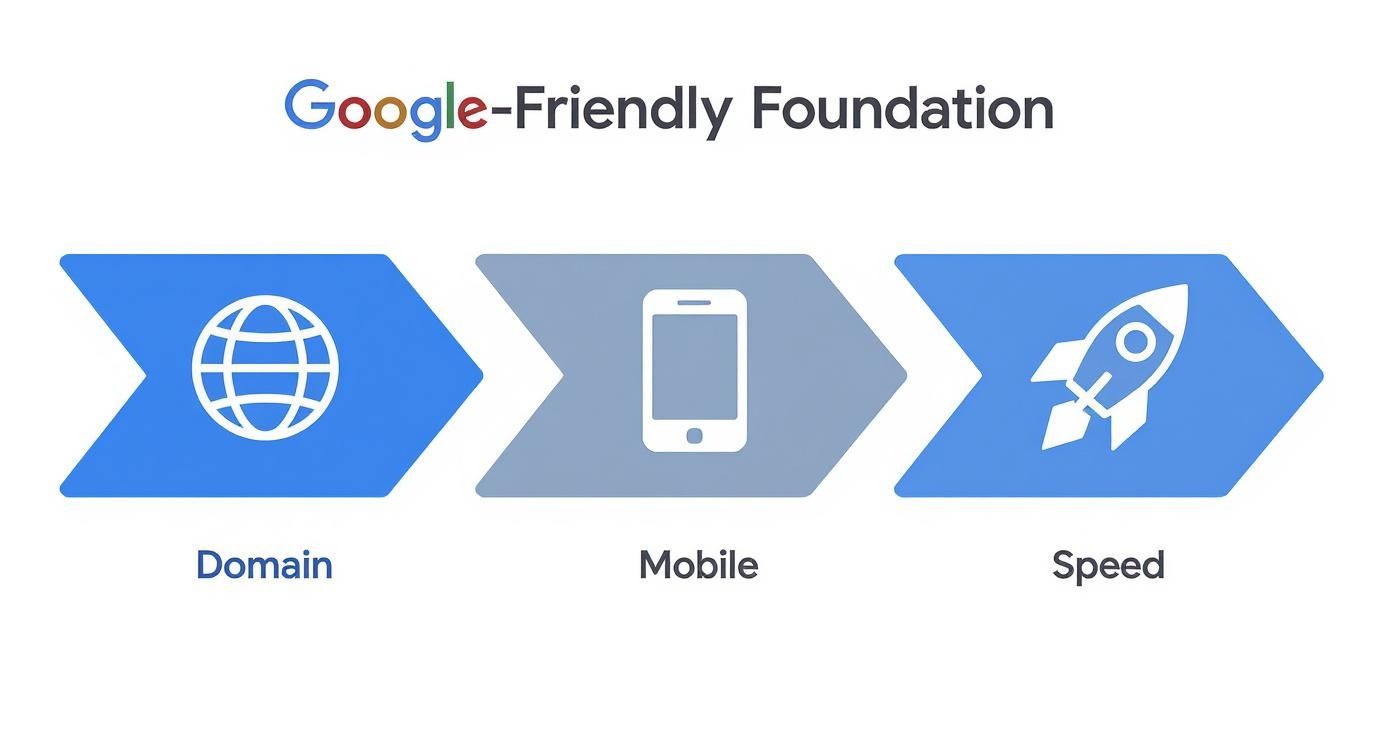
As you can see, getting these three pillars—a custom domain, a mobile-friendly design, and decent speed—sorted first makes everything you do in Search Console far more effective.
Submitting Your Sitemap (The Official Roadmap)
With verification out of the way, your first job is to hand Google a sitemap. It’s exactly what it sounds like: a map of your website.
This little XML file lists all the important pages you want Google to know about. It helps Google's crawlers find and understand your content much more efficiently.
Thankfully, modern builders like Wix generate and update this for you automatically. All you have to do is find the URL (it’s usually ) and pop it into the 'Sitemaps' section in GSC. Easy.
Submitting a sitemap doesn't guarantee you'll rank, but it gives Google a clear roadmap. For new sites, this dramatically speeds up the discovery process.
Decoding Indexing Issues
Once you've submitted your sitemap, Google will start crawling your pages. This is where GSC really starts to shine, because it’s where you'll spot problems.
One of the most common (and annoying) messages you might see is "Discovered - currently not indexed."
This basically means Google knows your page exists, but it hasn't bothered to add it to its library yet. Why? It could be a few things:
Perceived Low Quality: Google might have glanced at the page and thought, "Nah, not valuable enough."
Crawl Budget: For bigger sites, Google might be prioritising what it sees as more important pages.
Site Overload: Sometimes Google pauses crawling to avoid crashing your server.
Another critical thing to check is your file. This is a simple text file that tells search engines which parts of your site to ignore. A tiny typo in this file—like a misplaced symbol—can accidentally tell Google to ignore your entire website, making you completely invisible. You can check and test this file right inside GSC.
To give you a clearer picture, here are the most important jobs you'll do in Google Search Console.
Key Actions in Google Search Console
This table breaks down the essential tasks within GSC and explains why each one is so critical for getting your website seen.
Action in GSC | Purpose | Why It Matters for Ranking |
|---|---|---|
Verify Ownership | Prove you own the site. | Unlocks all data and tools; without it, you can't do anything else. |
Submit Sitemap | Provide a list of all your important pages. | Speeds up the discovery of new content and ensures Google knows what to crawl. |
Check Page Indexing Report | See which pages are indexed and which have errors. | Helps you find and fix technical issues that are stopping pages from appearing on Google. |
Inspect URLs | Test a specific URL for indexing status and issues. | A brilliant diagnostic tool for troubleshooting why a single page isn't showing up. |
Review Performance Report | See which keywords you rank for and how many clicks you get. | Shows you what's working and where your opportunities are, guiding your content strategy. |
These actions form the backbone of your technical SEO. Getting comfortable with them is the first step toward taking real control of your Google visibility.
For local businesses, connecting GSC with your Google Business Profile is a game-changer. You can learn more about that in our UK guide to Google Business Profile.
Ready to take control? Setting up Google Search Console is the most important thing you can do right now. If you get stuck verifying your site or can't figure out an indexing error, reach out to our team at Baslon Digital for some expert guidance.
Crafting Content That Google Loves
Right, so Google can now find your website. Fantastic. You've won half the battle.
The next challenge? Giving Google a reason to show your pages to actual humans. This is where on-page SEO comes into play. It’s how you shout from the digital rooftops that your content is valuable, relevant, and the absolute best answer to whatever someone just typed into that search bar.
It all kicks off with the very first thing people see in the search results: your page title and its little description. These aren't just bits of text; they're your digital billboard on the world's busiest motorway.
Writing Titles and Descriptions That Get Clicks
Your title tag is that big blue, clickable headline in a Google search result. It needs to be crystal clear, snappy (keep it under 60 characters if you can), and include the main keyword you're targeting. Think of it as the title of a book chapter—it has to nail what the page is about, instantly.
The meta description is the short snippet of text lurking underneath. While it won't directly make you rank higher, it's your sales pitch. A killer meta description (around 155 characters) tempts people to click by summing up the page's value and often throws in a call to action.
Let's look at the difference:
Poor Title: "Services"
Good Title: "Professional Garden Design in Bristol | Get a Free Quote"
Poor Meta Description: "We offer garden design services."
Good Meta Description: "Transform your outdoor space with our award-winning garden design services in Bristol. We create beautiful, sustainable gardens. Contact us for a free consultation!"
See? That small tweak can make a massive difference to your click-through rate, which sends all sorts of lovely positive signals back to Google.
Structuring Content for Humans and Search Engines
When someone lands on your page, you have mere seconds to convince them they're in the right place. A giant wall of text? That’s an instant "nope." This is precisely why organising your content with proper headings is non-negotiable.
Headings (H1, H2, H3, etc.) create a clear hierarchy and make your content easy to scan. Your page should have only one H1 tag—this is your main page title, the big kahuna. Use H2s for major sections and H3s for the sub-points within them. This structure doesn't just help readers; it helps Google understand the main topics and subtopics of your content, too.
Think of your headings as the outline for your page. A well-structured outline lets both users and Google quickly grasp the key info, which boosts readability and signals what your page is all about.
Creating Genuinely Helpful Content
At the end of the day, the real secret to sustainable SEO is creating top-notch content that genuinely solves your audience's problems. This means getting way past just stuffing keywords into a page. You need to get inside your ideal customer's head, figure out what they're searching for, and then create the most helpful resource on that topic. Period.
This is especially true for local businesses. Here in the UK, how people search is changing, even though Google is still the king. Local SEO is absolutely vital. Google’s Local Pack and Maps features are now the main way people discover businesses down the road. In fact, studies show that over 70% of UK consumers use Google to find local businesses, making accurate local info a cornerstone of any plan to get a website noticed. If you're interested in the nitty-gritty, you can discover more insights about UK search behaviour on Exposure Ninja.
Crafting brilliant content that solves real-world problems is, hands down, the most reliable way to earn Google's trust and get that long-term visibility you're after.
If your content just isn't hitting the mark or driving traffic, our team at Baslon Digital can help you whip up a content strategy that actually works. Book a free consultation today to start creating content that both Google and your customers will absolutely love.
Advanced Signals to Boost Your Visibility
Okay, you've got the basics down. Your site is live, the content is solid, and Google knows you exist. Now it's time for the fun part—sending stronger signals to Google that your website isn't just another site, but a real authority.
These next steps are a little more technical, but they are incredibly effective for standing out on a crowded search results page. Think of it as adding extra details that help Google not just read your content, but truly understand it. This is where you get a serious competitive edge.
Use Structured Data to Create Rich Snippets
One of the most powerful tools in your SEO toolkit is structured data, often called Schema markup. It’s basically a special code you add to your website that spells out exactly what your content is about for search engines.
Instead of Google guessing that "Joe's Plumbing, 0161 123 4567" is a business name and phone number, structured data explicitly labels it for them. "This is a business name. This is a phone number." No more guesswork. This helps Google categorise your information with far greater accuracy.
The real prize? The chance to win rich snippets. These are those jazzed-up, eye-catching search results that include extra info like:
Star ratings for a product or service
Event dates and locations
Cooking times for a recipe
FAQs with dropdown answers right there in the search results
Snippets like these make your listing pop. They can seriously improve your click-through rates, even if you aren’t sitting in that coveted number one spot.
Dominate Local Search with Google Business Profile
For any UK business with a local customer base, a fully kitted-out Google Business Profile (GBP) is completely non-negotiable. This free listing is what gets you into the 'Local Pack'—that map and list of three businesses you see at the top of local search results.
Getting your website on Google is one thing. Getting it to show up for "plumber near me" is another game entirely, and your GBP is the key player.
Make sure your profile is 100% complete with accurate info: your business name, address, phone number (NAP), opening hours, and of course, a link to your website. Don't be shy about asking happy customers to leave reviews, either. Those positive ratings build trust and give your local ranking a nice boost.
A well-managed Google Business Profile is arguably the single most important factor for local SEO success. It connects your website directly to your physical location, making you visible to customers actively searching for your services in your area.
Build Initial High-Quality Backlinks
Finally, let’s talk about backlinks. A backlink is just a link from another website pointing to yours. In Google’s world, every high-quality backlink is like a vote of confidence for your site.
When a reputable website links to you, it signals that your content is trustworthy and valuable. The golden rule here is quality over quantity. Honestly, one link from a respected industry blog is worth more than a hundred links from spammy, low-quality sites.
Google's dominance in the UK search market has been incredibly steady. Data from StatCounter shows that between November 2024 and November 2025, Google’s market share consistently hovered between 92% and 93%. This stability means the core strategies that work—like creating great content and earning trustworthy backlinks—have remained effective for a long time. Learn more about the UK search engine market on Kinsta.
When you're just starting out, you can earn your first few links by getting listed in reputable local directories or teaming up with other local businesses. These initial links begin building the authority that is absolutely essential for long-term visibility.
Feeling a bit overwhelmed by these advanced steps? Our team at Baslon Digital specialises in implementing technical and local SEO strategies that actually get results. Contact us today for a free chat about boosting your visibility.
So, What Happens Next? A Few Final Questions
You've made it through the guide. You now have the full playbook for getting your Wix website found on Google and, eventually, climbing up those search results.
The secret sauce isn't really a secret: it’s about consistently applying these principles. It starts with a solid technical foundation and grows with every signal of authority you send Google's way.
But I know there are always those lingering "what if" questions that pop up right when you think you're done. Let's tackle a few of the most common ones.
How Long Does It Really Take to Show Up on Google?
This is the big one, isn't it? For a brand-spanking-new website, it can take anywhere from a few days to several weeks for Google to even realise you exist, crawl your pages, and finally index them.
Following the steps in this guide, especially submitting your sitemap through Google Search Console, is like giving Google a friendly nudge to speed things up. But getting indexed is just the first step. Ranking for competitive keywords takes much longer. Think months, not days, and it requires you to keep creating content, fine-tuning your site, and earning those valuable links.
Help! Why Isn’t My Website Showing Up at All?
First, don't panic. There are a few usual suspects. If your site is brand new, Google might just be taking its sweet time getting around to you. Patience is part of the game.
More often, it's something technical. You could be accidentally blocking Google's crawlers with a rogue line in your file (it happens more than you'd think!). Another possibility is that your site has some serious technical gremlins or just not enough quality content for Google to bother with.
Your first port of call should always be the URL Inspection tool in Google Search Console. It’s like a doctor for your web pages, telling you exactly what's wrong.
Do I Have to Pay to Get on Google?
Nope. You absolutely do not need to pay a single penny to get your website to appear in Google's organic search results. The entire process we've walked through is completely free.
Now, you can pay to show up at the very top of the results page through Google Ads. That’s a whole different ball game. This guide is all about earning your spot the old-fashioned way—for free.
Ready to take your visibility to the next level? If you need an expert to map out a winning SEO strategy that’s actually built for your business, my team is here to help.
Get in touch with Baslon Digital today for a consultation at https://www.baslondigital.com. Let's get you noticed.
Comments