How to Create an Online Store: how to create online store tips for UK success

Starting an online store really boils down to three big phases: nailing down your niche and business plan, picking your e-commerce platform, and then the fun part—building out your product catalogue and storefront. Honestly, your success depends on getting that strategy solid before you even dream about colour schemes. It’s all about building your business on a profitable foundation from day one.
Your Blueprint for a Profitable Online Store
Jumping into e-commerce without a clear plan is like setting sail without a map. I get it—the excitement to just launch is real, but the stores that truly succeed are the ones built on careful preparation. This first part is all about strategy: figuring out what you’ll sell, who you’ll sell it to, and most importantly, how you’ll stand out from the crowd.
Think about it. If you launch an online store in the UK today, you're diving into a market that's expected to be worth a staggering £353.5 billion by 2026. With more than 500,000 other businesses already out there, just winging it isn’t an option. You need a rock-solid plan to grab your piece of that pie.
Finding Your Niche and USP
First things first: you need a profitable niche. Don't try to be the next Amazon. Instead of selling everything to everyone, zero in on a specific type of customer with a problem you can solve. What are you passionate about? What gap in the market have you noticed?
For instance, instead of a generic "pet supplies" shop, you could specialise in "eco-friendly dog toys for city dwellers." That kind of focus makes your marketing a million times easier and helps you build a community of loyal fans.
Once you’ve got your niche, you need a Unique Selling Proposition (USP). This is your secret sauce. It’s what makes you different. Maybe it’s your commitment to sustainable sourcing, your ridiculously good customer service, or exclusive product designs nobody else has. Whatever it is, your USP needs to be at the very heart of your brand.
A strong USP isn't just a catchy marketing slogan; it's a promise you make to your customers. It answers one simple question: "Why should I buy from you and not from your competitor down the road?"
This whole process—from finding your niche to choosing the right platform—is a logical flow. You can't skip a step.
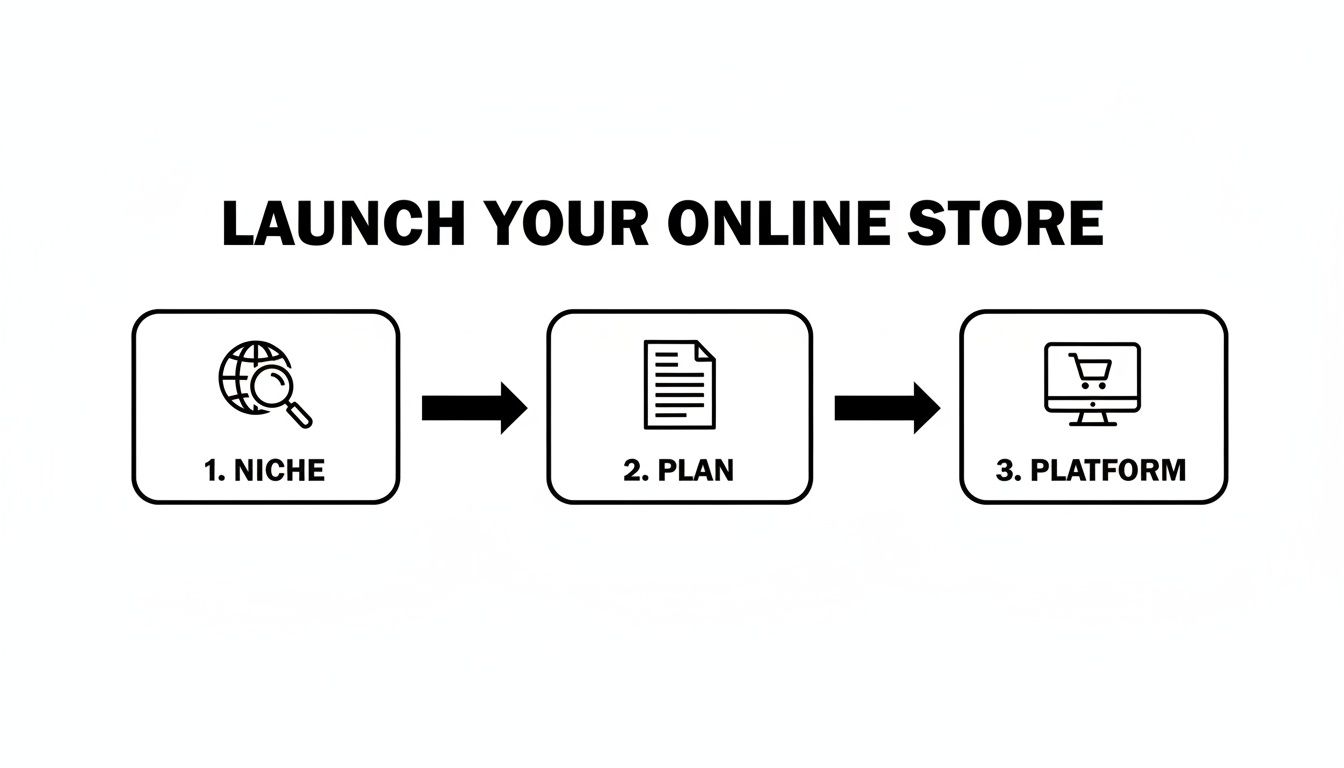
It really is that simple: Niche, Plan, Platform. Getting these three things right forms the bedrock of a business that's built to last.
Choosing Your E-commerce Platform
With your strategy starting to take shape, it's time for the next big decision: your tech. As you map out your blueprint, a huge piece of the puzzle is figuring out how to choose an ecommerce platform.
For a lot of small businesses and startups, an all-in-one solution like Wix is the perfect fit. It takes all the technical headaches—like hosting and security—off your plate, giving you powerful, user-friendly tools to build and grow. Choosing a platform that can scale with you is a massive asset. It lets you focus on what you actually do best: selling your products.
Ready to take that idea and turn it into a real, live business? Let's get to work on building your digital foundation.
Building Your Digital Foundation on Wix
Right, you’ve mapped out your business plan. Now for the fun bit – choosing the platform that will become the backbone of your entire online operation. Think of it less like picking software and more like finding the right business partner. For a lot of UK small businesses dipping their toes into e-commerce, Wix hits that sweet spot between power and simplicity.

Its real magic is the intuitive drag-and-drop editor. Honestly, it removes all those scary technical hurdles that put so many people off. You don't need to know a scrap of code to build a shop that looks professional and actually works. This frees you up to obsess over the important stuff: your products, your brand, and your customers. While we're zeroing in on Wix here, it's worth having a peek at a broader e-commerce platform comparison guide to see just why this user-friendly approach is such a game-changer.
Getting Started with Your Wix Account
Setting up your digital headquarters on Wix is refreshingly straightforward. It all starts with creating a Wix Business account, which is your key to unlocking all the e-commerce tools you'll need.
One of the biggest reliefs is that Wix handles all the web hosting for you. No late-night panics about server management, security patches, or site speed. It’s all baked into your plan, giving you a solid, secure foundation from day one.
And it’s a great time to be jumping in. The UK e-commerce scene is buzzing; in 2024, 84% of e-commerce businesses reported growth. Even with a slight slowdown, the market is still very much alive and kicking. This is your chance to launch a polished store and grab a piece of the action.
Wix isn’t just a website builder; it's a complete business ecosystem. From taking payments with Wix Payments to built-in marketing tools and analytics, it gives you one central hub to run everything from.
Securing Your Professional Domain and Template
Your domain name is your shop's address on the internet—it’s how people find you. A professional domain (like ) screams credibility and cements your brand in people's minds. Wix makes this dead simple, letting you register a new one right there or connect one you already own in just a few clicks.
Once your account is live, you can get stuck into the design by picking a template. Wix has hundreds of them, all professionally designed and ready for mobile.
Here are a few tips I always give for choosing the right one:
Look for your industry: Start with templates designed for businesses like yours. They often have layouts and features that you'll actually need.
Keep it clean: Pick a template with simple, clear navigation. If customers can't find what they're looking for, they'll just leave.
Test on mobile: Seriously, preview the template on your phone. Make sure the shopping experience is smooth for people on the go.
The best part about Wix is that a template is just a starting point. You have total creative freedom to tweak colours, fonts, layouts, and add new bits and bobs to make it perfectly yours. For a more detailed look at this, check out our Guide to Ecommerce on Wix for UK Stores
Ready to turn that idea into a real, high-performing online shop? Let's get this foundation sorted so we can start bringing your store to life.
Adding Products, Payments and Shipping
You’ve laid the digital foundations, which is great. But now it’s time for the fun part: stocking your shelves and actually opening for business. This is the moment your online store stops being just an idea and turns into a real, functioning marketplace.
We’re going to walk through adding your products, getting paid securely, and setting up a shipping strategy that won’t give you—or your customers—a headache.
Think of this stage as building the engine of your e-commerce machine. Nailing these details ensures a smooth ride for your customers, from the second they land on a product page to the thrill of unboxing their order. Let's get it right.
Crafting a Compelling Product Catalogue
Your product pages are your digital salespeople. Seriously. They have to be persuasive, packed with useful info, and look good enough to make someone click "Add to Basket." This isn't just about listing features; it's about telling a story.
Start with your visuals. You don't need a fancy studio; a modern smartphone and some good natural light can work wonders. Get shots from multiple angles, show the product in action, and be upfront about its size and scale. For an online shop, your photos are the closest a customer gets to touching the product before buying. Read our Blog Post E-commerce photography that sells for some excellent pointers.
Next up, the words. Your product descriptions are a golden opportunity to connect with your audience. Focus on the benefits, not just the technical specs. For a deep dive into writing copy that actually sells, you can learn more about how to write product descriptions effectively in our dedicated guide.
Finally, get organised. A messy shop is a confusing shop. It’s dead simple to create categories and collections in your Wix dashboard to help shoppers navigate your site. A logical structure is everything for a good user experience.
Managing Inventory and Product Variations
Once your product pages are looking sharp, you need to sort out the nitty-gritty behind the scenes. This is where stock keeping units (SKUs) and product variations come into play. Trust me, an organised inventory system is non-negotiable if you want to run an online store without tearing your hair out.
An SKU is just a unique code for each specific item you sell. For example, if you have a t-shirt in three sizes (Small, Medium, Large) and two colours (Red, Blue), you’d have six distinct SKUs.
TSHIRT-RED-S
TSHIRT-RED-M
TSHIRT-RED-L
TSHIRT-BLU-S
TSHIRT-BLU-M
TSHIRT-BLU-L
Setting these up in Wix is straightforward and helps you track what you have in stock with pinpoint accuracy. It stops you from selling something you don't actually have and makes fulfilling orders a breeze.
A clear inventory system isn't just for you; it's for your customers. When stock levels are accurate, you avoid the disappointment of overselling and the frustration of cancelled orders, which builds immense trust in your brand.
Configuring Payments and Taxes
Okay, let's talk about getting paid. To take money from customers, you need to connect a payment gateway. Wix keeps things simple with its own integrated solution, Wix Payments, which handles all major credit and debit cards. You can also easily hook up other big names like Stripe and PayPal to give people more choice at checkout.
When you're picking a provider, keep these things in mind:
Transaction Fees: They all charge a small percentage plus a fixed fee for every sale. Compare them to see which one makes the most sense for your bottom line.
Payment Methods: Can customers pay with Apple Pay or Google Pay? Offering these convenient one-click options can seriously cut down on abandoned checkouts.
Payout Times: How quickly does the cash from a sale actually hit your bank account?
As a UK-based business, you'll also have to deal with tax. Inside the Wix dashboard, you can set up automated tax calculations for the UK. If you're VAT registered, just pop in your registration number and set the right rates for your products. It’s always a good idea to have a chat with an accountant to make sure you're compliant with HMRC rules right from the get-go.
Defining Your Shipping Strategy
The final piece of this operational puzzle is shipping. Your delivery policy can make or break a sale—unexpectedly high shipping costs are one of the biggest reasons people abandon their baskets. A clear, fair strategy is essential.
First, define your shipping zones. In Wix, you can create different rules for different regions. For instance, you could have one rate for the UK mainland, another for the Highlands and Islands, and a separate one for international orders.
Next, figure out your pricing model. Here are a few popular ways to do it:
Flat-Rate Shipping: Charge one set price for all orders, no matter the size. It's simple and easy for customers to understand.
Weight-Based Rates: The shipping cost is calculated based on the total weight of the items in the basket.
Free Shipping Threshold: This is a classic. Offer free delivery on orders over a certain amount (e.g., "Free shipping on orders over £50"). It's a fantastic tactic to encourage shoppers to add a little extra to their basket.
Once your products are listed and your back-end is sorted, you're ready to design a storefront that truly sells.
Designing a High-Converting Storefront
Right, you’ve sorted the backend and your products are ready to go. Now for the fun part—what your customers will actually see. This is your storefront. A pretty design is one thing, but a smart design that actually guides people to the checkout? That’s everything. This is where user experience (UX) and conversion rate optimisation (CRO) come into play.

This isn't about just grabbing a fancy template. It’s about making deliberate choices that build trust, get rid of any buying friction, and make shopping on your site an absolute breeze. Honestly, seeing your shop through your customer's eyes is the best perspective you can have.
Mastering Brand Identity and Visual Appeal
Your brand's personality needs to come through in every corner of your website. Wix templates are a brilliant launchpad, but the real magic happens when you stamp your own unique identity all over the design.
Start with a clean, uncluttered layout. If too many things are screaming for attention, you’ll just confuse and overwhelm visitors. White space is your best mate here—it helps frame your products and pulls the eye towards important bits like your "Add to Basket" buttons.
Next up, your colour scheme. Colours stir up emotions and can seriously influence buying decisions.
Primary Colour: This should be your main brand colour, used for big elements like your header and calls-to-action.
Secondary Colour: Use this to complement the primary and highlight less critical information.
Accent Colour: Pick a contrasting colour that makes your most important buttons and links really pop.
Typography is another biggie. Stick to two, maybe three, fonts max—one for headings and another for body text. Readability is the name of the game. If customers have to squint to read your product descriptions, they’ll just click away.
Your storefront design is a silent conversation with your customer. A professional, cohesive design communicates trustworthiness and quality before they've even read a single word. It says, "We care about the details, and we care about your experience."
Optimising the User Journey for Conversions
A slick user experience is what turns casual browsers into loyal customers. It’s all about making the path from discovery to checkout as smooth and obvious as possible. Get this right, and you'll see a huge impact on your sales.
Think about your navigation menu. Keep it simple, logical, and easy to follow. Use clear terms everyone understands like "Shop," "About Us," and "Contact." If you've got a big catalogue, using product filters (by size, colour, price, etc.) is non-negotiable. It helps people find exactly what they’re looking for without the faff.
This focus on user experience is especially vital in the UK, which is one of Europe's most mature e-commerce markets. Here, online shopping makes up a whopping 27% of all retail sales, way above the European average. With nearly every adult in the UK shopping online, the battle isn’t for new users—it's for their loyalty. And that's won or lost based on how good your site's experience is.
Building Trust and Driving Action
Every single element on your site should have a job to do. From plastering customer reviews everywhere to having crystal-clear calls-to-action (CTAs), your design choices should be actively building trust and nudging visitors to take that next step.
When you're building out your Wix store, there are a few must-have features that build trust and encourage people to buy. Think of this as your essential checklist for a storefront that doesn't just look good, but actually sells.
Essential UX Features for Your Online Store
1. High-Quality Product Photos
Why it matters - This is the closest a customer gets to touching your product. Multiple angles and context shots build confidence and reduce hesitation.
Wix implementation tip - Use the Wix Pro Gallery to showcase images in a visually rich, mobile-responsive layout.
2. Prominent Customer Reviews
Why it matters - Social proof is incredibly powerful. Reviews build trust and show that real people love your products.
Wix implementation tip - Add the Wix Reviews app directly to your product pages to collect and display customer feedback effortlessly.
3. Clear Calls-to-Action (CTAs)
Why it matters - Buttons like “Shop Now” or “Add to Basket” should be unmissable and guide users toward taking action.
Wix implementation tip - Customise your buttons in the Wix Editor using contrasting colours and action-oriented text so they stand out on every page.
4. Mobile-First Design
Why it matters - Over half of online purchases happen on mobile. Your store must look and function perfectly on smaller screens.
Wix implementation tip - Wix templates are automatically mobile-responsive, but always use the mobile editor to fine-tune spacing, text size, and usability.
By weaving these elements into your design, you create a persuasive and reassuring space for shoppers. If you want to dig even deeper into this, check out our detailed guide on e-commerce conversion rate optimisation that works.
Ready to turn that beautiful design into a proper sales machine? The next step is launching your store and getting it in front of the right people.
Launching and Marketing Your New Store
You've built your store, stocked your digital shelves, and designed a beautiful storefront. The temptation to flip the switch and go live is massive, but launching your online store is a milestone, not the finish line. A successful launch is all about being prepared, and that preparation starts right now.
This final push ensures that when you do open your virtual doors, everything works flawlessly. A smooth launch builds immediate trust and sets the stage for growth, turning all that hard work into a thriving business.
Your Pre-Launch Checklist
Before you announce your new shop to the world, you absolutely must run a final, thorough check of every single component. Think of yourself as your very first, and most critical, customer. This is your chance to catch any small hitches before they can frustrate a real buyer.
Go through your store with a fine-tooth comb. A simple typo on a product page or a broken link can chip away at your credibility. The goal here is to create an experience so seamless that customers don't even have to think about it.
Here’s a practical checklist to guide you:
Test the entire checkout flow: Place a real order, from adding a product to the basket all the way through to the confirmation page. Use a discount code to make sure that works, too. Did the payment go through smoothly? Did you receive the confirmation email?
Proofread everything: Read every single word on your site. Check product descriptions, your 'About Us' page, and your returns policy for any spelling or grammar mistakes.
Check on all devices: Open your site on a desktop, a tablet, and your smartphone. Make sure images load correctly and that the mobile checkout process is simple and intuitive.
Configure your SEO basics: Inside your Wix dashboard, the Wix SEO Wiz is your best friend. Follow its step-by-step checklist to set up your homepage title, meta description, and connect your site to Google Search Console. This tells Google you're ready to be found.
Think of your launch as the opening night of a play. You wouldn't raise the curtain without a full dress rehearsal. This checklist is your dress rehearsal, ensuring every scene, line, and light is perfect for your audience.
Getting Your First Customers
With your store live and tested, the focus shifts entirely to marketing. A brilliant shop with no visitors won't make any sales. Your initial marketing efforts are all about building momentum and getting those crucial first orders. You don't need a huge budget; you need a smart, focused plan.
The goal is to create a buzz and start a conversation with your target audience. Social media is a fantastic place to start. Announce your launch to your personal and professional networks. People who already know and trust you are often your first and most enthusiastic supporters.
Your Initial Marketing Game Plan
A simple, actionable marketing plan will keep you focused. Don't try to do everything at once. Instead, pick a few key channels and do them well.
Set Up Email Marketing: This is non-negotiable. Add an email sign-up form to your site's footer or a subtle pop-up offering a small launch discount (e.g., 10% off your first order). Every email you collect is a potential future customer you can market to for free.
Engage on Social Media: You don't need to be on every platform. Pick one or two where your ideal customers hang out. Share high-quality photos of your products, behind-the-scenes content, and tell the story of your brand. Engage with your followers by asking questions and responding to comments.
Explore a Small Ad Budget: Once you have a little traction, consider putting a small, targeted budget towards paid ads. A £5-£10 per day campaign on Meta (Facebook and Instagram) or Google Shopping can be incredibly effective at driving your first wave of targeted traffic and sales.
Finally, start monitoring your performance from day one. Wix Analytics, built right into your dashboard, provides a wealth of information. You can see which pages are most popular, where your traffic is coming from, and what your conversion rate is. This data is gold. It helps you understand what's working so you can double down on it and make informed decisions to grow your new online store.
Frequently Asked Questions
Jumping into the world of e-commerce can feel like you've suddenly got a million questions. That's totally normal. Here are some of the most common ones we hear from new business owners in the UK, with straightforward answers to help clear things up.
How Much Does It Cost to Create an Online Store in the UK?
Honestly, it can range from a few hundred pounds for a solid DIY job to several thousand if you're going for a completely custom build. The main costs you'll need to account for are your e-commerce platform subscription (like Wix), your domain name, and the payment processing fees, which are usually a tiny slice of each sale.
If you're a small business just starting out, a platform like Wix keeps the initial hit to your wallet very manageable. But here’s a pro tip: don't skimp on product photography. Budget for good photos and a little bit of marketing spend to get those first few customers through the digital door. It makes a world of difference to how people see your brand.
Do I Need to Register My Online Store as a Business in the UK?
Yes, absolutely. If you're selling products online with the goal of making a profit (and of course you are!), you have to register your business with HMRC. The simplest route is to register as a sole trader, which is what most new sellers do. You could also set up a limited company or a partnership.
It's so important to get this right from the start to avoid headaches later on. We always suggest a quick chat with an accountant. They’ll make sure you’re set up correctly and are playing by all the UK's rules.
What Is the Best Platform for a Beginner to Create an Online Store?
For anyone just dipping their toes into e-commerce, the best platforms are the all-in-one solutions that don't make you want to pull your hair out. You want something with an intuitive setup and support you can actually rely on. This is why Wix is such a great shout for beginners—it gives you a simple drag-and-drop website builder that’s already packed with powerful e-commerce tools.
The real beauty of a platform like Wix is that it handles all the techy stuff for you. Hosting, security, payment gateways... it's all sorted. This leaves you free to focus on what actually makes you money: marketing your products and making sales.
You don't need to know a single line of code to get a professional-looking, fully working shop online, which really lowers the barrier for new entrepreneurs.
How Do I Get My First Customers After Launching My Online Store?
Getting those first sales means you have to be proactive. Just hitting "publish" and hoping for the best is a recipe for disappointment. You need to go out and find your people. A great place to start is simply telling your friends, family, and social media followers that you're open for business.
From there, try a few of these moves:
Run a launch offer: A special discount or a freebie with the first 50 orders can create a bit of buzz and urgency.
Hang out where your customers do: Find relevant Facebook groups, forums, or subreddits. Don't just spam your link; join the conversation and share your store when it makes sense.
Get the SEO basics down: Make sure your homepage and product pages have clear, descriptive titles. SEO is a long game, but you've got to start on day one.
Spend a little on ads: You'd be surprised what a targeted social media ad campaign can do. Even a small budget of £50 can drive your first few sales and give you some really useful data on who's buying.
So, Ready to Build Your Online Business?
Creating a successful online shop is a marathon, not a sprint. But with the right roadmap and tools, it’s a goal that’s well within reach for any UK small business. The steps we’ve walked through—from dreaming up a strategy and picking a platform to sweating the small stuff like design and marketing—are the real-world building blocks of a sustainable business. You’re not just launching a website; you’re building an asset that can grow with you.
Just remember, every little decision you make adds up to the final customer experience. A slick product catalogue, a checkout process that doesn’t make people want to throw their laptop out the window, and a clear brand voice all work together to build trust and, ultimately, drive sales. The secret sauce? Consistent effort and a willingness to actually listen to what your data is telling you. You now have the blueprint for how to create an online store that doesn't just launch, but thrives.
If you are ready to create an online store but feel you need an expert hand to guide you through the design, launch, and marketing process, our team at Baslon Digital is here to help. Contact us today for a consultation, and let's build your e-commerce success story together.
Comments