Fixing the Http Error 502 A Practical Guide for UK Businesses

That sinking feeling when a '502 Bad Gateway' error pops up on your screen is a familiar one. In plain English, this error is a sign that there’s a communication breakdown happening behind the scenes. An http error 502 means one server tried to talk to another and got a completely baffling or invalid response back.
What a 502 Bad Gateway Error Actually Means
Picture your website as a bustling restaurant. Your visitor is the customer, and they place an order with a waiter (that's a proxy or gateway server). The waiter then heads to the kitchen (the main server) to get the order sorted.
A 502 Bad Gateway error is like the waiter coming back to the table and shrugging, saying the kitchen’s response made absolutely no sense. The message got lost in translation somewhere between the front of the house and the back.
This communication failure can happen for a few reasons. The main server might be offline, totally swamped with other orders, or just having a software moment. It’s what’s known as a server-side error, which is a nice way of saying the problem isn't with your visitor's computer or Wi-Fi—it's somewhere in your website's infrastructure.
Common Causes for a 502 Error
While the reasons can vary, they almost always trace back to servers not playing nicely together. Getting to grips with the usual suspects is the first step to fixing the problem.
Server Overload: Your marketing campaign in the UK just went viral? Fantastic! But if it sends a massive wave of traffic to your site, your server might get overwhelmed and start dropping requests.
Firewall Blocks: Sometimes, an overzealous firewall (like one from a service such as Cloudflare) gets a bit trigger-happy. It might mistake perfectly legitimate requests for a threat and slam the door shut.
Dodgy Network Issues: This bucket includes all sorts of fun things like DNS problems or routing snags between the different servers that help deliver your website.
Faulty Scripts or Plugins: A badly written plugin or a PHP script that takes too long to run can cause your main server to crash or fail to send back a valid response.
The main takeaway? A 502 error isn't one specific problem but a symptom of a communication breakdown. The gateway server did its job and passed on a request, but the upstream server it relies on sent back gibberish.
Your mission, should you choose to accept it, is to figure out which link in this chain is broken. Is your main hosting server taking a nap? Is your Content Delivery Network (CDN) having trouble connecting? We’ll dig into how to find out next.
If you're fed up with playing detective with technical errors and just want a reliable partner to keep your website healthy, get in touch with Baslon Digital today for a friendly chat.
Your First Steps in Troubleshooting the 502 Error
When that dreaded HTTP error 502 pops up, it’s easy to jump to conclusions and think your entire server has just imploded. I get it. But before you hit the panic button and alert your tech team, take a breath. More often than not, a few simple checks on your end can fix the problem in minutes, saving you a whole lot of stress.
These first steps are all about ruling out any gremlins in your own setup.
Quick Fixes to Try First
First things first, let's look at the quickest checks you can perform to see if the issue is local to your machine. These are the go-to moves I always try before digging any deeper.
Action to Take | Why It Works | Estimated Time |
|---|---|---|
Hard Refresh | Forces your browser to ignore its cache and download a fresh copy of the page. It’s like telling your browser, "Forget everything you think you know about this site." | ~5 seconds |
Clear Browser Cache & Cookies | Corrupted or outdated files stored by your browser can cause all sorts of communication breakdowns with a server. Wiping them clean gives you a fresh start. | ~30 seconds |
Try a Different Browser | This isolates the problem. If the site works in Firefox but not Chrome, you know the issue is with your Chrome setup, not the server. | ~1 minute |
Use an Incognito Window | This is a fast-track way to test without cache, cookies, or extensions getting in the way. It’s a clean slate. | ~10 seconds |
These initial actions are incredibly effective because they immediately help you understand where the problem lies. If any of these solve the 502 error, you’ve just saved yourself a lot of unnecessary server-side investigation.
How to Isolate the Problem Like a Pro
The simplest action is often the most effective: a hard refresh. On Windows, hit Ctrl + F5, and on a Mac, it's Cmd + Shift + R. This one command forces your browser to bypass its stored cache and pull a brand-new version of the page directly from the server. Sometimes, that’s all it takes.
If that doesn’t do the trick, the next logical step is to clear out your browser's entire cache and cookies. Think of it as a digital spring clean. Over time, these stored files can get corrupted and cause a 502 Bad Gateway error that only you are experiencing.
Still seeing the error? Time to find out if it’s just your browser having a bad day. Try loading your website in a different one—if you’re a Chrome user, fire up Firefox or Safari. An even quicker test is to open an incognito or private window, which loads the site without any of your saved data or extensions interfering.
If the site loads perfectly in another browser or an incognito window, congratulations! You've just confirmed the issue is with your primary browser's settings, not the server. That narrows things down beautifully.
This flowchart gives you a bird's-eye view of the diagnostic process, showing how your initial checks fit into the bigger picture of finding the root cause.
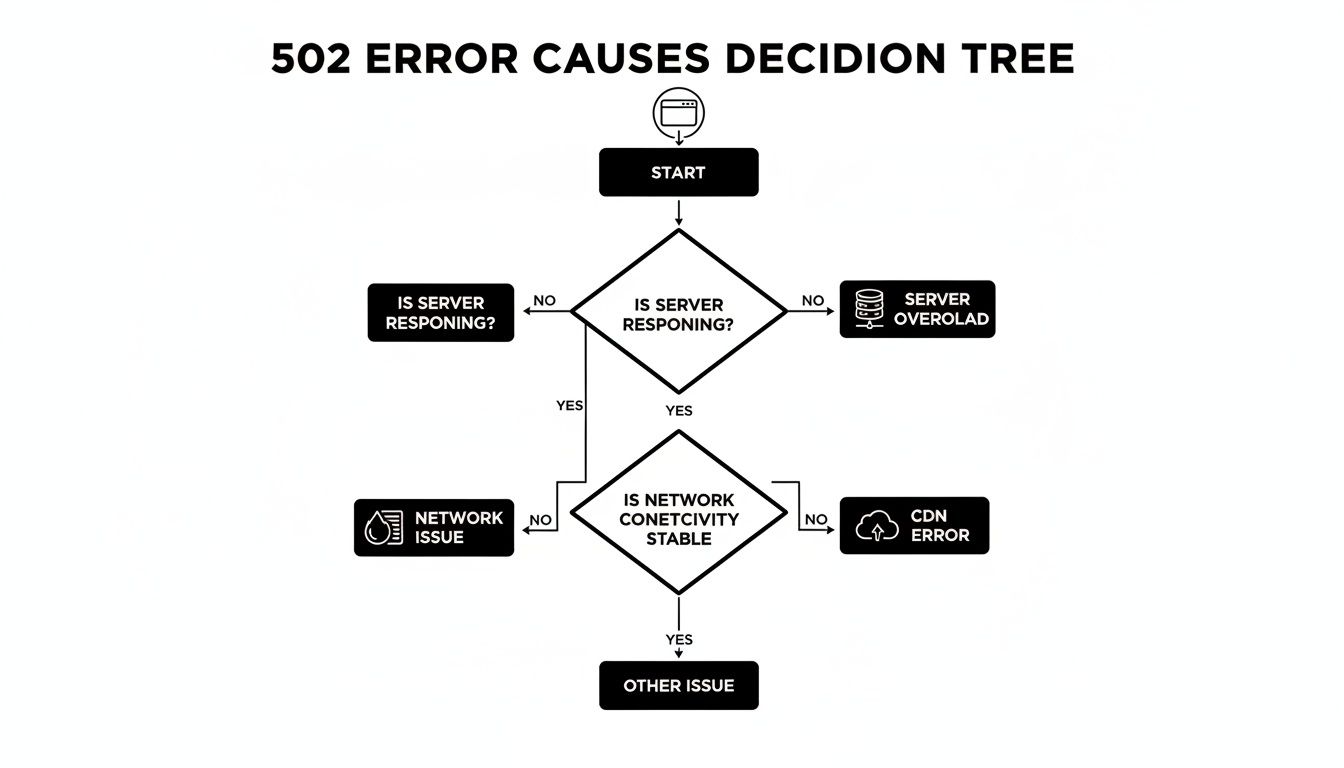
As you can see, while the problem could be something complex like a server overload or a CDN fault, those first few client-side checks are vital to make sure you're not chasing a ghost.
Should these steps fail to fix things, the problem is likely further up the chain—with the server, network, or CDN. To get a handle on server-side issues, it's helpful to be familiar with some essential network diagnostic utilities.
By systematically ticking off these initial checks, you eliminate local causes one by one. This not only resolves common browser glitches but also arms you with crucial information if you do end up needing to contact your hosting provider or developer.
If you’ve tried these quick fixes and the 502 error is still staring back at you across different browsers and devices, you can be pretty confident the problem isn't on your end. Now, it's time to investigate the server itself.
Feeling out of your depth with technical troubleshooting? Contact Baslon Digital today. Let our experts handle your website's health, so you can get back to what you do best—running your business.
Investigating Common Server-Side Causes
Alright, so you’ve tried the quick client-side fixes and you're still staring at that infuriating http error 502. It’s time to roll up our sleeves. If the problem isn't on your end, it’s almost certainly happening where your website lives: on the server. This means we need to play detective and look at the usual suspects on the server-side that cause this communication breakdown.

Think of it like a power cut at home. You don't immediately start rewiring the house; you check the fuse box first. It's the most common and fixable cause. For a 502 error, we're going to check the server’s "fuse box"—its resources, security setup, and the code it's trying to run.
Pinpointing Server Overload
One of the most common culprits behind a 502 error is plain and simple exhaustion. Your server has a finite amount of memory and processing power. If it suddenly gets hammered with a massive spike in traffic—maybe from a viral blog post, a successful marketing campaign, or even a nasty bot attack—it can just run out of juice.
When a server is overloaded, it can't process new requests. So, when the gateway or proxy tries to get a response, the overwhelmed server gives it nothing valid back. Voilà, a 502 error appears. It's not just traffic, either. A badly optimised plugin, a monster of a database query, or even a backup process kicking in at peak hours can hog all the resources, leaving nothing for your visitors.
When Firewalls and Security Plugins Go Wrong
We all want our sites to be secure, but sometimes the very tools meant to protect you can backfire and trigger an http error 502. Web Application Firewalls (WAFs), like the service provided by Cloudflare, or even security plugins on your site can be a bit too aggressive. They might mistakenly flag legitimate traffic from a CDN or proxy server as a threat and block the request cold.
This is a textbook bad gateway scenario. The proxy tries to grab content for a visitor, but the firewall is blocking its IP address, cutting off communication with the main server. With no valid response, the proxy has no choice but to throw up a 502 error. It’s a surprisingly common issue, though finding UK-specific data on firewall-induced 502s is tricky, as most sources lump all causes together.
Uncovering Faulty Scripts and Code
If it’s not traffic and it’s not the firewall, the next place to look is the code actually running your website. A single dodgy PHP script, a conflict between your theme and a plugin, or an outdated bit of software can crash and burn, timing out before it can do its job.
When a crucial script fails, the server process handling it might just die, leaving the gateway server with nothing to talk to.
In this situation, the server's error logs are your absolute best friend. They are a detailed, blow-by-blow account of everything happening behind the scenes. Hunt for entries around the time the 502 errors started—they will often point you directly to the rogue file or script.
Armed with that info, you can have a much more productive chat with your hosting provider or developer. Instead of just saying "my website is down," you can give them specific clues from the logs, which speeds up the whole diagnostic process immensely. If you find your server is frequently overloaded, it might be time to look for a better home for your site. Our guide on the best WordPress website hosting for UK small businesses can help.
If digging through server logs feels a bit daunting, don't sweat it. Our team at Baslon Digital can handle all the technical heavy lifting for you. Contact us for a free consultation and let us get your website running smoothly again.
Troubleshooting 502 Errors on the Wix Platform
One of the best things about using a platform like Wix is that they handle all the tricky server stuff behind the scenes. It’s a huge weight off your shoulders. But, this doesn’t mean your site is completely immune to the dreaded http error 502. When a 502 Bad Gateway error pops up on your Wix site, the cause is usually a bit different from a traditional hosting setup. More often than not, it points to something happening within your site's own configuration.
The usual suspects? Custom code or third-party app integrations. Wix’s Velo development platform is incredibly powerful and lets you customise your site to your heart's content, but a tiny slip-up in a custom script can cause a server-side process to stumble, leading straight to a 502 error. In the same way, apps from the Wix App Market, while super useful, can sometimes have a digital argument with each other or with your site's theme.
Isolating the Problematic App or Code
The moment you see that error, take a breath and think: what was the last thing I changed? A methodical approach is always your best bet for playing detective and finding the culprit.
Did you just install a new app or add a custom Velo snippet? Start there. The quickest way to diagnose the problem is to temporarily disable these recent additions one by one.
Disable Third-Party Apps: Head over to your site's dashboard, find your "Apps," and uninstall the most recent one. After it’s gone, check if your site is back up. If it is, you’ve found your troublemaker.
Review Custom Code: If you’re using Velo, try temporarily disabling any new code snippets you’ve added. You can simply comment out the code, publish the change, and see if the 502 error vanishes. This process of elimination is key.
This step-by-step method stops you from making random, panicked changes and helps you pinpoint the exact cause of the communication breakdown. If you want to get a better handle on how the platform works under the hood, check out our article on what Wix is and how it actually works.
Checking for Platform-Wide Issues
Before you go on a deep dive through your site’s settings, it’s always smart to check if the problem is bigger than just your website. On rare occasions, Wix itself might experience a service disruption that can trigger 502 errors across the board.
The fastest way to check is by visiting the official Wix System Status page. This page gives you real-time updates on any ongoing incidents or maintenance affecting the platform. If you see an active issue, all you can really do is grab a coffee and wait for their engineering team to work their magic.
If the status page shows all systems are humming along nicely, then the issue is almost certainly on your end. That’s your cue to move on to the final step if you're still stuck.
When to Contact Wix Support
Okay, so you've disabled recent apps, double-checked your custom code, and the Wix status page says everything is fine... but the error is still there. Now it's time to call in the experts. Contacting Wix Support is your next logical move.
To get the fastest, most helpful response, you need to give them some good information to work with. Be ready to tell them:
Exactly when the http error 502 started happening.
The troubleshooting steps you’ve already taken (e.g., "I've disabled all my third-party apps one by one").
Any changes you made to the site right before the error appeared.
Giving them this context helps their support team get to the bottom of the problem much, much faster.
Feeling a bit out of your depth with all this technical troubleshooting? Our team at Baslon Digital lives and breathes Wix websites. Contact us today, and let us sort out the technical headaches so you can get back to focusing on your business.
Managing Communication During Website Downtime
When your website goes down with an http error 502, fixing the technical side is only half the battle. How you handle the silence is just as critical. Staying quiet creates a vacuum that customers will fill with frustration and speculation, which can damage your brand's reputation far more than a temporary glitch ever could.
Proactive, transparent communication can actually turn a negative into a positive. It shows your customers you're aware of the problem, you respect their time, and you're all over it. The goal isn't just to fix the error; it's to manage the customer experience around it.
Alerting Your Technical Team
Your first move should be a crystal-clear report to your developer or hosting provider. Vague messages like "the site is broken" will only slow things down. To get the fastest possible response, you need to give them something they can actually work with.
A well-structured email makes all the difference. Here’s a template you can swipe:
Subject: Urgent Issue - 502 Bad Gateway Error on [Your Website URL]Hi [Developer/Support Team Name],We're currently seeing an intermittent http error 502 on our website, [Your Website URL]. It started at approximately [Time, e.g., 10:15 AM GMT].We've already taken these troubleshooting steps to rule out anything on our end:* Hard refresh and cleared browser cache/cookies.* Tested on multiple browsers (Chrome, Firefox) and in incognito mode.* Checked the site on different networks and devices.The error is still happening, so it points to a server-side issue. Could you please investigate this as a priority? Let us know if you need anything else from us.Thanks,[Your Name]
This template gets straight to the point. It tells your tech support exactly what the problem is, when it started, and what you've already done. This helps them skip the basic questions and dive straight into diagnosing the real cause.
Keeping Your Customers Informed
While your tech team is digging in, your next priority is your audience. A simple, honest message on your main channels—like Twitter, Facebook, or a status page—is essential. You don’t need to give them a complex technical breakdown; just acknowledge the issue and manage expectations.
Here’s a professional and reassuring template you can use for a social media post or customer email:
Subject: We're Currently Experiencing Technical DifficultiesHello everyone,We're aware that our website is currently unavailable and showing an error message for some users. Our team is investigating the issue with the highest priority and working hard to get everything back online as quickly as possible.We sincerely apologise for any inconvenience this may cause and will post another update as soon as we have more information. Thank you for your patience!
This message nails three crucial goals: it acknowledges the problem, reassures customers that you're on the case, and sets an expectation for future updates. By controlling the narrative, you minimise frustration and maintain a professional image, even when things are going wrong behind the scenes.
If website downtime and technical errors are causing you stress, let the experts at Baslon Digital manage your online presence. Contact us today for reliable Wix website support and maintenance.
Still Got Questions About the 502 Bad Gateway Error?
Even after you’ve managed to fix it, seeing an http error 502 can leave you with a few lingering worries. It’s totally normal to wonder about the long-term damage and what you can do to stop it from happening again. Let's dig into the most common questions we get from clients after they've survived a 502 showdown.
Will a 502 Error Hurt My SEO?
This is usually the first thing on every business owner’s mind, and the answer isn't a simple yes or no. The real answer is: it depends on how long it lasts.
If your site throws a 502 for just a few minutes, don't panic. Google's crawlers are smart enough to know that technical hiccups happen. They’ll likely just come back later to crawl the page without holding it against you. Phew.
However, if that error sticks around for hours—or worse, keeps popping up—it sends a huge red flag to search engines that your website is unreliable. Prolonged downtime can absolutely tank your SEO. Google might even temporarily de-index pages it can't reach, assuming they're gone for good. That's a situation you want to avoid.
Is the 502 Error My Fault?
It’s easy to jump to the conclusion that you broke something, but a 502 Bad Gateway is almost always a server-side issue, not something on your end. The problem isn't with your laptop, your Wi-Fi, or anything you've done as a user trying to visit the site.
The blame lies somewhere in the communication breakdown between the gateway server (like a proxy or CDN) and the origin server—the place where your website's files actually live. It could be an issue with your hosting provider, a cranky firewall, or a script that’s gone rogue. While you can do a few quick checks, the root of the problem is typically out of your hands as a website visitor.
The key takeaway here is knowing the difference between client-side errors (like a 404 Not Found, which can be a simple typo) and server-side errors (like our friend, the 502). A 502 tells you the problem is happening behind the scenes, on the website's infrastructure.
How Can I Stop 502 Errors From Happening?
Look, you can't prevent every single server glitch from ever happening again. But you can definitely take some proactive steps to make your website more robust and less likely to fall victim to the common culprits behind a 502. An ounce of prevention is worth a pound of cure, right?
Here are three solid strategies to put in place:
Choose Rock-Solid Hosting: Your hosting is the foundation your entire website is built on. Going with a reputable provider that guarantees excellent uptime and has genuinely helpful support is your best defence against server overload and general instability.
Use a Content Delivery Network (CDN): A CDN is a game-changer. It spreads copies of your website's content across servers all over the world. This doesn't just make your site load faster for visitors; it also balances traffic, making it much harder for your main server to get overwhelmed during a sudden rush of visitors.
Get Serious About Performance Monitoring: Set up tools that keep an eye on your website's uptime and performance around the clock. These services can shoot you an alert the second your site goes down—often before your customers even notice. That means you can jump on the problem immediately.
Being proactive is the best way to keep the dreaded 502 Bad Gateway away. If you need a partner to help manage your site's performance and keep it running smoothly, contact Baslon Digital for expert Wix website support.
Take Control of Your Website's Health
Getting hit with an http error 502 feels like a punch to the gut, but think of it as a wake-up call. It's the perfect nudge to shift from frantically fixing things when they break to actually preventing them from breaking in the first place. This is your moment to take a good, hard look at your site's resilience.
Is your hosting plan still fit for purpose? Are your plugins playing nicely together, or is one of them about to cause chaos? Setting up some basic performance monitoring can alert you to trouble long before your visitors see an error screen. Your website is the foundation of your online presence—it shouldn't be an afterthought.
Looking beyond the quick fixes, solid IT strategies like proper preventive and corrective maintenance can dramatically improve your site’s stability. Regularly reviewing your setup is a must. We’ve put together some practical advice in our guide to UK website maintenance packages that can help you build a much stronger digital foundation. A little proactive care goes a long way in keeping your site ready for customers, 24/7.
If you're a UK business feeling a bit out of your depth with all the technical stuff and just want a reliable partner to handle your Wix website, Baslon Digital is here to help. Contact us today, and let's make sure your site is secure, fast, and always online.
Comments