A Guide to Transferring a Domain Name Without Downtime

Updated: Feb 3
Transferring a domain name is just jargon for moving your website's address from one company (the registrar) to another. People do it all the time to bundle services, cut costs, or get better support. The best part? When you do it right, your website and emails don't go down for even a second.
Why Bother Transferring Your Domain? It's a Smart Business Move

At first, the idea of moving your domain can sound like a tech headache you’d rather avoid. But for small business owners and freelancers, it's often a savvy move that cleans up your digital life and gets you a better deal. Think of it less like a chore and more like a spring clean for your online setup.
The reasons for switching are usually pretty practical. Lots of entrepreneurs end up juggling different accounts—one for the domain, another for hosting, maybe even a third for emails. It's not just messy; it’s a recipe for missed renewal dates and administrative nightmares.
The Sheer Joy of Consolidation
One of the biggest wins from a domain transfer is consolidation. Imagine managing your website files, domain payments, and security settings all from one clean dashboard. For instance, if you're building a new site on a platform like Wix, moving your domain over just makes sense. It tidies up your billing and gives you one person to call when something goes wrong.
Bringing all your digital bits and pieces under one roof is a game-changer. It cuts down the complexity and frees you up to focus on what actually matters—growing your business. This simple act of getting organised can save you from major headaches down the road.
Finding a Better Deal and Getting Real Support
Let's be honest, cost is a huge factor. Domain renewal fees can be wildly different from one registrar to the next. A competitor might have a lower yearly price or throw in juicy extras like privacy protection for free. Even small savings add up over the years, making a transfer a no-brainer financially.
But it’s not just about the money. The quality of customer support is everything. When your website is your livelihood, you can’t afford to wait three days for a reply to a simple question. A top reason for switching is to find a provider who’s known for having a responsive, clued-up support team on standby.
Here are a few classic scenarios that usually trigger a domain transfer:
You've Found a Better Deal: Your current registrar hiked up their renewal prices, and another company offers the same thing for less.
You Need Better Security: Your new provider includes top-notch security features, like DDoS protection, that you currently have to pay extra for.
You're Centralising Your Brand: You’ve just built a slick new website on a platform like Wix and want everything—site and domain—managed in one place.
You're Fed Up with Bad Service: You've had a terrible experience with your current provider's support and need a partner you can actually rely on.
At the end of the day, transferring a domain isn't just about moving a web address. It's about taking back control of your online presence and making sure it lines up with your business goals.
If your current setup feels scattered or you’re just not getting the features you need, it might be time for a change. Baslon Digital lives and breathes Wix websites and can help you pull your entire online presence together seamlessly. Get in touch today to talk about what you need for your website.
Your Pre-Transfer Prep Checklist
A smooth domain transfer is all about what you do before you even start. Trust me, rushing in without a plan is the quickest way to cause yourself a massive headache and potential downtime. Think of this as your pre-flight check; getting these simple but crucial items sorted first ensures your transfer goes off without a hitch.
The whole process relies on your old and new registrars talking to each other, and you're the vital link in that conversation. If they can't verify you're the legitimate owner, everything just grinds to a halt. This is exactly why a little prep work goes a long, long way.
Verify Your WHOIS Contact Information
First things first, let's talk about your domain's contact details. The WHOIS database holds the official record of who owns and manages your domain, and the most important piece of that puzzle is the administrative email address. This email is everything when it comes to the transfer.
Your current registrar is going to send a confirmation email to this exact address to authorise the move. If that email is an old one you can't access anymore, you won't get the link, and the transfer will fail. It’s a super common roadblock that’s incredibly easy to avoid. So, log into your current registrar right now and make sure the admin email is up-to-date.
While you're in there, you'll need to temporarily disable any WHOIS or domain privacy protection. While great for security day-to-day, these services often mask your real email with a generic one, which will block those vital authorisation emails. You can flick it straight back on once the transfer is complete.
Check the 60-Day Transfer Lock
Working with a fairly new domain? You need to know about the 60-day transfer lock. ICANN, the organisation that governs all things domains, has a rule to prevent domain theft. It means you can't transfer a domain for 60 days after a few specific events:
Initial registration: Just bought the domain? You'll have to wait two months before you can move it.
A previous transfer: If you recently moved the domain to your current provider, the clock resets, and you've got to wait another 60 days.
A change in registrant contact information: In some cases, updating the owner's details can trigger this lock.
There’s absolutely no way around this, so check your domain’s registration date. If you're inside that 60-day window, you'll just have to wait it out before you can start the transfer.
Back Up Everything Important
While transferring the domain name itself shouldn't take your website down, it's always smart to prepare for the unexpected. A full backup is your safety net, and it gives you complete peace of mind. Before you kick things off, make sure you have solid backups of two key areas.
Your Website Files and Databases: Grab a complete copy of your website. This means all the files, images, themes, plugins, and especially your database, which stores all your content and settings. Most hosting providers have a simple one-click backup tool right in their control panel.
Your Email Settings and Archives: If your email is hosted with your current domain registrar, back up your emails. More importantly, take a screenshot or note of your MX records and other email settings. You'll need these details to get your email accounts configured correctly with your new provider once the transfer is done.
Taking a few moments to secure backups is non-negotiable. It's the one step that can turn a potential disaster into a minor inconvenience. Please, don't skip it.
Once your contact info is correct, you’ve confirmed your domain is eligible for transfer, and your backups are safely tucked away, you're ready for the main event.
If preparing your website for a move sounds like a lot, or you'd rather have an expert handle it, our team at Baslon Digital can manage the entire process for you. Contact us to discuss a seamless website and domain transfer.
The Core Domain Transfer Process Explained
Alright, with the prep work out of the way, let's get into the nuts and bolts of the actual domain transfer. This is the part that often feels a bit technical and intimidating, but I promise it's just a logical sequence of steps. Think of it as securely handing over the keys to your digital property from one company to another. We'll walk through it together, step-by-step, so you feel completely in control.
Imagine you're a small business owner, Sarah, who runs a boutique bakery. She’s moving her website to a new platform with better e-commerce tools. She’s done her homework and is now ready to move her domain, . The journey she's about to take is the exact one you'll follow.
The whole thing really just boils down to three key actions: unlocking your domain, grabbing a special transfer code, and then telling your new provider to kick off the move.
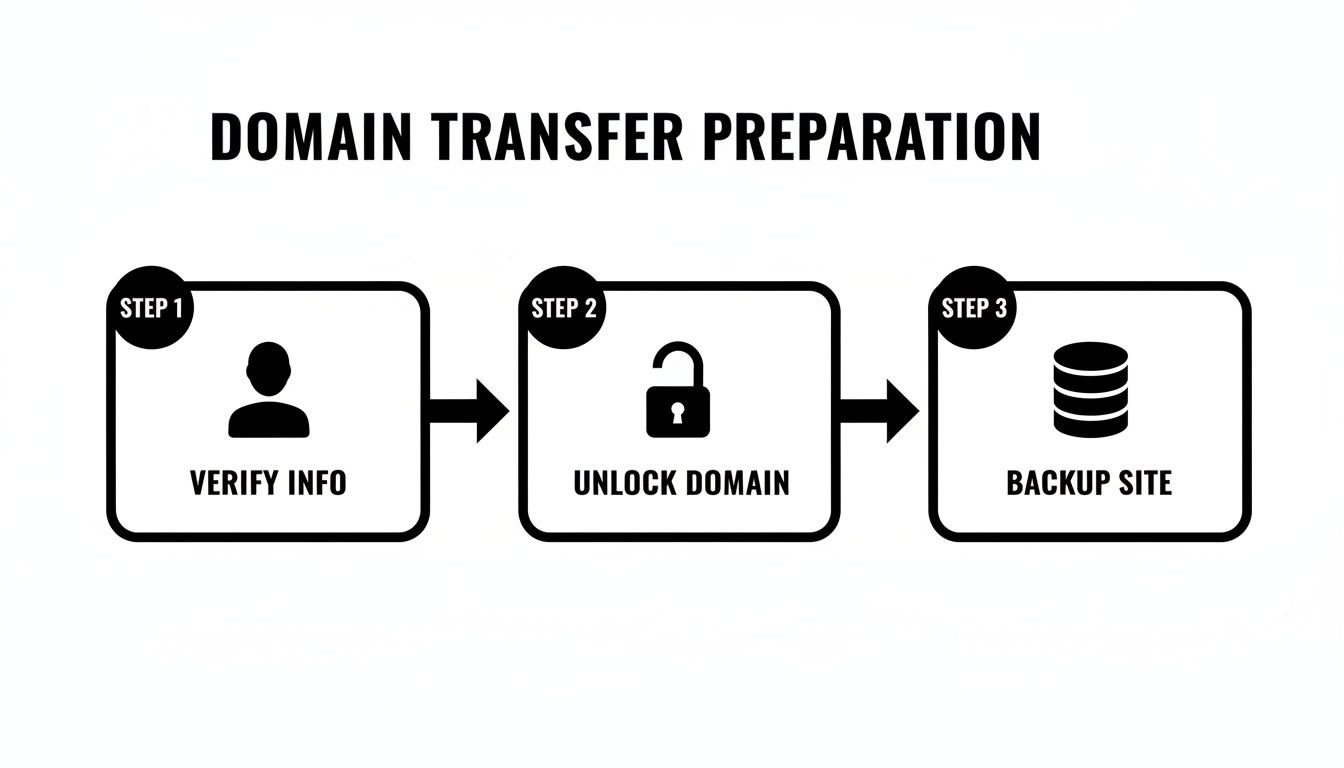
This visual just reinforces that checking your info, unlocking the domain, and backing things up are the foundations for a smooth transfer.
Unlocking Your Domain for the Move
First things first: you need to unlock your domain at your current registrar. By default, most registrars slap a transfer lock on your domain. This is a good thing! It’s a critical security feature that stops someone from trying to hijack your domain—like a digital deadbolt on your front door.
To get the transfer started, you have to remove this lock. For Sarah, this means logging into her current registrar's dashboard, finding the domain management section for , and looking for a setting that says "Domain Lock" or "Transfer Lock." Usually, it's a simple toggle switch or a button she can click to change its status from "On" to "Off."
That one click signals to the wider domain system that you, the rightful owner, are getting ready to make a change. It's a straightforward but absolutely non-negotiable step; no transfer can happen while that lock is on.
Securing Your Authorisation Code
Once the domain is unlocked, it's time to get your Authorisation Code. This is the most important piece of the puzzle. It’s basically a unique password for your domain that proves you own it and gives you permission to start the transfer.
Now, this code goes by a lot of different names, which can be super confusing. You might see it called:
Auth Code
EPP Code (which stands for Extensible Provisioning Protocol)
Transfer Key
Transfer Secret
Don't worry, they all mean the same thing. For Sarah, requesting this code is usually done in the same area of her registrar's dashboard where she unlocked the domain. She'll likely see a button or link that says "Get Auth Code" or "Request Transfer Code."
After she clicks it, the registrar will either show the code on the screen or, more commonly, send it to the administrative email address on file. This is exactly why we made such a big deal about checking your WHOIS info earlier! The code is just a string of letters, numbers, and sometimes symbols. Sarah needs to copy this code exactly as it appears, because even a tiny typo will make the transfer fail.
Key Takeaway: Your Authorisation Code is the golden ticket. Keep it safe and copy it precisely. Without it, your new registrar has no way of proving to the global domain registry that you've approved the move.
Before we move on, let's quickly break down some of the jargon you'll bump into. It can feel a bit like alphabet soup, but knowing these terms will make the process much clearer.
Key Domain Transfer Terms You Should Know
This little table is a quick reference to help you understand the essential terms you'll encounter during the domain transfer process.
Term | What It Means for You |
|---|---|
Registrar | The company you bought your domain from (e.g., GoDaddy, Namecheap). You'll have a "losing" registrar and a "gaining" registrar. |
Registrant | That's you! The legal owner of the domain name. |
WHOIS | A public database of domain ownership information. Keeping your contact details here up-to-date is crucial for a transfer. |
Domain Lock | A security setting that prevents unauthorised transfers. You must turn this off to start the process. |
Auth/EPP Code | The secret password for your domain that authorises the transfer. You get this from your current registrar. |
ICANN | The non-profit organisation that oversees the entire domain name system. They set the rules for transfers. |
Getting familiar with these terms just helps demystify the whole operation. You'll feel more confident knowing what's happening behind the scenes.
Initiating the Transfer with Your New Registrar
With your domain unlocked and that all-important Auth Code copied, you're ready for the final step. Now, you can head over to your new registrar's website—the company you want to move your domain to.
You'll start their "transfer-in" process. This usually involves searching for your domain name and choosing an option like "Transfer this domain." You'll then be asked to enter the Authorisation Code you just got. This is where Sarah pastes the unique code for .
After you've provided the code, you'll go through the checkout process. The cost usually includes a one-year extension of your domain registration, which is a nice little perk. Once you've paid, your new registrar sends a formal transfer request into the global domain system, which then pings your old registrar to let them know what's happening.
This process is generally pretty efficient, especially for small businesses looking to consolidate their online assets. To ensure a smooth transition and minimise disruption, it's always a good idea to approach a domain transfer with structured IT change management processes. You can find more detail on the end-to-end process in our complete guide on how to transfer a domain name.
From this point on, it’s mostly a waiting game, which we'll cover in the next section. You’ve done your part.
If managing these steps feels like one more thing on an already overflowing to-do list, Baslon Digital can handle the entire domain transfer for you as part of our website design services. Contact us today for a stress-free transition.
What to Expect: Timelines, Costs, and a Few Common Roadblocks
Once you've kicked off the domain transfer, two big questions immediately pop into your head: how long is this going to take, and what’s it going to cost me? Let's get you some straight answers and prepare you for a few common hiccups that can show up uninvited.
Understanding the timeline is crucial for managing your own expectations. It's not instant, but it’s not usually a painfully slow process either. The real answer depends on the type of domain you're moving.
How Long Does a Domain Transfer Really Take?
The speed of a domain transfer can vary quite a bit. If you're moving a UK-specific domain like a .co.uk or .uk, you're in luck. The process can be incredibly fast, often wrapping up within just a few hours. This is all thanks to a simple "IPS Tag" system managed by Nominet, the UK's official domain registry. Easy peasy.
However, for generic top-level domains (gTLDs) like .com or .org, you’ll need to plan for a longer wait. The standard timeline here is usually 5 to 7 days. This window gives both your old and new registrars enough time to securely process the request and get all the necessary authorisations sorted.
A few things can nudge the timeline one way or the other:
Domain Type: As we covered, domains are the sprinters, while domains are more like marathon runners.
Registrar Policies: Some registrars will automatically approve a transfer after five days. Others are a bit more helpful and let you manually approve it to speed things up.
Your Responsiveness: The clock really starts ticking once you respond to that authorisation email. The faster you act, the smoother it goes.
Here's the key takeaway: be patient. While you wait, your website and emails will carry on working just fine. The transfer itself doesn't cause downtime; that only happens if DNS settings are mismanaged after the move is complete.
Breaking Down the Costs of Transferring a Domain
Now, let's talk money. The good news is that transferring a domain is usually quite affordable. You're not going to be hit with a massive, unexpected bill. The main cost is simply the transfer fee from your new registrar.
This fee almost always includes a one-year extension of your domain registration. So, if your domain was set to expire in six months, it will be valid for 18 months after the transfer. You’re not losing any time you've already paid for; you’re just adding another year on top. You can get a better sense of what goes into these fees by understanding domain name costs for your website.
The UK domain registrar market is buzzing, largely fuelled by small and medium-sized businesses looking for better value. The market was valued at USD 35.41 million, climbed to USD 37.26 million, and is projected to hit USD 58.79 million by 2033. This competition is great for you, as it means providers often have attractive deals on the table. For example, some registrars offer incoming transfers from as little as £9.76, which includes that free registration year—a seriously cost-effective move for freelancers and small businesses. You can find more data on UK domain registrar market trends.
Common Roadblocks and How to Fix Them
Even with the best preparation, you can sometimes hit a snag. Knowing what to look out for means you can solve issues quickly before they turn into a real headache.
Here are the most common transfer problems I see:
Transfer Rejected Due to Domain Lock: This is the number one culprit. You absolutely must log in to your current registrar and switch the 'transfer lock' setting to 'Off'. The transfer simply cannot start while this security feature is on.
Incorrect Authorisation Code: That EPP code is like a password—it has to be exact. A single typo, a missed hyphen, or an extra space will cause the whole thing to fail. My advice? Always copy and paste the code directly instead of trying to type it out.
Privacy Protection is Still On: If you forget to disable WHOIS privacy, that all-important authorisation email might get sent to a generic forwarding address you can't even access. You’ll need to turn it off temporarily, then start the transfer process again.
The 60-Day Lock is Active: This is a firm rule from ICANN. If the domain was registered or transferred within the last 60 days, it’s locked. There’s no way around this one; you’ll just have to wait until the 60-day period is over.
By knowing about these potential tripwires in advance, you can keep your domain transfer on schedule and on budget, ensuring a smooth move to your new provider.
If you’d rather not deal with the timelines and potential roadblocks, our team at Baslon Digital can manage the entire transfer for you as part of our Wix website services. Get in touch with us to handle your domain transfer seamlessly.
Post-Transfer Steps to Keep Your Website Live
You’ve received that long-awaited email: your domain transfer is complete! It’s a great feeling, but before you tick this job off your list, there are a few crucial final steps. This is where you prevent the dreaded "website down" error that catches so many people out.
This last stage is all about telling the internet where your website now lives. Your domain has a new home with your new registrar, but it still needs the correct directions to find your web host. Getting this right is what guarantees a truly seamless transition for you and your customers.
Connecting Your Domain to Your Web Host
The single most important post-transfer task is updating your Domain Name System (DNS) settings—specifically, the nameservers. Think of nameservers as the internet's signposts; they point your domain name (like ) to the exact server where your website files are stored.
When you move a domain, the old registrar's nameservers often come along for the ride. You need to swap these out for the ones your web host provides. For example, if your website is built on Wix, you’ll need to log into your new registrar’s dashboard and replace the old nameserver addresses with the ones Wix gives you.
This is a non-negotiable step. If you don't update them, visitors will be sent to an old, empty location, and all they'll see is a broken website. Your web host will have a clear guide showing you exactly what their nameserver addresses are.
Don't panic if your website doesn't reappear instantly. DNS changes can take anywhere from a few minutes to 48 hours to 'propagate' across the globe as internet servers everywhere update their records.
After sorting your domain, it’s a good moment to review your website's broader infrastructure. Understanding the differences between hosting options can help when choosing the right hosting solution to keep your site performing well as your business grows.
To avoid any confusion, it’s worth clarifying the different jobs your registrar and host do. They work together, but they aren’t the same thing.
Registrar vs Web Host What's the Difference
Function | Domain Registrar (e.g., GoDaddy, Nominet) | Web Host (e.g., Wix, Squarespace) |
|---|---|---|
Primary Role | Manages the registration of your domain name. | Stores your website's files and makes them accessible online. |
Manages | Domain ownership, contact info, and nameserver settings. | Website content, performance, security, and uptime. |
Analogy | Like the land registry holding the title deeds to your address. | Like the actual house built at that address. |
Getting these roles straight in your head makes managing your online presence much simpler.
Re-Establishing Your Custom Email Accounts
Just like your website, your email needs to be pointed in the right direction. If you use a custom address like , you need to make sure your email records are correctly set up with your new registrar.
The key records here are your MX (Mail Exchange) records. These tell the internet which server is responsible for handling your emails. If you use a third-party email provider like Google Workspace or Microsoft 365, you'll need to:
Log into your new domain registrar’s control panel.
Find the DNS or zone file management area.
Add the specific MX records provided by your email host.
Forgetting this is a classic pitfall. Your website might be live, but your emails will vanish into the void. Always double-check that your MX records, along with any others like SPF or DKIM for email authentication, are correctly in place.
Final Verification and Housekeeping
With the technical work done, it's time for one last check to make sure everything is running perfectly. Don’t skip this—it’s your final quality assurance.
Check Your Website: Open your site in a few different browsers and on different devices. Ask a friend to check it too; their internet provider might have updated its DNS records faster or slower than yours.
Test Your Email: Send an email from a personal account (like your Gmail) to your custom domain address. Then, reply to it. This confirms both sending and receiving are working as they should.
Re-enable Domain Privacy: Remember turning off WHOIS privacy before the transfer? Now's the time to log back into your new registrar and switch it back on to protect your personal information.
Review Your SSL Certificate: Make sure your SSL certificate, which provides that secure HTTPS connection, is active and correctly configured. To learn more, check out our articles on SSL certificates for your website's security.
By working through these final steps, you can ensure your domain transfer results in zero downtime and no disruption to your business.
If you need a trusted partner to handle everything from website design to domain management, Baslon Digital is here to help. Contact us today for a consultation on creating a powerful Wix website for your business.
Common Questions About Domain Transfers
Even with the best-laid plans, a few questions always seem to pop up during a domain transfer. It’s a process full of jargon and specific rules, so having a couple of uncertainties is completely normal. Here are some quick, straight-to-the-point answers to the questions we hear most often.
Think of this as your go-to guide for clearing up any last-minute doubts before you hit that "transfer" button.
Will My Website Go Down When I Transfer My Domain?
This is the big one, and I get it. The short answer is no, your website should not go down. When done correctly, transferring a domain name doesn't touch your website files or hosting at all. It's purely an administrative change, like updating the registration details on your car.
Your website and email stay online because your DNS settings—the instructions that point your domain to your web host—are carried over. Downtime almost always comes from mismanaging those DNS settings after the transfer is complete, not from the transfer itself. The secret is to double-check your nameservers are correct before you start and right after you finish.
How Long Does a Domain Transfer Actually Take?
For most common domain types like or , you can expect the transfer to take between five and seven days. It’s not instant. This window gives both your old and new registrar time to securely process and authorise the move.
Some registrars do offer a faster route if you can manually approve the transfer emails on both ends, which can sometimes cut the time down to a day or two. But honestly, it's safest to just plan for the standard 5-7 day timeline. Whatever you do, don't start a transfer the day before a huge product launch.
Expert Tip: Don't leave it to the last minute. The sweet spot for starting a domain transfer is at least two weeks before it's due to expire. This gives you a nice, comfortable buffer to handle any unexpected hiccups without the stress of a looming deadline.
Can I Transfer a Domain That Has Already Expired?
Generally, no. Once a domain expires, most registrars lock it down to prevent unauthorised transfers and give the original owner a chance to get it back. You'll almost certainly need to renew the domain with your current registrar first.
After you've renewed, you might still have to wait out a 'renewal grace period' or another registrar-imposed lock before you can get the auth code and start the transfer. It’s a messy, stressful situation that's much easier to just avoid by acting a few weeks early.
What Is the 60-Day Domain Transfer Lock?
The 60-day transfer lock is a non-negotiable security rule from ICANN, the organisation that oversees all domain names globally. It's there to stop domain hijacking by preventing a domain from being transferred for 60 days after two specific events:
A brand new registration
A previous transfer
So, if your domain is new or you just moved it to your current provider, you're stuck there for two months. It's a hard and fast rule with no way around it, so it's crucial to check your domain's registration date before you make any plans to move it.
If you're ready to make the switch but would rather have an expert handle all the technical bits, Baslon Digital can manage your domain transfer as part of our professional Wix website services. Contact us today to ensure a smooth, stress-free transition for your business.
Ready to Make Your Move?
Let’s be honest, transferring a domain name can sound a bit intimidating. But as we've walked through, it’s really just a series of straightforward steps that puts you firmly back in the driver's seat. It's totally manageable.
Think of it this way: you’re taking control of one of your most important digital assets. By doing your homework and following the checklist, you can switch to a better provider, beef up your security, or just get everything tidied up under one roof. This guide has given you the playbook, from the pre-flight checks to sticking the landing with your DNS updates.
Follow the process, take your time, and you’ll pull off a smooth transition without giving your customers or your business a moment of downtime. You've got this. Go make the change that’ll set your brand up for success.
If you’d rather have an expert handle the technical bits—from a full-on website redesign on Wix to mapping out a bigger digital strategy—our team at Baslon Digital is here to help. Give us a shout today to see how we can make your business shine online.
Comments