WordPress vs Wix A UK Small Business Guide

Let's get straight to the point: the fundamental difference between WordPress and Wix is a bit like choosing between a professional chef's kitchen and a top-of-the-line meal kit service. WordPress gives you every tool and raw ingredient imaginable for limitless creation, while Wix delivers a curated, all-in-one package designed for speed and simplicity.
For most UK business owners I talk to, Wix offers a faster, more secure, and less technical route to a professional website. It’s the perfect fit if you value predictable costs and want to avoid getting bogged down in the technical weeds.
The Critical Choice For Your UK Business
Picking between WordPress and Wix isn't just a technical choice; it's a strategic business decision that will shape your entire online presence. This is especially true for UK small businesses, freelancers, and e-commerce start-ups, where every penny and every hour counts.
WordPress is the powerful, open-source beast known for its endless flexibility. Think of it as being handed a professional toolkit—you can build literally anything you can imagine, but you need to know how to use the tools or be prepared to learn. It’s brilliant, but it’s a commitment.
Wix, on the other hand, is the all-inclusive holiday package. It bundles everything—hosting, security, design, support—into one neat monthly fee. This lets you focus on running your business, not wrestling with a server backend at 2 AM.
But before you commit to either platform, a crucial first step for any UK business is making sure you've got a solid market. I always recommend nailing this down first. You can learn more about finding a profitable niche.
WordPress vs Wix At A Glance For UK Businesses
To kick things off, this table gives you a quick, no-fluff snapshot of what you're getting into with each platform. It’s a handy reference as we dive deeper.
Feature | Wix | WordPress |
|---|---|---|
Ease of Use | Excellent. Genuinely intuitive drag-and-drop editor. | Moderate. Steeper learning curve; requires setup and know-how. |
Customisation | High. Very flexible templates and powerful design tools. | Unlimited. Total control with themes, plugins, and custom code. |
Maintenance | None. Fully managed and updated by Wix. You do nothing. | User's Responsibility. You have to handle all plugin and security updates. |
All-in-One | Yes. Hosting, security, and customer support are included. | No. Requires separate hosting, security plugins, and self-support. |
These differences really matter in the competitive UK market. It's telling that Wix holds a dominant 49% market share here, just nudging ahead of WordPress at 47.14%. This isn't a fluke; it shows how much small businesses value speed and simplicity.
Performance-wise, Wix's platform achieves a solid 61.82% good Core Web Vitals (CWV) score. In plain English, that gives it a performance edge right out of the box, which can translate to better rankings on Google, especially for your UK mobile customers.
Ready to build a professional website without the technical headaches and endless updates? At Baslon Digital, we specialise in creating stunning, high-performing Wix websites specifically for UK businesses like yours.
Get Your Free Wix Website Proposal Today
Comparing Your Time To Launch A Professional Site
For any UK small business owner, time is a currency you can't get back. When you're weighing up WordPress vs Wix, the conversation usually drifts towards features. But let's be honest, the real-world time it takes to get from a blank screen to a live, professional website is a much better measure of what's right for you.
Wix is built for speed. The whole experience is designed to get you online in hours, not weeks, by cutting out the technical faff. Its sign-up process is slick and gets you into the good stuff—designing—almost immediately.
The biggest time-saver with Wix? It’s an all-in-one package. Hosting, security, and tech support are all handled for you. This single feature saves you from sinking hours into research, setup, and troubleshooting that would otherwise land squarely on your shoulders.
This integrated setup means you can pour all your energy into the creative side of things—the design and the content—instead of wrestling with server configurations or security patches.
The Wix Launch Timeline: A Weekend Project
Seriously. A freelancer needing a portfolio or a local business wanting a simple service site can realistically go from zero to live in a single weekend with Wix. The process is that straightforward.
Sign Up & Onboard: Takes a few minutes, tops.
Choose a Template: You get access to hundreds of professional, industry-specific templates right away.
Customise: The drag-and-drop editor is where the magic happens. You can change colours, fonts, images, and the layout without touching a single line of code.
Here's a peek at the Wix editor. It’s a visual playground where you can directly click, drag, and drop elements on the page for ridiculously fast customisation.This hands-on, visual interface is precisely why building a site on Wix is so much faster for anyone who isn't a developer.
The WordPress Setup: A Multi-Step Marathon
In stark contrast, launching a site with WordPress is more of a marathon than a sprint. It’s a fragmented process where each step is its own little project, demanding time for research and setup. It all adds up.
A more realistic breakdown looks something like this:
Sourcing Reliable UK Hosting: Just researching and picking a hosting provider can easily eat up a few hours.
Installing WordPress: Even with "one-click" installs from hosts, it's still another box to tick.
Finding and Installing a Theme: You'll need to sift through thousands of themes, pick one, and get it installed.
Researching and Configuring Plugins: This is the real time-sink. You have to find, install, and set up individual plugins for essentials like SEO, security, contact forms, caching, and backups.
Each of these stages introduces complexity and another chance for things to go wrong, quickly turning what you thought was a weekend job into a multi-week saga. For a deeper look at what this whole process really involves, check out our guide on how long it typically takes to build a website in the UK.
While WordPress offers almost limitless power, it comes at the cost of your time—a significant upfront and ongoing investment that most business owners just don't have. For getting a professional, secure website live quickly, Wix has a clear and massive advantage.
Ready to launch a stunning website without the technical headaches? Baslon Digital specialises in creating custom Wix sites that get your business online faster.
Balancing Creative Freedom With Design Practicality
Your website’s design is your digital storefront. It’s the first impression, the handshake, and a direct reflection of your brand’s quality. When it comes to WordPress vs Wix, the design debate often boils down to a classic trade-off: do you want the keys to the entire kingdom, or do you want a beautiful, foolproof castle you can move into today?
Wix operates on a principle of ‘structured freedom’. Think of it as a high-end architectural kit. It gives you an incredibly flexible, visual drag-and-drop editor that lets you build a custom-looking site without touching a single line of code. This framework is smart; it’s designed to stop you from making common design mistakes, ensuring your site stays functional and professional-looking.
WordPress, on the other hand, offers near-limitless design potential. With thousands of themes, powerful page builders like Elementor, and direct access to the code (CSS, HTML, PHP), if you can dream it, you can build it. But—and it's a big but—this absolute control comes with a serious catch.
The Wix Approach: Structured Visual Design
Wix’s killer feature is its massive library of over 900 professionally designed templates. These aren’t just bland layouts; they’re complete, industry-specific starting points that look polished right out of the box.
The drag-and-drop editor is where Wix really clicks for business owners. You can nudge elements around, resize images, and switch up colour schemes with pixel-perfect precision, all while seeing your changes happen in real-time. This visual-first approach completely demolishes the technical barrier to great design.
For a business owner without a design degree, Wix's editor is a godsend. It gives you the creative tools to look unique, while its built-in structure ensures the final site is mobile-friendly and easy to use. It prevents the accidental chaos that a poorly managed WordPress site can quickly descend into.
One crucial thing to remember: once you pick a Wix template and hit publish, you're committed. You can't just swap to a new one later. This encourages you to choose wisely and customise deeply from the get-go, rather than hopping between different foundational structures.
The WordPress Path: Limitless But Seriously Complex
WordPress is a blank canvas. Your design journey usually starts by picking a theme, which can be anything from a free, basic template to a sophisticated premium one costing £50-£200 or more. While thousands are available, the quality can be all over the place.
To get a true drag-and-drop experience like Wix, you’ll have to install a page builder plugin. The most popular choices are:
Elementor: A visual editor with a huge ecosystem of add-ons for pretty much any feature you can think of.
Divi Builder: Another powerful visual builder that completely takes over the standard WordPress editor.
These tools are incredibly capable, but they add another layer of complexity—and potential cost—to your project. The real power of WordPress only shines when you need to go beyond what a theme or plugin can do. With full code access, a skilled developer can tweak every single pixel of the site.
This complete control is a classic double-edged sword. Without an expert eye, it's dangerously easy to make mistakes that break your site's layout, torpedo its performance, or open up security holes.
The bottom line is clear: Wix gets you a polished, professional website quickly and safely. WordPress offers absolute control, but at the cost of a much steeper learning curve and a higher risk of technical headaches.
If you’re looking for a professionally designed website that captures your brand perfectly without the technical risks of WordPress, our team at Baslon Digital can help. We specialise in creating stunning, high-performing Wix websites.
Achieving Real-World SEO Results
Showing up on Google is essential for any business, but the whole WordPress vs Wix for SEO debate is full of old, tired myths. Let’s get one thing straight: the idea that Wix is rubbish for SEO is completely out of date. Modern Wix is a seriously capable platform built for business owners who need to be found online without needing a degree in computer science.
Wix’s real power is how it brings everything together in one place. It makes search engine optimisation accessible by building the essential tools right into the dashboard, so anyone can use them. No more hunting for third-party plugins just to handle the basics.
For a business owner who isn’t a tech whizz, Wix’s built-in SEO toolkit is a massive advantage. You get all the crucial features—like editing meta tags and adding structured data—in one secure environment. It takes the guesswork and technical headaches out of juggling a dozen different WordPress plugins.
This all-in-one approach means you spend less time wrestling with technical settings and more time creating the great content that actually brings in customers.
The Wix SEO Advantage: Control Without the Complexity
Wix gives you a full suite of SEO features from the get-go, with its handy Wix SEO Wiz to guide you. The tool creates a personalised checklist that walks you through the basics of optimising your site, from picking keywords to getting connected with Google Search Console.
But it’s not just for beginners. Wix gives you direct control over the important stuff:
Meta Tags: You can easily edit your meta titles and descriptions for every single page. This is how you control what people see when you show up in search results.
Structured Data Markup: Add schema markup for your products, articles, or local business details without touching a line of code. This helps Google really understand what your content is about.
Automated Sitemaps: Wix automatically creates and updates your XML sitemap, so search engines can always find and crawl your pages efficiently.
URL Customisation: You get full control over your page URLs, letting you create clean, keyword-friendly web addresses.
Because it's all integrated, the core technical SEO is pretty much handled for you. If you want to dive deeper, our guide on whether Wix is good for SEO provides an honest review of what it can really do today.
WordPress SEO: All the Power, All the Responsibility
WordPress has a legendary reputation for SEO, and it’s well-deserved. With plugins like Yoast SEO or Rank Math, you can dig into an incredibly deep level of on-page and technical optimisation. These tools offer fine-grained control over almost every SEO factor imaginable.
However, that immense power comes with a huge catch: it's all on you. Unlike Wix, where security and performance are managed for you, a WordPress site’s SEO health is a direct result of the choices you make.
You’re responsible for:
Plugin Configuration: You have to correctly install, set up, and maintain your SEO plugin. One wrong setting can tank your rankings.
Performance Optimisation: Site speed is a massive ranking factor, and it depends entirely on your hosting, theme, and the caching plugins you choose.
Ongoing Security: It’s up to you to keep every plugin and the WordPress core software updated. A security hole can get your site penalised or even de-indexed.
WordPress definitely has a higher ceiling for SEO potential, but reaching it demands constant technical effort. Wix, on the other hand, gives you a solid SEO foundation that’s much harder for a non-expert to mess up, delivering more reliable results right out of the box for the average business owner.
Ready to build a website with powerful, built-in SEO features that you can actually manage? Our team at Baslon Digital creates high-performing Wix sites designed to get you noticed on Google.
Start Your Wix SEO Journey With Us
Evaluating E-Commerce For UK Sellers

Choosing the right e-commerce platform is one of the most critical decisions you'll make for your UK business. This isn't just about listing products; it's the very engine of your online shop, handling everything from first impressions to the final click of the "buy" button. This is where the Wix vs. WordPress debate gets really interesting, as they represent two completely different philosophies for selling online.
Think of Wix eCommerce as leasing a fully serviced, high-security retail space in a bustling shopping centre. Everything you need—from the shop fittings to the payment terminals and security guards (PCI compliance)—is included and managed for you. It’s built for speed and simplicity, letting you focus on your products, not the plumbing.
On the other hand, WordPress with the powerhouse WooCommerce plugin is like buying a plot of land and building your dream shop from scratch. You have ultimate freedom over the design, layout, and functionality, but you’re also the one responsible for sorting out the wiring, security systems, and ongoing maintenance.
Core E-Commerce Features: A Quick Look
For any UK seller, certain features are simply non-negotiable. Both platforms will get you selling, but the journey to your first sale—and the effort required to keep things running—couldn't be more different.
Wix has e-commerce baked right into its DNA. Adding a shop to your site is a simple, guided process that instantly gives you tools for managing products, tracking stock, and taking secure payments. It’s designed for entrepreneurs who want to get online and start selling yesterday, without having to become a part-time developer.
WooCommerce, in contrast, is an add-on that transforms a standard WordPress site into an incredibly powerful online store. Its main selling point is its almost ridiculous level of flexibility. With a colossal library of extensions, you can add just about any feature you can dream up, from complex Royal Mail shipping calculators to highly specific product customisation tools.
For a UK startup selling a curated range of goods, Wix offers a much faster and more secure path to market. The all-in-one system minimises technical headaches and lets you focus on what really matters: selling. But for businesses with unique operational needs or grand ambitions for custom features, WordPress and WooCommerce are the clear winners.
Wix eCommerce vs WooCommerce: A UK Feature Breakdown
To make things clearer, let's break down how these two platforms stack up on the key aspects that matter most to UK sellers. This table should help you see, at a glance, where the biggest differences lie.
E-Commerce Aspect | Wix eCommerce | WordPress with WooCommerce |
|---|---|---|
Setup Speed | Very Fast. Can be selling within hours. | Slower. Requires plugin installation, setup, and theme integration. |
Ease of Use | Extremely easy. All-in-one dashboard. | Steeper learning curve. Multiple dashboards and settings. |
Initial Cost | £17 - £27+ per month (Business plans). | Plugin is free, but hosting, themes, and extensions add up. |
Security (PCI) | Handled for you. Fully managed and compliant out of the box. | Your responsibility. Requires SSL, security plugins, and secure hosting. |
Maintenance | None. All updates are managed by Wix. | Ongoing. You must manage plugin, theme, and WordPress updates. |
UK Payment Gateways | Good selection (Stripe, PayPal, Wix Payments). | Huge selection. Almost any UK gateway has a WooCommerce plugin. |
Customisation | Good. Customisable templates and product pages. | Limitless. Total control over every aspect of the store's design. |
Best For | Startups, small businesses, and sellers prioritising ease of use. | Businesses with custom needs, large inventories, and tech resources. |
As you can see, the choice isn't about which is "better," but which is a better fit for your specific business model, technical comfort level, and long-term goals.
UK Payment Gateways and Security
Getting paid smoothly and safely is, of course, the whole point. While both platforms integrate with popular UK payment gateways like Stripe and PayPal, the way they handle security is a major differentiator.
Wix eCommerce: Takes care of all payment integrations and security compliance for you. This built-in protection is a massive weight off your shoulders—no need to worry about managing SSL certificates or ensuring you're PCI compliant.
WooCommerce: Offers a far wider range of payment gateways through extensions. However, the buck stops with you when it comes to security. This means you're responsible for setting up and maintaining security plugins, keeping everything updated, and choosing a secure hosting provider.
No matter which platform you choose, following the 10 best practices for ecommerce checkout can make a huge difference in converting visitors into loyal customers.
Ultimately, your decision comes down to your business needs. If you need a reliable, secure, and hassle-free online shop for physical or digital products, Wix is a fantastic, streamlined solution. If your business has complex requirements and you've got the technical confidence (or budget) to manage it, the endless customisation of WooCommerce is tough to beat.
Understanding The True Cost Of Ownership
A website's price tag can be deceptive. What looks simple upfront often hides a tangled web of ongoing costs. When you're weighing up WordPress vs Wix, the real question isn't about the initial setup fee—it's about what you'll actually pay over a year, in both hard cash and precious time.
Let's cut through the marketing fluff. Wix runs on a straightforward subscription model. You pick a premium plan, and everything you need—hosting, security, the lot—is bundled into one predictable payment. Think of it as a fixed-price contract for your website. No nasty surprises.
WordPress, on the other hand, lures you in with the magic word: "free." The core software doesn't cost a penny, which is fantastic. But that's where the spending starts, not where it ends. To build a proper, professional business website, you have to buy all the essential parts separately, turning your budget into a guessing game.
Deconstructing The WordPress Price Tag
So, what does a "free" WordPress site really cost? For a secure, functional UK business website, several costs are non-negotiable. These aren't fancy extras; they're the bare minimum.
Quality UK Hosting: You can't skimp on this. For reliable hosting that's fast and secure, expect to pay anywhere from £10 to £30+ per month.
Domain Name: Your website's address. This will typically run you about £10-£15 per year.
Premium Theme: Sure, free themes exist, but a professional design with proper support and updates will set you back £40-£80 as a one-off payment.
Essential Plugins: To cover security, backups, and decent SEO, you'll need premium plugins. Budget for another £100-£200 per year, easily.
The real kicker with WordPress is often the unplanned developer fees. When a plugin update breaks your site or a security flaw pops up, you’re on your own. You'll likely need to hire an expert, with rates starting from £50 an hour, just to get your site back online.
Calculating The Hidden Cost of Time
The most overlooked expense for any business owner is time. And this is where the difference between Wix and WordPress becomes crystal clear.
With Wix, their team handles all the technical grunt work. Platform updates, security patches, bug fixes—it all happens automatically in the background. Your time investment in technical upkeep? Pretty much zero. You can just focus on your business.
WordPress puts the entire maintenance burden squarely on your shoulders. You're responsible for updating the core software, your theme, and every single plugin. If you ignore these updates, you're leaving the door wide open for hackers, making it a time-sucking but absolutely critical weekly chore. To get a better idea of what this really entails, check out our guide on UK website maintenance costs and tasks.
For most small business owners, Wix's predictable, all-in-one cost brings peace of mind. WordPress offers endless flexibility, but you have to be honest with yourself about the true cost—both in money and the significant time you'll spend managing it all.
Ready to invest in a professional website with clear, predictable costs and zero maintenance headaches? Baslon Digital creates stunning Wix websites that let you focus on your business, not on technical upkeep.
Get Your Free Wix Website Quote Today
The Final Verdict: Which Platform Is Right For You?
So, after all that, how do you actually choose between WordPress and Wix? It really comes down to one simple question: what’s your most valuable asset?
If your answer is time, then Wix is almost certainly your platform. It offers a streamlined, secure, and professional path to getting online quickly. For the vast majority of UK small businesses, freelancers, and entrepreneurs who just need to get on with running their business, this efficiency is a game-changer.
On the other hand, if your most valuable asset is absolute control, WordPress is the clear winner. It's built for those with very specific functional requirements, a vision that can't be compromised, and the technical know-how (or the budget to hire it) to manage its complexity.
For pretty much everyone else, the time saved on security updates, backups, and general maintenance with Wix is a massive competitive advantage.
This decision tree breaks down the cost side of things, which is often a major factor.
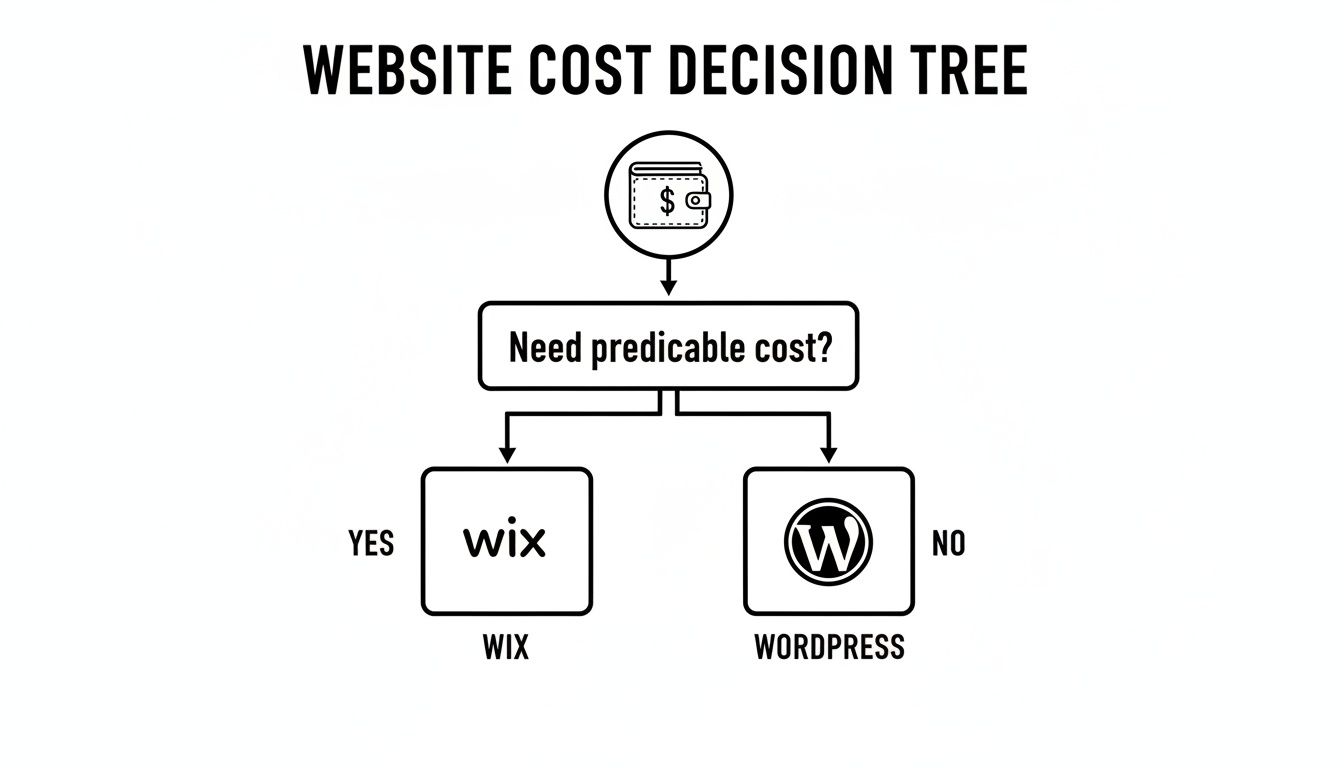
As the guide shows, if you need financial predictability, Wix is the safer bet. WordPress costs can creep up with hosting renewals, premium plugins, and unexpected developer fees. Ultimately, the best platform is the one that fits your goals, budget, and how comfortable you are with the tech side of things.
Ready to build a stunning, high-performing website without the technical headaches? At Baslon Digital, we specialise in creating custom Wix websites that drive real results for UK businesses.


Comments