Wix vs WordPress A Definitive Comparison for UK Businesses

Updated: Dec 9, 2025
At its core, the Wix vs WordPress debate boils down to a simple trade-off: ease of use versus ultimate control. Wix gives you a streamlined, all-in-one package that's brilliant for beginners, while WordPress offers limitless customisation for anyone who wants total ownership over their digital turf.
Your Quick Guide to Wix vs WordPress
Picking the right platform is one of the biggest decisions you'll make for your business. It shapes how easily you can get online, how much you can grow, and what it all really costs you over time. This guide is for the UK small business owners, freelancers, and entrepreneurs who need a clear, no-nonsense comparison to get it right from day one. Before we get into the nitty-gritty of Wix versus WordPress, it’s worth taking a moment to explore other top e-commerce platforms for small businesses just to be sure you've covered all your bases.
The UK market is pretty evenly split on this. Wix currently leads the UK website builder market, holding about 49% of the share. WordPress isn't far behind, capturing roughly 47.14%. This tells us that Wix's simple drag-and-drop approach really clicks with UK users who just want to get things done without a fuss.
To help you see the core differences right away, here’s a quick summary table.
Wix vs WordPress At a Glance
For those who just want the highlights, this table breaks down the fundamental differences between the two platforms.
Feature | Wix | WordPress |
|---|---|---|
Best For | Beginners, small businesses, and anyone needing a fast launch. | Growth-focused sites and those who want full customisation. |
Ease of Use | Super intuitive drag-and-drop editor. You'll feel at home fast. | A bit of a learning curve, but incredibly flexible once you get it. |
Control & Ownership | Hosted on Wix's platform (it's a closed system). | Self-hosted, giving you 100% ownership and control. |
Customisation | You're limited to Wix templates and the apps in their market. | Nearly infinite possibilities with thousands of themes and plugins. |
Ongoing Costs | Predictable monthly or annual subscription fees. | Costs are variable (hosting, domain, premium plugins add up). |
This table gives you the 30,000-foot view, but the best choice for you really depends on your specific goals, how comfortable you are with tech, and where you see your business in a few years.
Ready to find the perfect fit? Let's dive deeper. And if you just need a professional site launched quickly without the headache, our team at Baslon Digital is here to help. Get in touch today for a free, friendly chat.
User Experience: A Tale of Two Builders
When you first sit down to build a website, the vibe you get from the platform is a huge deal. It’s what decides whether you’ll feel totally confident or want to throw your laptop out the window. This is where Wix and WordPress couldn’t be more different. Think of it as the classic clash: instant results versus long-term power.
Wix is all about speed and simplicity. Its secret sauce is a super visual, drag-and-drop editor. Seriously, if you can click and drag a mouse, you can build a Wix site. You can grab text boxes, images, or buttons and just plonk them anywhere on the page. It’s a true "what you see is what you get" (WYSIWYG) setup, which feels incredibly natural.
Want to get online even faster? Wix has this clever tool called Artificial Design Intelligence (ADI). You just answer a few questions about your business, and poof—it spits out a fully functional website in minutes. It's a lifesaver for a small business that needed a professional-looking site, like, yesterday.
The Wix Onboarding Vibe
The Wix dashboard just makes sense. It’s designed to feel familiar and take the technical fear factor down a few notches. Everything you need is clearly labelled and easy to find, from adding a new page to hooking up your domain.
This is a screenshot from the Wix homepage, and it immediately tells you what they're all about: beautiful, template-driven sites without the headache.The whole design screams, "let's get you a gorgeous, working website with zero fuss." It's perfect for beginners who just want to get the job done.
The WordPress Learning Curve
WordPress, on the other hand, asks for a bit more commitment upfront. The first time you log in, you’re met with the WordPress dashboard. It's powerful, for sure, but it’s also a lot more structured. Instead of a blank canvas to paint on, you’re working with themes, plugins, and a block editor.
This system is unbelievably flexible, but you need to get your head around the concepts first. You have to learn the difference between a "post" and a "page," figure out how plugins bolt on new features, and understand how your theme dictates the site's overall look and feel.
Here's the real trade-off: Wix gives you simplicity that can eventually feel limiting. WordPress's initial learning curve is the price of admission for total creative control. You’re trading speed for sovereignty.
Let’s Get Practical: Wix vs WordPress Scenarios
To make this less abstract, let’s imagine two businesses here in the UK.
Scenario 1: The Local Café. A new coffee shop in Manchester needs a website—fast. They need their menu, opening times, and a map online by Friday. For them, Wix is a no-brainer. They can use the ADI or a slick template to have a stunning, mobile-friendly site live in a couple of hours, without a single moment of tech-induced panic.
Scenario 2: The Content Creator. A freelance writer wants to build a proper content hub with a unique brand, a members-only section, and custom portfolio layouts. In this case, WordPress is the clear winner. The time they invest in learning the ropes will pay off massively, giving them a completely bespoke digital asset that can grow with their career.
Ultimately, picking between Wix and WordPress on user experience boils down to one question: do you need a great website right now, or are you building a digital foundation that needs to last for years to come?
If the speed and ease of Wix sounds like your cup of tea but you want a professional finish without the learning curve, our team at Baslon Digital lives and breathes Wix. Get in touch for a free chat, and let’s get your business online.
Design Flexibility and Customisation Potential
Your website's look and feel is your digital handshake, the very first impression you make. And this is precisely where the core philosophies of Wix and WordPress really show their different colours, offering two completely separate paths to getting a professional site online.
Wix basically champions a model of guided creativity. It hands you over 900 professionally designed, slick templates that look great on mobile straight out of the box. They’re all neatly organised by industry, so finding a starting point that fits your business—whether you're a consultant in London or an artist in Brighton—is ridiculously easy.
Once you’ve picked one, you’re dropped into an intuitive drag-and-drop editor. You can shunt elements around, tweak colours, and add new bits and pieces with total visual freedom... within that template's structure. But here lies Wix's biggest catch: once you commit to a template, you're locked in. Decided you hate it a year later? A full redesign means starting over from scratch. Ouch.
The WordPress Design Ecosystem
WordPress plays a completely different game. Think of it as a blank canvas with almost scary potential. Instead of a curated gallery of templates, you get access to thousands of "themes" from the official library, plus countless more from third-party developers. A theme is the foundational style and structure of your site.
The sheer volume of choice is one thing, but the real magic happens when you pair a theme with a page builder plugin like Elementor or Divi.
These tools effectively bolt a visual, drag-and-drop experience onto the standard WordPress editor, one that often outmuscles what Wix can do. Suddenly, you're building completely custom headers, footers, and page layouts without ever having to peek at a line of code. If you're curious how these tools stack up, it's worth exploring a guide on the best website design software options available.
You can really boil it down to this: Wix helps you design a beautiful website; WordPress empowers you to build a unique digital experience.
Unlocking True Customisation with Code
For any business needing something truly bespoke—a specific function or a design that’s 100% on-brand—access to the code is a deal-breaker. And this is another area where Wix vs WordPress reveals a massive difference in thinking.
Wix lets you inject some custom code using its Velo platform. It’s clever, allowing you to add custom features and talk to third-party APIs, but you're still playing in Wix's sandpit. You can't touch the underlying source code of your site or its template. The walls are still there.
WordPress, on the other hand, is open-source. This means you get complete and unrestricted access to every single file. A decent developer can dive in and change anything, from a theme’s core structure to how a plugin behaves, creating something genuinely one-of-a-kind. This level of control is non-negotiable for businesses with complex technical needs or big growth plans that demand an adaptable foundation.
This difference is critical for your long-term plan. If you can see a future where you'll need custom integrations, unique user features, or a design that smashes the mould, WordPress offers the freedom and power to get it done. Wix gives you a beautiful, secure, but ultimately walled garden to create in.
Evaluating SEO and Performance Capabilities
When it comes to the Wix vs WordPress showdown, SEO is where the old myths really start to fly. For years, the story was simple: if you wanted to rank on Google, you had to use WordPress. Full stop.
That’s just not true anymore. But the way each platform gets your site noticed is still fundamentally different.
Wix now comes with a surprisingly solid set of built-in SEO tools. Straight out of the box, you get a personalised SEO checklist, instant Google indexing, and easy access to edit your meta titles and descriptions. It even handles the basics of structured data markup for you.
This all-in-one approach is a massive win for simplicity. You can manage your core on-page SEO without ever touching a third-party app. If you’re a florist in Bristol or a café in Edinburgh, focusing on local search, Wix gives you everything you need to get in the game. You can dig deeper into its capabilities in our complete guide on whether Wix is good for SEO.
Advanced SEO Control with WordPress Plugins
While Wix has the essentials covered, WordPress hands you the keys to the entire SEO kingdom. Because it's open-source, you can plug in powerhouse tools like Yoast SEO or Rank Math that turn your website into a finely-tuned optimisation machine.
These plugins go miles beyond what Wix offers natively. They give you granular control over every tiny detail, including:
Advanced Schema Markup: Add super-detailed structured data for things like recipes, products, or local business hours to help you win those eye-catching rich snippets in search results.
Content Analysis: Get live feedback on your keyword usage, sentence length, and overall readability as you type, helping you craft perfectly optimised posts.
Internal Linking Suggestions: Find opportunities to link between your own pages automatically, which is a huge help for site structure and SEO authority.
Technical SEO Management: Need to tweak your file, edit , or manage complex redirect chains? You can do it all right from your WordPress dashboard.
The real difference is scope. Wix gives you a solid, pre-built SEO toolkit designed for 90% of users. WordPress gives you an empty toolbox and lets you fill it with the best professional-grade tools on the planet.
Performance and Core Web Vitals
Website speed is a massive ranking factor, and both platforms can be incredibly fast. The key difference is who’s responsible for making that happen.
With Wix, performance is pretty much handled for you. It's a closed system, so Wix manages the servers, optimises the content delivery networks (CDNs), and even squashes your images down to size automatically. This means you get a consistently good, reliable level of performance with zero technical effort.
WordPress performance, on the other hand, is entirely in your hands. How fast your site loads depends completely on your choice of hosting, your theme, the plugins you install, and how well you optimise everything. A well-built WordPress site on great hosting can be lightning-fast. A bloated one on a cheap server will crawl. It’s a high-risk, high-reward game.
You can see this play out at the top end of the web. WordPress has a commanding CMS market share of over 60% and powers 47.5% of the world's top 1,000 websites. In that same high-traffic group, Wix powers just 0.3%. It’s a clear sign that when it comes to complex, content-heavy sites that need raw power, WordPress is the go-to.
Ultimately, your choice depends on your ambition. For rock-solid foundational SEO and reliable, hands-off performance, Wix is an excellent pick. But for businesses planning a serious, content-driven SEO strategy that demands absolute control, WordPress is still the undisputed champion.
If you're leaning towards Wix's simplicity but want to make sure your site is perfectly optimised from day one, we can help. Schedule a free consultation with our Wix experts today and let's get your business ranking.
6. Comparing E-commerce and Business Functionality
Right, so you’re ready to start selling. This is the moment your website has to level up from a digital brochure into a proper business engine. And honestly, this is a make-or-break point in the Wix vs WordPress debate, because your choice here directly shapes how you’ll handle sales, bookings, and customers.
Wix eCommerce is built for one thing: getting you up and running, fast. It's a clean, all-in-one system where you can add a shop, track your stock, and take payments straight from your Wix dashboard. No messing about.
This approach is brilliant for businesses with a clear, simple product range. If you’re a UK artist selling a curated collection of prints, a local boutique with a handful of items, or a consultant selling digital courses, Wix delivers a polished, frustration-free experience from day one.
WooCommerce: The Scalable E-commerce Engine
WordPress gets its selling superpower from a free plugin called WooCommerce. The moment you install it, your humble WordPress site transforms into a beast of an online store — the same platform that powers millions of shops all over the world.
WooCommerce is designed for growth and complexity. It’s the go-to for businesses with massive product catalogues, tricky shipping rules, or those needing to connect with obscure payment gateways. Because it's open-source, you can tinker with pretty much anything.
For instance, businesses dealing with specific regulations can easily find and install some of the best shipping restriction plugins for WooCommerce to get granular control. That level of customisation just isn't on the table with Wix's closed, all-in-one system.
Wix gives you a streamlined e-commerce tool that gets you selling quickly with zero fuss. WooCommerce hands you an industrial-strength framework that can be moulded to fit any business model you can dream up, no matter how complex.
Let's break down what that really means for an entrepreneur.
E-commerce Feature Comparison
Here’s a side-by-side look at how the e-commerce capabilities of Wix and WooCommerce stack up in the real world.
E-commerce Feature | Wix eCommerce | WordPress + WooCommerce |
|---|---|---|
Setup & Management | Extremely user-friendly; fully integrated into the Wix dashboard. | Requires installing the WooCommerce plugin; offers a more detailed but powerful control panel. |
Payment Gateways | Supports major providers like Stripe and PayPal, plus Wix Payments. | Supports virtually every payment gateway imaginable through dedicated extensions. |
Product Variations | Good for basic options like size and colour, but can be limiting for complex products. | Offers unlimited and highly customisable product variations for intricate catalogues. |
Shipping & Fulfilment | Provides solid, built-in shipping options suitable for most small businesses. | Infinitely extendable with plugins for international shipping, multi-carrier support, and custom rules. |
Third-Party Integrations | Limited to the apps available in the Wix App Market. | Huge ecosystem of thousands of extensions for inventory, marketing, and accounting integrations. |
As you can see, the theme continues: Wix offers polished simplicity, while WooCommerce provides boundless, but more hands-on, flexibility.
Business Tools Beyond the Storefront
Let's be real, your business is probably more than just a checkout button. You might need to manage appointments, sell memberships, or handle client projects. Once again, the two platforms have very different philosophies for solving these problems.
Wix comes with some excellent built-in tools like Wix Bookings and member areas. They are beautifully woven into the platform, giving you and your customers a seamless experience. For a personal trainer, a local salon, or a small consultancy, these native features are often all you’ll ever need.
WordPress, you guessed it, leans on its plugin library. Need a seriously advanced booking system? There are dozens of powerful choices. Want to build an entire online course platform? Plugins like LearnDash or MemberPress offer functionality that blows Wix’s native tools out of the water.
This really gets to the heart of the trade-off. Wix gives you good, reliable tools that are guaranteed to work perfectly together. WordPress offers a world of specialised, best-in-class tools, but it’s on you to pick them, configure them, and make sure they all play nicely.
Feeling drawn to Wix's integrated business tools but want a professional setup that actually drives results? Contact Baslon Digital today for a free consultation, and let our Wix experts build a website that works as hard as you do.
Understanding the Real Cost and Long-Term Growth
When you’re weighing up Wix vs WordPress, the price you see upfront is almost never the full story. The real question isn’t about which is cheaper today, but which platform’s cost structure will actually support your business as it grows. One offers the comfort of predictable bills, while the other is all about scalable freedom.
Wix makes budgeting dead simple. You pay a fixed fee, either monthly or annually, and you get the full package: hosting, security, and customer support are all included. No nasty surprises for server updates or security fixes. It’s a clean, straightforward model that’s perfect for new businesses needing to keep a tight rein on their cash flow.
But that simplicity has its own potential costs. As your ambitions grow, you might need to add premium apps from the Wix App Market, and each of those tacks another monthly fee onto your bill. While the core subscription is fixed, these add-ons can slowly but surely push up your total spending. For a proper look at how these plans stack up, it's worth reading a complete UK pricing guide for Wix.
WordPress: The ‘Pay-As-You-Grow’ Investment
WordPress paints a completely different financial picture. The core software is famously free, but that’s just the starting block. To get a professional site off the ground, you’re in charge of buying and piecing together several key components yourself.
This is what I call the 'free but not really free' model. Your essential shopping list will look something like this:
UK Web Hosting: This is non-negotiable. It can be anything from a few quid a month for basic shared hosting to a much bigger investment for high-performance managed hosting.
Domain Name: Your website's address, which is usually a small annual fee.
Premium Themes & Plugins: Thousands of free options exist, but let's be realistic—most businesses end up paying for premium tools to get better design, tighter security, and specific features.
This pick-and-mix approach means your initial spend can actually be lower than a top-tier Wix plan. However, as your website gets more traffic and becomes more complex, your costs will grow right along with it. Upgrading your hosting or buying more advanced plugins isn't just an option; it becomes a necessary part of scaling up.
Tying Cost to Your Long-Term Plans
This is where the real difference between Wix and WordPress snaps into focus. Wix’s predictable costs give you peace of mind, but its ability to scale is ultimately limited by the features and apps within its ecosystem. You can absolutely grow, but you’re growing within the playground that Wix has built for you.
The core financial trade-off is budget certainty versus investment freedom. Wix offers a stable, predictable cost for a defined set of powerful tools, while WordPress offers a variable cost model that allows for unlimited, bespoke growth.
WordPress, with its variable costs, offers basically limitless scalability. As your business evolves, you can switch hosting providers, bolt on any custom feature you can dream of with a plugin, and totally redesign your site without ever losing your content. That kind of flexibility is priceless for ambitious businesses that expect to pivot, expand, or dominate their niche. Your investment directly fuels your growth, with no platform telling you what you can and can't do.
So, which is right for you? It all comes down to where you see your business heading. If you value a predictable budget and need a powerful, all-in-one solution to hit the ground running, Wix is a brilliant choice. But if you’re planning for a future that demands custom features, handles huge amounts of traffic, and requires total control over your digital home, then the flexible investment model of WordPress was built for that journey.
If the certainty of Wix's costs sounds appealing but you want to make sure your site is built to grow from day one, getting a professional on board can make all the difference. Schedule a free consultation with our Wix experts at Baslon Digital and let's talk about building a scalable, cost-effective website for your business.
Making Your Final Decision
So, which one is it? Honestly, there’s no single ‘winner’ in the Wix vs WordPress showdown. It’s less about picking the best platform on the planet and more about picking the right tool for your job.
The whole debate really boils down to one simple trade-off: do you want simplicity or do you want sovereignty?
Think of Wix as the beautifully curated, all-in-one package. It’s built for speed and ease, perfect for business owners who just need to get a professional, reliable site online—fast. You get predictable costs, zero maintenance headaches, and a surprisingly powerful set of tools right out of the box.
WordPress, on the other hand, is about total control and endless possibility. It’s the better choice if you see your website as a core business asset that will grow and evolve with you. Yes, there's a learning curve, but mastering it unlocks unparalleled customisation, scalability, and complete ownership of your digital turf.
Your Final Checklist
To cut through the noise, just ask yourself these three questions:
Time vs. Control: Is getting a site launched this week more important than tweaking every last technical detail yourself?
Budget: Do you sleep better with a predictable monthly fee (Wix) or are you comfortable with a variable investment that you manage (WordPress)?
Ambition: Are you building a slick online brochure, or are you creating a complex, content-heavy engine for your business's growth?
This decision tree gives you a good visual on how your budget and growth plans play into the choice.
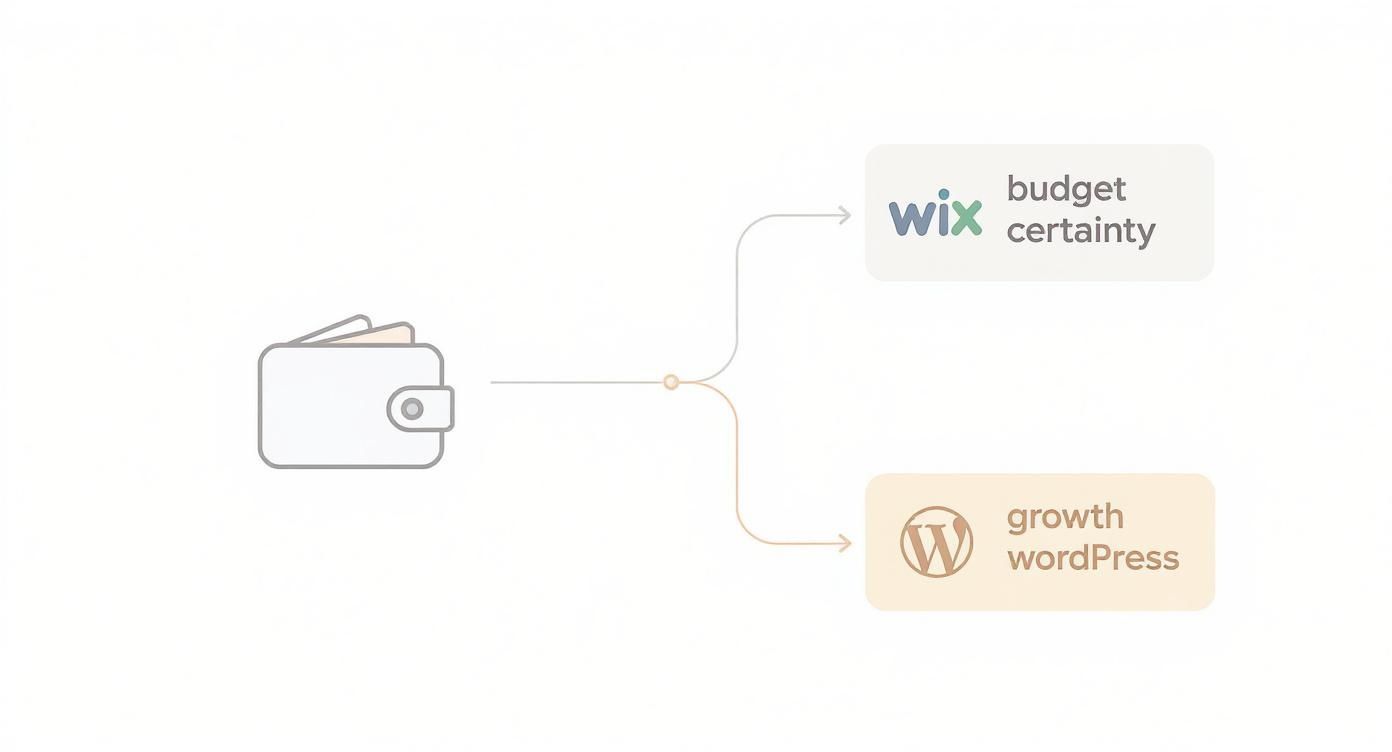
As you can see, if budget certainty is king, Wix makes a lot of sense. But for those who want the freedom to scale without limits, WordPress provides a foundation that can handle just about anything you throw at it.
Still on the fence? Sometimes the best move is to bring in an expert who can give you clarity from day one and make sure you get the most out of whichever platform you choose.
Schedule a free, no-obligation consultation with our Wix experts at Baslon Digital today and let’s build a website that genuinely drives your business forward.
Got Questions? We've Got Answers
Right, let's tackle some of the big questions that pop up when you're stuck between Wix and WordPress. Getting these sorted can save you a massive headache down the line.
Can I Just Move My Site From Wix To WordPress Later?
Technically, yes. But it's not like packing a suitcase and moving house. It’s more like knocking the house down and rebuilding it from scratch somewhere else.
You'll have to manually export your content (like blog posts) and then completely rebuild your site's design on WordPress. Because it's such a faff, you're much better off choosing the right platform from day one. Trust me, a full rebuild is a huge drain on your time and money.
Which One Is Actually More Secure?
Wix has your back right out of the box. Because it's a closed, all-in-one system, the Wix team handles all the security updates, server stuff, and SSL certificates for you. You get top-notch protection without lifting a finger.
WordPress is also incredibly secure at its core, but the responsibility is all yours. You have to stay on top of updating your themes and plugins and follow security best practices to keep the baddies out.
If you want a hands-off approach to security, Wix is the clear winner here. WordPress is like a fortress, but you’re the one who has to keep the guards on duty.
I Heard WordPress Is Free. Is That True?
The core WordPress software is free, a bit like how the engine of a car might be free—you still need to buy the wheels, the chassis, and the petrol to actually go anywhere. Running a professional website on it definitely isn't free.
To get a WordPress site live, you'll need to pay for:
A domain name (your website address)
Web hosting (where your site lives online)
A premium theme or page builder for a decent design
Premium plugins for specific features Wix often includes
So, while the software itself costs nothing, you need to budget for all the essential extras.
Do I Need To Be a Coder?
Nope! You can build a brilliant, professional website on either platform without knowing a single line of code. Wix is famous for its super-intuitive, code-free, drag-and-drop editor.
WordPress also lets you create amazing sites without code, using its block editor and the thousands of themes and page builder plugins available. That said, knowing a little bit of HTML and CSS can be a real superpower for tweaking a WordPress site, whereas it’s pretty much irrelevant with Wix.
Still weighing it all up, or are you ready for a website that just works, beautifully? The team at Baslon Digital are experts in crafting high-performance Wix websites that help UK businesses shine. Get in touch today for a free, no-obligation chat!
Comments