How to Process Credit Cards Online in the UK

Updated: Feb 14
To get paid online, you need two things: a merchant account where the money lands, and a payment gateway to securely grab card details from your website. Thankfully, for most small UK businesses, platforms like Stripe or Wix Payments bundle these into one neat package, making your site ready for business from the get-go.
Why You Absolutely Must Accept Online Card Payments
Let's be blunt. In today's UK market, taking card payments online isn't a "nice-to-have" feature—it's the very foundation of a business that actually makes money. Your customers live online, and they expect the convenience and security of paying with a card. For a freelancer or a small business owner, especially one running on a platform like Wix, ignoring this shift is a costly mistake.
The Real Cost of Sticking to the Old Ways
Picture this: a customer discovers your handmade jewellery on your slick Wix site. They fall in love with a piece, pop it in their basket, and head to the checkout, ready to buy. But then they hit a wall. There's no simple card payment option. What happens next? They're gone.
This isn't some rare, dramatic scenario; it happens all the time. High cart abandonment is a direct result of clunky or non-existent payment systems. You haven't just lost one sale—you've lost a potential lifelong customer to a competitor who made it easier for them to click "buy".
Without a way to take card payments, your website is just a pretty digital brochure. The moment you integrate a smooth payment system, you build trust. It tells visitors you're a professional, legitimate business ready to serve them. Your site transforms from a passive portfolio into an active sales machine that works for you 24/7.
The Tangible Rewards of a Seamless System
Getting your online payment system right delivers clear, measurable results that go straight to your bottom line. The proof is in the numbers. Recent data shows that by September 2025, online spending hit 50.5% of total UK consumer card spending. That’s a massive jump from 43.7% in September 2019, and it hammers home just how vital a solid digital payment setup is for any UK business. You can dig into these consumer spending trends from the ONS yourself.
But the rewards go beyond just keeping up. A streamlined checkout unlocks some serious perks:
More Revenue: By making it ridiculously easy for people to buy, you capture sales that would otherwise have vanished into thin air.
A Bigger Pond to Fish In: You're no longer limited by your postcode. You can sell to anyone, anywhere in the UK—or even the world.
Healthier Cash Flow: Money hits your account quickly. No more waiting for cheques to clear. This financial stability is a game-changer.
The simple truth is that customers expect to pay by card. Meeting that expectation isn't just good service; it's a fundamental strategy for growth and, frankly, survival.
Ready to turn that Wix website into a sales powerhouse? The first step is picking the right tools for the job. Let's dive into what you'll need.
Choosing Your Online Payment Toolkit
Before you can start taking credit card payments, you need to pick the right digital tools for the job. This sounds a bit techy, but honestly, it’s just about choosing a service to handle the money side of things for you. Think of it as hiring a super-secure digital cashier for your website.
At its heart, taking a card payment online involves two bits of financial plumbing. First, there's the merchant account—a special type of bank account where money from your sales sits before it lands in your main business account. Then there's the payment gateway, which is the clever tech that securely grabs your customer’s card details on your Wix site, encrypts them, and sends them off for approval.
The good news? You almost certainly don’t need to worry about finding these two things separately. Things are much simpler these days.
All-in-One vs. Traditional Setups
For most freelancers and small businesses, especially when you're just starting out, an all-in-one payment service provider (PSP) is the only way to go. Big names like Stripe and PayPal, and even Wix’s own Wix Payments, bundle the merchant account and payment gateway into one neat, easy-to-use package. You sign up for one service, and they handle everything else.
This all-in-one approach is a lifesaver. It’s quick to set up and plays nicely with platforms like Wix. You get a single point of contact if something goes wrong and one set of fees, which makes your bookkeeping much less of a headache. The old-school alternative involves getting a merchant account from a bank and then hooking it up to a separate payment gateway. While this can sometimes work out cheaper for businesses with huge sales volumes, it's a lot more admin and a much bigger faff to get approved.
For a new online venture, the sheer simplicity of an all-in-one provider is a massive win. It lets you focus on your products and customers, not on wrestling with complicated financial tech.
Key Factors in Your Decision
Picking the right payment partner isn't just about going with the most famous name. You need a service that actually fits how you do business. Here are the things I always tell my clients to think about.
Transaction Fees: This is the most obvious cost. Most PSPs charge a percentage plus a small fixed fee for each sale (for example, 1.4% + 20p for UK cards is pretty standard). Always dig into the fine print for international or corporate cards, as the rates are usually a bit higher for those.
Setup and Monthly Costs: Are there any sneaky setup fees or monthly charges just to keep the account open? Many of the best services, like Stripe, have no monthly fees at all. This is perfect if your sales go up and down—you only pay when you actually make money.
Wix Integration: How easily does it connect to your Wix website? This is a big one. Wix has a list of approved payment providers that you can link up in just a few clicks, making the whole technical side completely painless. You can learn more about the best options in our guide to the top UK payment gateways for ecommerce.
Currency and Country Support: Planning on selling to customers abroad? Check that the gateway can handle payments in different currencies. It creates a much smoother checkout experience for your international buyers and means they don't get hit with unexpected conversion fees from their bank.
Before you commit, it’s also a really good idea to get familiar with a provider's rules. For instance, knowing the ins and outs of the Paypal Acceptable Use Policy can save you from accidentally trying to sell something they don’t allow on their platform.
Comparing Popular UK Payment Gateways for Wix Websites
To make this a bit easier, I've put together a quick comparison of the most popular choices for UK-based Wix users. This should give you a good starting point for your own research.
Payment Gateway | Best For | Typical Transaction Fee (UK Cards) | Wix Integration Ease |
|---|---|---|---|
Wix Payments | Ultimate simplicity for Wix users; everything is managed in one dashboard. | From 1.9% + 20p | Excellent: Built-in, activated with a few clicks. |
Stripe | Businesses wanting powerful features, customisation, and global reach. | 1.5% + 20p | Excellent: A native, fully supported integration. |
PayPal | Businesses wanting to offer a widely trusted and recognised payment option. | 1.2% + 30p | Very Good: Easy to connect as a primary or secondary option. |
Klarna | Retailers wanting to offer "Buy Now, Pay Later" financing to customers. | Varies (often ~2.99% + 20p) | Good: Available as an additional payment method. |
Remember, these fees can change, so always check the provider's official website for the most up-to-date pricing.
A smart choice at this stage will save you a world of headaches and hidden costs later on. Take a bit of time to compare two or three options against what your business actually needs, paying close attention to fee transparency and how easy it is to get started.
Connecting a Payment Gateway to Your Wix Site
You've done the homework and picked your payment provider. Now for the fun part: plugging it all into your Wix website. This is where your site goes from being a pretty online brochure to a machine that can actually process credit cards online.
The great news? Wix has made this incredibly simple. Gone are the days of needing a developer on speed dial just to get your checkout page working.
Let's walk through this with a real-world example. Imagine a local artist, Sarah, who's just put the finishing touches on her gorgeous Wix portfolio. She wants to start selling prints and has decided on Stripe, thanks to its straightforward fees. Our job is to get her from a simple gallery to a fully-fledged online shop.
This little flowchart breaks down how everything works together behind the scenes when a customer buys something. It shows your merchant account, payment gateway, and Wix site all playing nicely together.
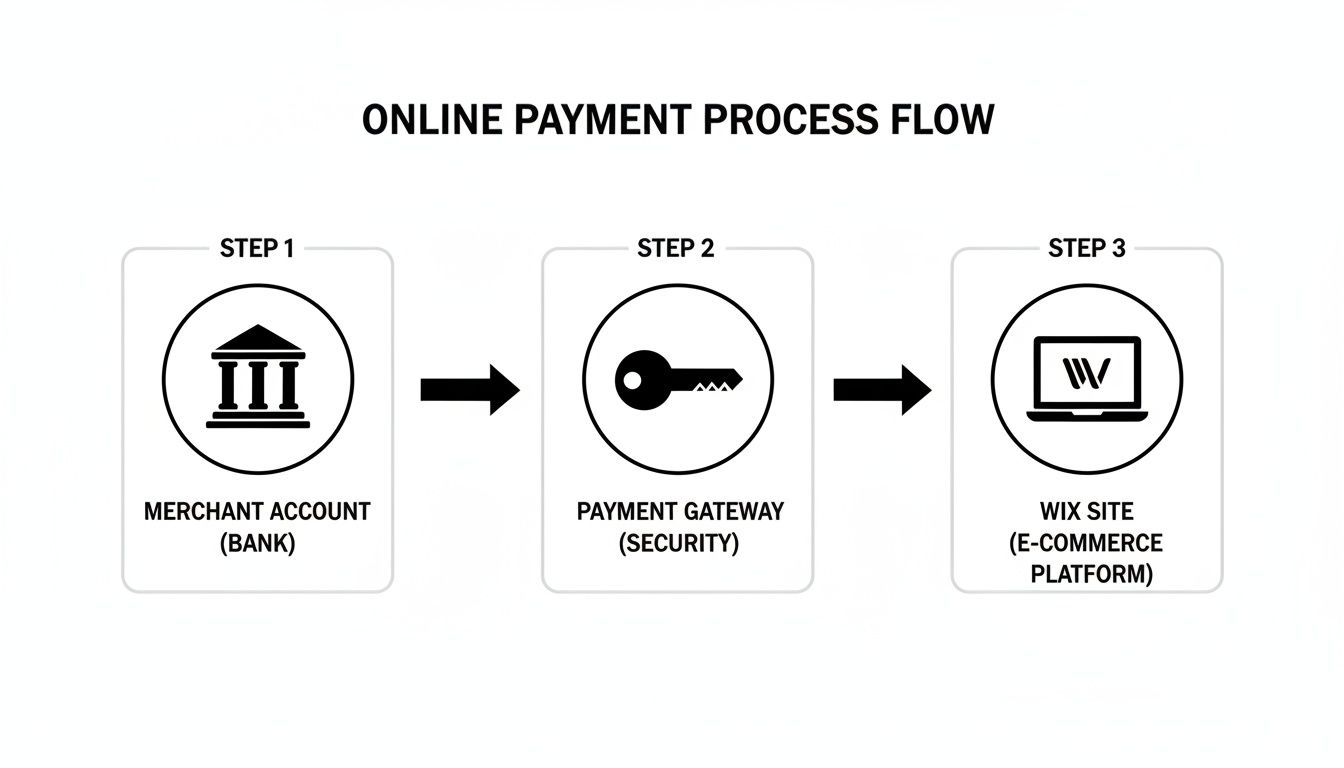
It might look a bit technical, but think of it as the digital handshake that happens every single time you make a sale.
Navigating the Wix Dashboard to Accept Payments
Your Wix Dashboard is mission control for your entire online business. Marketing, finances, inventory—it all lives here. For Sarah, this is where she’ll tell her website exactly how she wants to get paid.
First, she’ll log in. Over on the left-hand menu of her site's dashboard, she’s looking for a section called "Settings." A click on that reveals more options, and the one she needs is "Accept Payments." This is the central hub for everything money-related on your Wix site.
Once she's in the "Accept Payments" area, Wix helpfully suggests a list of providers popular in her region (the UK). This is where the choice you made earlier really matters. If you need a more detailed walkthrough of the whole setup, our complete guide to ecommerce on Wix for UK stores is a great resource.
Finalising the Connection
Sarah will see the big names like Wix Payments, Stripe, and PayPal listed out clearly. Since she’s going with Stripe, she just needs to hit the "Connect" button next to its logo.
Wix will then prompt her to either sign in to her existing Stripe account or walk her through setting up a new one right on the spot. It's a seamless process.
She’ll need to enter her business and bank details into Stripe's secure form. It’s a good idea to have this stuff ready to go:
Your registered business name and address
Your business bank account number and sort code
A quick description of what you sell (for Sarah, it's art prints)
After she fills everything out and gives the connection the green light, Stripe will officially be linked to her Wix account. Back in her Wix dashboard, the status will flip from "Connect" to "Connected." That’s it. Her payment gateway is now live.
Don’t Skip This: The Test Transaction Okay, you’re connected, but don't pop the champagne just yet. Before you tell the world you’re open for business, you absolutely must run a test transaction. This is non-negotiable.
Why You Must Run a Test
A test transaction is your final quality check. It confirms the entire journey—from a customer clicking 'Buy Now' to the money actually hitting your account—is working perfectly. It's how you catch any tiny glitch that could lead to lost sales and very unhappy customers on day one.
Most payment providers, Stripe included, have a "test mode." You can flick this on and use a special test card number (they provide this) to make a fake purchase on your own site. It mimics a real sale without any money changing hands.
Here’s the drill:
Enable Test Mode: Pop over to your payment provider's dashboard (e.g., Stripe) and switch to "Test Mode."
Make a Purchase: Head to your own Wix shop and buy something cheap, like one of Sarah's postcard prints.
Use Test Card Details: At the checkout, enter the dummy credit card info provided by your gateway.
Confirm Everything: Check that the order pops up in your Wix dashboard and that the "payment" registers in your Stripe test dashboard.
This five-minute check is worth its weight in gold. It gives you complete peace of mind, proving your setup is flawless and you're officially ready to process credit cards online. Your first real customers will get the smooth, professional checkout experience they deserve.
Navigating Security and PCI Compliance
Okay, you've connected your payment gateway. High five! But now we need to talk about something that sounds a bit scary but is actually your best friend: security.
When you process credit cards online, keeping your customers' data safe isn’t just a nice thing to do—it's a massive, non-negotiable requirement. This is where you’ll hear the term PCI DSS thrown around.
PCI DSS stands for the Payment Card Industry Data Security Standard. Think of it as the official rulebook for preventing fraud and keeping card details locked down. The mere mention of "compliance" can make small business owners break out in a cold sweat, but I’ve got brilliant news for you if you’re using Wix.
The beauty of a modern platform like Wix, especially when paired with an approved payment provider like Stripe or Wix Payments, is that they do almost all of the heavy lifting for you. These guys are already PCI compliant at the highest level. Their systems for handling card data are basically digital Fort Knoxes.
So, What's My Job in All This?
This whole setup works on what's called a shared responsibility model. Your payment provider handles the ridiculously complex, technical side of security. But you? You still have a small, but absolutely vital, part to play.
Here's what your payment gateway is doing behind the scenes:
Encrypting Data: The second a customer types in their card number, it's scrambled into unreadable code.
Secure Transmission: That scrambled code is then sent securely to the banks for the thumbs-up.
Protecting Stored Info: If you offer saved cards for repeat buyers, that data is stored in a secure digital "vault," not on your site.
This means you never actually see, touch, or store a customer's full credit card number. Phew. That massively reduces your risk and the compliance headache. Your responsibility really just boils down to good old-fashioned digital common sense.
The most secure payment gateway in the world can't protect you from a weak password. Your simple actions are the final, crucial link in the security chain that keeps your business and customer data safe.
Simple Security Habits That Make a Huge Difference
While your provider secures the transaction itself, you need to secure your access to their system. Think of it like this: the bank has a vault with guards and lasers, but you’re still responsible for not leaving your keys in the door of your house.
Here are the simple but essential practices you need to adopt. Seriously, do these today.
Use Strong, Unique Passwords: This is non-negotiable. The password for your Wix account and payment gateway dashboard needs to be long, weird, and used absolutely nowhere else. A password manager is your best friend here.
Switch on Two-Factor Authentication (2FA): If 2FA is an option, turn it on. Always. It adds a second layer of security—usually a code sent to your phone—meaning a hacker can't get in even if they somehow steal your password.
Learn to Spot Phishing Scams: Get paranoid about suspicious emails. Scammers love sending fake messages pretending to be from Stripe or PayPal, asking you to "verify" your account. Never, ever click links in emails you weren't expecting. Always log in to your accounts by typing the address into your browser directly.
Keep Your Devices Clean: Make sure the computer you use to run your business has up-to-date antivirus software. And don't ignore those "update available" notifications for your browser or operating system—they often contain critical security patches.
By partnering with a trusted payment gateway and making these straightforward habits part of your routine, you can process credit cards online with complete confidence, knowing both your business and your customers are properly protected.
Managing Fees and Handling Customer Disputes
Right, so you're set up to take card payments online. The sales are starting to roll in. But beyond the buzz of a new order notification, you've got the day-to-day reality of managing the money. This is where you'll run into the less glamorous side of things: fees and the occasional customer dispute. Getting your head around these is absolutely vital for keeping your business in the black and your reputation sparkling.
The costs of taking payments aren't just one simple percentage. That headline transaction fee (like 1.9% + 20p) is the most obvious part, but it's far from the whole story. To price your products properly and have any hope of accurate financial forecasting, you need to know exactly what you're being charged for.
A No-Nonsense Look at Payment Processing Fees
Think of the costs less as a single fee and more as a small family of charges that can nibble away at your profit margins. To manage your money well, you need to know every single one of them.
Here’s a quick rundown of what to watch out for:
Transaction Fees: This is the big one. It's a percentage of the sale plus a tiny fixed amount. Be aware that the rate can change depending on the card used – international or corporate cards often cost you a bit more to process.
Monthly Account Fees: Some payment providers will charge you a flat monthly fee just for the privilege of having an account. Thankfully, many modern services like Stripe have ditched this model, which is a massive win for small businesses whose sales might go up and down.
Chargeback Fees: This is the one that stings. If a customer disputes a charge and the bank sides with them, you don't just lose the sale amount. Your provider will also slap you with a separate, often painful, fee, usually around £15-£20. Ouch.
Currency Conversion Fees: Selling to customers overseas? Great! Just remember your payment gateway will take a slice for converting their currency into pounds, typically around 2%.
It’s easy to think these small fees don’t matter much, but they add up incredibly fast. In Q3 2025, the average online sale in the UK was a modest £78.20, but the total value rocketed to a staggering £75.9 billion. That just shows how crucial it is to keep a tight grip on every penny. You can dive into the nitty-gritty in the latest UK Finance card expenditure statistics.
A Practical Guide to Handling Chargebacks
Sooner or later, it will happen. A chargeback. This is when a customer sidesteps you and goes straight to their card company to dispute a payment. It could be because they suspect fraud, claim a product never arrived, or just weren't happy. It's frustrating, but how you handle it is what counts.
Let’s walk through a real-world example. Imagine you’re a freelance designer who just delivered a new logo to a client. A week later, you get that dreaded notification: the client has initiated a chargeback, claiming the design wasn't what they asked for.
Here’s how to tackle it without losing your cool:
Don’t Panic, Gather Your Evidence: The moment you get the chargeback notice, the clock is ticking. You have a very short window to respond. Your first move is to pull together every bit of documentation you have: the contract, all of your emails, proof you sent the files, and any records of revisions.
Try to Communicate (If It Makes Sense): Even though the official dispute is with the bank, it’s sometimes worth dropping the customer a calm, professional email to understand the problem. You'd be surprised how often a simple misunderstanding can be sorted out with a quick chat.
Submit a Watertight Rebuttal: Your payment provider will have a portal for you to upload your side of the story. Write a short, factual summary of what happened and attach all your evidence. No emotion, just the facts.
Accept the Outcome: The card issuer has the final say. They'll review everything and make a call. If you win, the money is returned. If you lose, the funds are gone for good, and you'll have to swallow that chargeback fee.
Keeping meticulous records is your absolute best defence against chargebacks. Clear communication, detailed invoices, and proof of delivery aren’t just good business habits—they’re your financial armour.
Beyond the transaction itself, simple things like creating a professional credit card receipt can be a lifesaver. This kind of detailed proof of purchase is often the very thing that swings a dispute in your favour.
By staying on top of these costs and having a solid plan for disputes, you can protect your cash flow and build a much more resilient online business.
Optimising Your Checkout to Turn Clicks into Sales
Okay, you've got your payment system locked in and secure. Now for the final, most crucial part: making sure your checkout is so smooth, your customers barely notice it's happening. A clunky, confusing, or slow checkout is the number one reason sales die a lonely death. Your mission is to bulldoze every bit of friction between "I want this" and "payment successful."
Think about it—modern shoppers are impatient. They want speed. In October 2025, the UK saw a staggering 85 million online contactless credit card transactions. That's a 6.8% jump from the year before, a clear signal that people demand fast, easy payments. You can dig into the stats yourself in the October 2025 card spending update from UK Finance. Your online checkout needs to reflect that same hurry-up-and-take-my-money vibe.
Making the Final Step Effortless
Every extra click, every unnecessary form field, is another chance for your customer to bail. Your checkout page should be a masterclass in efficiency, guiding them straight to the finish line without any distractions.
Here are a few non-negotiables to set up on your Wix site:
Guest Checkout is a Must: Don't you dare force people to create an account. It's a massive conversion killer. Always, always have a "checkout as a guest" option.
Keep Forms Minimal: Only ask for what you absolutely need to process the order. Do you really need their phone number? If it’s not essential for delivery, get rid of it.
Design for Thumbs: Your checkout must work flawlessly on a phone. If people have to pinch and zoom just to type in their address, they're gone. That's a recipe for an abandoned cart.
Think of your checkout page as the final handshake. A clean, trustworthy, and fast process tells your customer you respect their time and makes them feel good about their decision to buy from you.
Building Trust When It Matters Most
Even with the simplest layout, people get nervous when it's time to pull out their credit card. You need to reassure them they're in safe hands, and a few small visual cues can work wonders.
Make sure you're displaying trust badges from your payment provider (like "Powered by Stripe") and any SSL certificates right where they can see them. And be completely transparent about costs before they get to the final screen. Nobody likes a last-minute surprise shipping fee. For more hands-on tips, check out our other posts on ecommerce checkout optimisation.
Your Questions Answered
When you're starting to take card payments online, a few questions always pop up. It's totally normal. Let's tackle the most common ones so you can move forward with confidence.
How Quickly Will I Get My Money?
Ah, the big one—when does the cash actually hit your bank account?
In the world of online payments, this is called the "settlement period." For most of the big players you'll find on Wix, like Stripe or PayPal, you're typically looking at funds landing in your UK bank account within 2-3 business days. Some might offer faster (even instant) payouts, but usually for a little extra fee. Always double-check this before you commit, as it's a massive factor in managing your cash flow.
Do I Really Need a Proper Business Bank Account?
While it’s not always a hard-and-fast legal rule for sole traders here in the UK, the answer is a resounding yes. It's highly recommended.
Trying to run your business finances through your personal account is like trying to cook a Sunday roast in a microwave – you can, but it’s going to get messy. A dedicated business account keeps everything clean, makes accounting and tax time a breeze, and just looks more professional. Plus, most payment gateways will insist on a proper UK business account anyway. Do it from day one; your future self will thank you.
Think of a separate business account as creating a clear financial boundary. It's one of the simplest yet most effective steps you can take to manage your money professionally and make future financial planning easier.
Can I Sell to Customers Outside the UK on My Wix Site?
You absolutely can. Modern payment gateways, including Wix's own Wix Payments, are built for a global market. They’re designed to handle international transactions and different currencies right out of the box.
You’ll usually just need to flick a switch in your payment gateway’s settings to enable it. Just be sure to get familiar with their currency conversion rates and any international transaction fees. They’re often a touch higher than domestic sales, so it pays to know what you’re signing up for.
Ready to build a professional Wix website that not only looks incredible but is also optimised to turn visitors into customers? The team at Baslon Digital specialises in creating stunning, high-performing websites for UK businesses just like yours. Get in touch with us today for a free consultation.
Comments