A Practical Guide to Website Design on a Budget for UK Startups

Getting a professional website design on a budget isn't just a pipedream; it’s totally achievable with a bit of smart planning before you even think about colours or fonts. Your best cost-saving weapon is figuring out your website's main job and its core features right from the start. This stops you from making expensive U-turns later and makes sure every pound you spend is working hard for you.
Building Your Foundation for a Budget-Friendly Website
Before you get lost in a sea of templates, the most important thing you can do is map out a clear strategy. Think of this plan as your compass. It'll guide every decision and save you from "scope creep"—that notorious budget-killer where you keep adding little extras that weren't in the original plan. A disciplined approach means you build what your business actually needs, not just what looks cool.
First things first: what is your website's number one job? Is it a lead-generation machine? An online shop? A slick portfolio to show off your work? Or just a simple online brochure? Getting crystal clear on this will shape the entire project.
Must-Haves vs. Nice-to-Haves
Once you know your site's main purpose, it's time to get ruthless and separate the essentials from the fluff. This is where you can really keep your budget in line.
Must-Haves: These are the non-negotiable bits. For a local plumber, this would probably be a services page, a contact form with a phone number, and a few glowing customer reviews. The site just wouldn't work without them.
Nice-to-Haves: These are the features you'd love to have but aren't critical for launch day. Maybe that's an integrated blog, fancy animations, or a complex booking system. You can always add these later when the business is bringing in more cash.
Jotting down this simple list is a game-changer. It stops you from splurging on features that don't directly help you hit your immediate goals.
Setting a Realistic Budget for Your Website
With your feature list sorted, you can now put together a budget that makes sense. Your plan needs to cover the basics like your domain name, website hosting (which is usually bundled into Wix plans), and any must-have apps. If you're wondering what things really cost, we’ve put together a comprehensive guide to the cost of making a website in the UK that breaks it all down.
It’s also worth noting that the current economic climate is making businesses a lot more careful with their spending. In fact, the UK web design industry's income is projected to see a slight dip to £640.6 million in 2025. This shift is fuelling a massive demand for affordable but professional web solutions—which is exactly why platforms like Wix are exploding in popularity. Agencies like us at Baslon Digital are right there, building stunning, mobile-friendly sites that deliver serious results for a fraction of what old-school development used to cost.
This little decision tree can help you figure out which path makes the most sense for you:
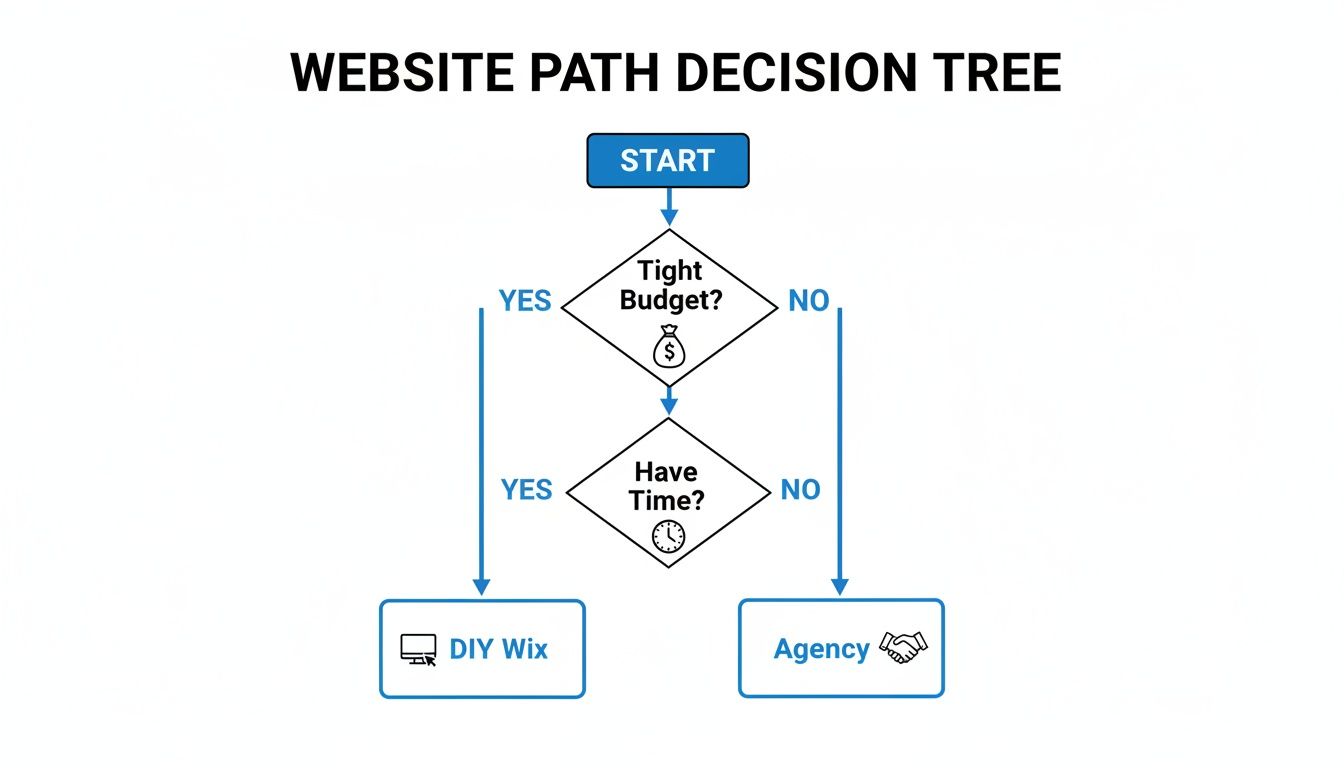
As you can see, it all comes down to balancing how much time you have versus how much money you can invest.
To make it even clearer, here’s a quick comparison of what you're signing up for with each option.
Cost and Effort Comparison: DIY vs. Professional Design
This table breaks down the key differences between going it alone and bringing in the pros.
Factor | DIY Wix Website | Professional Wix Agency (Baslon Digital) |
|---|---|---|
Upfront Cost | Lower (domain, hosting plan, potential apps) | Higher (one-off project fee or retainer) |
Time Investment | High (learning, design, content, troubleshooting) | Low (your time is for feedback and providing content) |
Design & UX | Can look amateurish if you lack design skills | Professional, polished, and user-friendly |
SEO & Performance | Basic, often missed critical optimisations | Expertly implemented for better Google ranking |
Speed to Launch | Can take weeks or months, depending on your skill | Much faster, typically a few weeks |
Ongoing Effort | You are responsible for all updates and maintenance | We can manage it for you, saving you headaches |
Ultimately, while the DIY route seems cheaper on paper, hiring an agency like Baslon Digital often provides far better value by saving you countless hours and delivering a more effective, professional result from day one. Nailing this foundational planning is the most important step you'll take toward a successful, affordable website.
Choosing the Right Path with Wix: Templates vs. Custom Design

So, you've got a plan. Brilliant. Now for the next big decision: how are you actually going to build this thing? For UK businesses looking for a professional website design on a budget, Wix is a seriously smart move. It’s an all-in-one platform that neatly rolls your hosting, design tools, and business features into one affordable package.
This bundled approach saves you the headache (and cost) of juggling different services. With Wix, you’re not just getting a website builder; you're getting a solid foundation that's built to grow with you. It’s no wonder so many startups kick things off here.
The Appeal of Wix Templates
Think of a Wix template as a professionally designed blueprint. It's a ready-made layout with colour schemes, fonts, and page structures already in place. All you have to do is drop in your own content.
The main draw here is speed and cost. You can get a great-looking site live in a few days, not months, for a tiny upfront investment. This path is a fantastic fit if:
Your budget is super tight. Templates are hands-down the most affordable way to get online professionally.
You need to launch, like, yesterday. If time is a factor, a template will get you to market faster than anything else.
You're happy to get your hands dirty. You'll need to be comfortable adding your own text, uploading images, and tweaking the design to match your brand.
The risk? Your site might look a little familiar. But with thousands of options and some clever customisation, you can still carve out a space that feels uniquely yours.
The Power of a Custom Wix Design
A custom design, on the other hand, is like hiring an architect to build your dream home. An agency like Baslon Digital will build your Wix site from the ground up, tailored precisely to your brand, your audience, and what you want to achieve.
A custom-built site isn't just about looking unique; it’s about creating a strategic user experience. Every button, every page, and every call-to-action is placed with purpose to guide visitors and drive sales, turning your website into a powerful business tool.
This approach is best when you need to stand out in a crowded market or need specific features that a template just can't handle. A custom build lets your brand’s personality shine through and creates a seamless journey for customers, which is huge for building trust. Yes, the initial investment is higher, but the return you get in brand perception and performance can be massive. If you're weighing up your options, a good ecommerce platform comparison can offer some valuable perspective.
Making the Right Choice for Your Business
So, how do you decide? It really boils down to a trade-off between your budget, your timeline, and your desire for a truly one-of-a-kind presence.
Platforms like Wix are changing the game. In fact, UK small businesses are embracing them so much that they're on track to power 15% of all new small business sites in 2025. This shift allows agencies like ours to deliver custom-designed sites that load incredibly fast—under 2.5 seconds—helping our clients sidestep the nasty 7% conversion drop that comes with every second of delay. Want to see more stats like this? Check out this eye-opening web design statistics report.
For a deeper dive into how these platforms stack up against each other, have a look at our UK website builder guide comparing WordPress, Wix, and Squarespace.
Whether you go for a template or a custom build, the most important thing is choosing the path that aligns with where your business is today and where you want it to be tomorrow.
Crafting Your Essential Pages and Content

A slick design is a great start, but it's the words and pictures that do the heavy lifting. This is what connects with your customers and persuades them to take action. When you're pulling together a website design on a budget, it’s far smarter to focus on a few essential, brilliantly executed pages than a sprawling site filled with thin content.
Think of these core pages as the foundations of your online home. Get them right, and you've built something that can turn casual visitors into proper customers.
The Four Pillars of Your Website
Your website needs to be simple. Obvious, even. A visitor should never have to hunt for information. That’s why we always start with these four non-negotiable pages:
Homepage: This is your digital shopfront. You have about three seconds to grab someone's attention, tell them what you do, who you do it for, and what they should do next. No pressure.
About Us Page: Here’s where you stop being just a business and start being human. People buy from people. Share your story, your mission, and what makes you different. Build that trust.
Services/Products Page: Time for the details. Clearly lay out what you’re offering, but always focus on the solutions you provide for your customers. Ditch the dry list of features.
Contact Page: Make it ridiculously easy for people to reach you. Include your email, phone number, a simple contact form, and an embedded map if you have a physical location.
Nail these four pages before you even think about adding more. A small, high-quality website will always outperform a large, mediocre one. Every time.
Writing Copy That Sells Without Being Salesy
With your page structure sorted, it's time to write. The secret? Stop talking about yourself and start talking to your customer. They're on your site because they have a problem, and your words should be laser-focused on how you solve it.
You need to shift from talking about features to shouting about benefits. A feature is what something is; a benefit is what it does for the customer. For example, a bakery doesn't just sell "sourdough bread" (feature). It sells "the joy of a fresh, crusty loaf for your family's Sunday breakfast" (benefit). See the difference?
Your website copy should act as your best salesperson. It needs to be clear, empathetic, and consistently focused on answering your customer’s main question: "What's in it for me?"
This approach makes your brand feel more relatable and proves you actually get what your customers need. It’s how you build a real connection.
Sourcing Professional Visuals on a Shoestring Budget
Brilliant copy deserves brilliant visuals. Grainy, amateur photos will instantly destroy all the credibility you just built with your words. But you don't need a Hollywood budget to look the part.
There are some fantastic resources for royalty-free images that won’t cost you a penny. Websites like Unsplash, Pexels, and Pixabay have huge libraries of professional-quality photos you can use for free. The key is to pick images that feel authentic and match your brand’s vibe.
For your own product shots or headshots, you might not even need to hire a photographer. You can learn how to take professional photos at home with just your smartphone and some decent lighting. It's an amazing way to keep costs down without sacrificing quality.
Master the Basics of SEO and Website Performance
Right, you've launched your shiny new website. Huge milestone! But don't pop the champagne just yet—this is where the real work begins. Now you've got to make sure people can actually find you.
This is where Search Engine Optimisation (SEO) comes into play. It’s not as scary or complicated as it sounds, especially when you're keeping a close eye on your budget.
You don't need to be a coding genius to get the basics right. Wix has some brilliant built-in tools, like the SEO Wiz, that literally walk you through the most important steps. Nailing these fundamentals can make a massive difference in how visible your site is on Google.
Getting Your On-Page SEO Sorted
On-page SEO just means all the tweaks you make directly on your website to help search engines understand what each page is about. Think of it as leaving a clear trail of breadcrumbs for Google to follow. The clearer the trail, the better your chances of showing up when your ideal customers are searching.
Your first job is to figure out your keywords. These are simply the phrases people type into Google when they're looking for what you offer. If you're a wedding photographer in Manchester, for instance, your keywords might be "Manchester wedding photographer" or "documentary wedding photography UK". Simple as that.
Once you have your main keyword for a page, you need to pop it in a few strategic places. Getting these bits right is a huge part of making your site visible, and it's something you can absolutely do yourself.
For a much deeper dive, check out our practical guide on how to get your website on Google.
To make this easier, I've put together a simple checklist you can follow inside the Wix editor.
Your DIY SEO Checklist for Wix
This little table breaks down the essential on-page SEO tasks you'll want to tackle. It covers what to do, why it's important, and exactly how to find it in Wix.
SEO Task | Why It Matters | How to Do It in Wix |
|---|---|---|
Page Title (SEO Title) | This is the blue, clickable link in Google search results. It’s your first impression, so make it count! | Go to the page in your editor, click 'Settings' > 'SEO Basics', and edit the 'Title tag'. Keep it under 60 characters. |
Meta Description | The short bit of text under the title in search results. It doesn't directly affect ranking, but it convinces people to click on your link. | Find it right below the 'Title tag' in the 'SEO Basics' panel. Write something compelling that includes your keyword. |
Image Alt Text | A short description of an image. It helps visually impaired users and tells Google what the image is about. | Click on any image, then the 'Settings' icon (the little cog), and fill in the 'What's in the image? Tell Google' box. |
Headings (H1, H2, etc.) | These structure your content and tell Google what's most important. Your main page title should be your one and only H1. | Use the text editor to assign heading tags (H1, H2, H3). Make sure your main keyword is in your H1. |
Working through this checklist for each of your key pages is a fantastic starting point for getting found online.
Why Website Speed Is A Massive Deal
Ever clicked away from a website because it was taking an eternity to load? We've all been there. A slow website is a conversion killer. Seriously.
Even a one-second delay in page load time can lead to a 7% reduction in conversions.
Google knows that users absolutely hate slow sites, which is precisely why page speed is a confirmed ranking factor. A faster website doesn't just create a better experience for your visitors; it actively helps your SEO.
A snappy, responsive site feels professional and keeps people engaged, which signals to Google that you’re a high-quality result. This is especially true on mobile, where people are even less patient.
Quick Wins For A Faster Wix Site
The good news is that boosting your site's performance doesn't mean you need a complete overhaul. A few simple tweaks can make a noticeable difference.
Here are a few things you can do today:
Compress Your Images: Large images are the number one cause of slow websites. Before you upload any image to Wix, run it through a free online tool like TinyPNG. It shrinks the file size without wrecking the quality.
Use Animations Sparingly: Sure, fancy animations and video backgrounds can look cool, but they also gobble up resources. Use them thoughtfully and only where they add real value, not just for the sake of it.
Limit Your Fonts: Using too many different custom fonts can slow your site down, as each one has to be loaded by the browser. Stick to two or three for a clean, professional look that also loads quickly.
By focusing on these SEO and performance basics, you’re building more than just a website; you’re building a business asset that can actually be found and trusted by your ideal customers.
Keeping Your Website Healthy After Launch
Hitting that 'publish' button feels amazing, doesn't it? But launching your website isn't the finish line; it’s the starting gun. Think of it like a new car. You wouldn’t drive it off the forecourt and just assume it’ll never need its oil checked or tyres topped up. Your website is a living, breathing part of your business, and it needs a bit of regular attention to keep it performing at its best.
This isn't just busywork. It's about protecting your investment. A site left to its own devices can become slow, buggy, or even a security risk. That’s a surefire way to lose trust with visitors and drop off Google's radar. A little bit of consistent care ensures your site remains a powerful asset, not a digital headache.
The DIY Maintenance You Can Definitely Handle
If you’ve built a website design on a budget, the great news is that you can handle most of the essential upkeep yourself, especially on a friendly platform like Wix. These are the jobs that keep your site feeling fresh and relevant without needing a degree in computer science.
You’re completely in charge of the content, which is your best tool for keeping your audience hooked and showing Google your site is alive and kicking.
Writing Blog Posts: Adding a new article now and then is brilliant for SEO and positions you as an expert in your field. Even one or two posts a month is a fantastic start.
Updating Images: Got new project photos? Swap out the old ones. Keeping your visuals current makes a massive difference to how professional your site looks.
Refreshing Your Portfolio: For any creative pro, this is non-negotiable. Your portfolio should always show off your latest and greatest work.
Checking for Broken Links: Every few months, use a free online checker to hunt down broken links. They’re frustrating for users and a red flag for search engines.
These tasks don't need a developer's touch, just a bit of time blocked out in your calendar each month. They’re the foundation of good website health.
When to Call in the Experts
While DIY is great for the budget, some jobs are trickier and carry bigger risks if you get them wrong. This is where having an agency like Baslon Digital in your corner makes perfect sense. Honestly, your time is much better spent running your business than getting lost in a rabbit hole of technical troubleshooting.
Handing over technical maintenance to a professional isn't an expense; it's an investment in peace of mind. It ensures the engine of your website is always finely tuned, secure, and performing at its best, allowing you to focus on what you do best.
Think about getting professional help for the stuff that happens "under the bonnet." These are the tasks that, if messed up, could have some pretty serious consequences for your site's performance and security.
A Straightforward Maintenance Schedule
To stop things from feeling overwhelming, just break it all down into a simple, repeatable routine. This proactive approach stops tiny issues from turning into massive, expensive emergencies down the road.
Your Monthly Checklist:
Review Your Analytics: Just spend 30 minutes looking at your site traffic. What pages are people loving? Where are they coming from?
Update Content: Pop up a new blog post or just refresh an existing page with some new info.
Test Your Forms: Fill out your own contact forms. You’d be surprised how often things can quietly break.
Your Quarterly Checklist:
Run a Performance Test: Use a tool like Google's PageSpeed Insights to check your site's loading speed. See if any new bottlenecks have appeared.
Check for App Updates: If you're using any third-party Wix apps, see if they need updating. This is key for security.
Review Your SEO: Are you still ranking for your main keywords? Could you be targeting any new ones?
By staying on top of this simple schedule, you’ll make sure your affordable website continues to work hard for your business long after its launch day.
Your Budget Web Design Questions, Answered
Starting a new website project, especially when you're keeping a close eye on the budget, always brings up a million questions. You need clear, straight-up answers to feel good about the decisions you're making. So, let's cut through the noise and tackle the most common things we hear from UK small business owners trying to get a professional website without breaking the bank.
Here are the questions that are probably buzzing around in your head right now.
How Much Should a Small Business Website Cost in the UK?
Ah, the big one. The honest-to-goodness answer? It's all over the place. The final price tag really depends on how complex you need it to be and which path you take.
Going the DIY route with a platform like Wix is incredibly cost-effective. You're often looking at just £150-£500 per year to cover your subscription and domain name. For a lot of businesses just starting out, it's a brilliant way to get online.
On the flip side, getting a fully custom-designed website from a pro agency like Baslon Digital is more of an upfront investment. For a solid small business site with all the essentials and a polished, professional look, you're typically looking at a starting price of around £1,500-£3,000. This gets you an expert-built site designed to convert visitors into customers, skipping the scary £10,000+ price tags that come with massive, bespoke projects. It all comes down to balancing what you can spend now with where you want your business to be tomorrow.
Can I Genuinely Build a Professional-Looking Website Myself?
You absolutely can. Modern tools like Wix have completely changed the game, giving everyone access to gorgeous, professionally designed templates and powerful editors. With a bit of your time and a good eye for what looks right, you can definitely create a website that looks credible and polished. It’s amazing how far these platforms have come.
But—and it's a big but—a truly 'professional' website is more than just a pretty face. It’s about how it works. Think intuitive navigation, lightning-fast load times, crystal-clear messaging, and a flawless experience on a mobile phone. A professional designer brings years of expertise in user experience (UX) and conversion rate optimisation—the stuff that actually turns a casual visitor into a paying customer. So while you can build something that looks great, an agency makes sure all those crucial business-driving bits are baked in right from the start.
Is Wix Actually Any Good for SEO?
Yes, one hundred percent. There are some seriously outdated myths still floating around, but modern Wix is an absolute powerhouse for Search Engine Optimisation. It hands you a full toolkit with everything you need to get seen in search results.
The old idea that some platforms are just 'bad' for SEO is officially dead. These days, your SEO success is all about your strategy and how well you execute it, not the platform you're on. A properly optimised Wix site can, and does, rank just as well as any other.
You get total control over the important stuff: page titles, meta descriptions, URL structures, image alt text, and you can even add structured data to help Google understand your content better. The Wix SEO Wiz even gives you a handy checklist to make sure you've covered the basics. When it's optimised correctly—either by you or an expert agency like us—your Wix site is more than ready to climb the rankings.
When Should I Hire an Agency Instead of Doing It Myself?
This one usually boils down to a simple trade-off: your time versus your money.
It’s time to call in a pro like Baslon Digital when your hours are better spent on what you do best—serving your clients, creating your products, or closing sales. The upfront cost of DIY is low, sure, but the hours you’ll pour into learning the platform, designing pages, writing copy, and fixing glitches are a huge, often forgotten, expense.
You should also lean towards an agency if you need a unique brand identity that a template just can't deliver, or if your website has a critical job to do, like generating high-quality leads or driving e-commerce sales. If you want to be certain your site is perfectly tuned for speed, conversions, and SEO from the moment it launches, partnering with an expert is simply the fastest and most effective way to get there.
Ready to Build Your Budget-Friendly Website?
Building a professional website without a giant budget is completely doable. Honestly. It all comes down to having a solid game plan.
By picking the right tools (like Wix), focusing on content that actually connects with your customers, and dipping your toes into some basic SEO, you can launch an online presence that punches well above its weight. A great website isn't about spending the most money; it's about making a genuine connection and hitting your business goals.
Whether you decide to roll up your sleeves and go the DIY route or bring in an expert to speed things up, the most important thing is to make smart choices that fit your vision. This whole process should feel empowering, not overwhelming. A website design on a budget doesn't mean you have to settle for less—it just means you're being clever with your cash. You've got this.
If you're ready to get a stunning, hard-working Wix website off the ground without the hefty price tag, we're here to help. Contact Baslon Digital today for a free, no-obligation chat, and let’s build something brilliant together.
Comments