The Ultimate Guide to an Online Booking System for Small Business

Let’s be honest, an online booking system for small business is essentially a digital receptionist that never sleeps. It's a tool that automates your appointment scheduling, letting clients book your services directly through your website, day or night. This means you can finally stop the endless email chains and phone tag, and get back to doing the work you actually enjoy.
Why Manual Scheduling Is Holding Your Business Back

If you're still juggling appointments with phone calls, scribbled notes, and a chaotic spreadsheet, you're not just wasting time—you're actively losing money. Every minute spent chasing a client to confirm a time slot or manually updating your calendar is a minute you aren't spending on billable work. It’s a huge administrative drain that quietly eats away at your profits.
Think about a freelance photographer in London. In between shoots and editing, they're losing hours every week trying to coordinate availability, send reminders, and chase confirmations. One tiny mistake—a forgotten entry in their diary—can lead to a catastrophic double booking, instantly damaging their professional reputation.
The True Cost of Old-School Methods
Relying on manual scheduling creates friction, not just for you, but for your customers too. Today's clients expect instant results. If they can’t book your service the moment they decide they want it, there's a good chance they'll just click over to a competitor who offers that convenience. This is especially true when you realise that over 40% of bookings happen outside of typical business hours.
The problem gets even worse when you're dealing with different types of clients. A business consultant trying to schedule meetings with people in different time zones is facing a logistical nightmare of back-and-forth emails. To get past these hurdles, investing in a solid system, like the ones detailed in this comprehensive tutor scheduling software guide, is a non-negotiable step for any modern business.
An online booking system acts as a silent partner, working 24/7 to fill your calendar, slash no-shows with automated reminders, and free you up to focus on what you actually love doing.
Beyond Just Booking Appointments
A good online booking system for small business does so much more than just fill slots in your calendar. It completely professionalises your operation.
It slashes no-shows by sending out automated SMS and email reminders. No more chasing people yourself!
It captures client details right at the start with customisable booking forms.
It secures your revenue by letting you take deposits or full payments at the time of booking.
By automating these tedious but crucial tasks, you create a smooth, professional experience that your clients will genuinely appreciate. It signals that you value their time as much as your own, setting a brilliant tone right from that very first interaction.
Ready to stop losing time and start gaining clients? Let's dig into how to choose and set up the perfect system for your Wix website.
Choosing the Right Booking System for Your Wix Website
Picking the perfect online booking system for small business owners using Wix isn't just about grabbing the first shiny object you see. Let's be honest, the wrong tool can become a source of endless technical headaches and clunky workarounds, completely defeating the point of automating things in the first place. What you're really after is a system that slots into your Wix website so smoothly it feels like it was always meant to be there, not some awkward, bolted-on extra.
The first big question you need to answer is whether to stick with Wix's own app, Wix Bookings, or bring in a third-party tool. Each route has its own perks, and the right choice really boils down to what your business actually needs.
Native Simplicity vs Third-Party Power
Wix Bookings is designed from the ground up to play nicely with Wix. Because it’s a native app, it integrates without a fuss, automatically picks up your site's design, and plugs straight into your dashboard. For a lot of service-based businesses—think consultants, personal trainers, or artists running workshops—it has everything you need, right out of the box.
But sometimes, your business has more specific demands. That's where third-party systems like Acuity Scheduling or Calendly come into their own. These platforms often pack a bigger punch with more advanced customisation, in-depth reporting, or niche features that Wix Bookings might not have. The trick is making sure they offer a solid, reliable integration with your Wix site.
Thinking through your options is a bit like choosing the best platforms to sell tickets online for an event. You have to look past the marketing fluff and figure out what features will genuinely make your life easier. For a really deep look at what Wix’s own tool can do, our complete guide on mastering Wix Bookings is a great place to start.
Here's a quick rundown of how the two options stack up against each other.
Wix Bookings vs Third-Party Integrations: A Feature Comparison
Feature | Wix Bookings | Third-Party Systems (e.g., Acuity/Calendly) |
|---|---|---|
Integration | Seamless. Built-in, inherits site design automatically. | Good to variable. Requires an embed or integration app; may not match site design perfectly. |
Ease of Use | Very high. Managed directly from the Wix dashboard. | High. Typically user-friendly but requires managing a separate account and dashboard. |
Core Features | Manages appointments, classes, and courses. Staff calendars, memberships, payment processing. | Often includes advanced features like automated reminders, complex scheduling rules, and intake forms. |
Customisation | Good. Customisable booking forms and email notifications. | Excellent. Deeper customisation of branding, email sequences, and booking logic. |
Pricing | Included in Wix Business & eCommerce Premium Plans. | Varies. Often a tiered subscription model based on features or number of users/staff. |
Best For | Simplicity and convenience. Ideal for small businesses already using Wix for everything. | Specialised needs. Businesses needing advanced features, deep reporting, or specific integrations. |
Ultimately, Wix Bookings is brilliant for its all-in-one convenience. But if you find yourself needing that one specific feature it doesn't have, a third-party system might be the smarter long-term move.
Key Factors to Evaluate
To avoid buyer's remorse, measure any potential system against these crucial points:
Scalability: Will this tool grow with your business? Think about the future. Will you need to add multiple staff members, sell complicated class packages, or manage bookings across different locations? Don't pick a system you'll outgrow in six months.
Specific Features: Get granular. Do you need to manage resources, like booking both a personal trainer and a specific piece of gym equipment? What about recurring group sessions or waitlists? Make a list of your absolute must-haves.
Client Experience: How easy is it for a customer to actually book with you? The process needs to be dead simple. A clunky, confusing booking flow is a fast track to lost sales.
Cost: Don't just look at the monthly price tag. Are there hidden transaction fees on payments? Does the price jump up dramatically when you add another team member? You need a clear, transparent pricing model.
Choosing a booking system isn't just a technical decision; it's a strategic one. The right tool should fit your current needs perfectly while providing a clear pathway for future growth, not boxing you in.
The move to online booking is gathering serious steam in the UK. Recent forecasts show businesses need to be ready to capture the 64% of bookings happening on desktops and 44% on mobiles. This just goes to show how vital a smooth, optimised booking process is for turning casual browsers into paying clients. You can dig into more of these UK online booking trends on Statista.
Ready to get this set up and turn your website visitors into confirmed appointments? Let’s walk through how to configure your chosen system for maximum efficiency and a flawless customer journey.
Setting Up Your Booking System for Success
Right, you've picked your system. Now it’s time to stop planning and start doing. This is where you turn that shiny new tool into a workhorse for your business. Setting up your new online booking system for small business on Wix doesn't have to feel like you're trying to defuse a bomb; think of it more like setting the house rules for how clients get a slice of your time.
First things first, let's define what you actually sell. Head into your Wix Bookings dashboard and create your services. Use clear, human-friendly names—not industry jargon nobody understands. For instance, "Initial Project Scoping" sounds corporate and dull. "30-Minute Discovery Call" tells the client exactly what they're getting. Simple.
This is also where you nail down the price and how long each service takes. Be honest with yourself. If a haircut really takes 45 minutes, don't put 30 just to look faster. Getting this right from the start is the foundation of a schedule that serves you, not one that runs you ragged.
Mapping Out Your Availability
Think of your availability settings as your digital bouncer. It’s not just about listing your opening hours; it’s about strategically carving out a schedule that keeps you sane and productive. Start by blocking out your standard working days and hours in the Wix dashboard.
Then, get granular. Need a lunch break every day? Block it out. Are Friday afternoons sacred for catching up on admin? Make yourself unavailable. This simple act ensures clients can only book you when you're actually ready for them, which cuts out the chaos of a poorly managed calendar.
The infographic below shows the journey from picking a system to plugging it in—which leads directly to this setup phase we're talking about now.
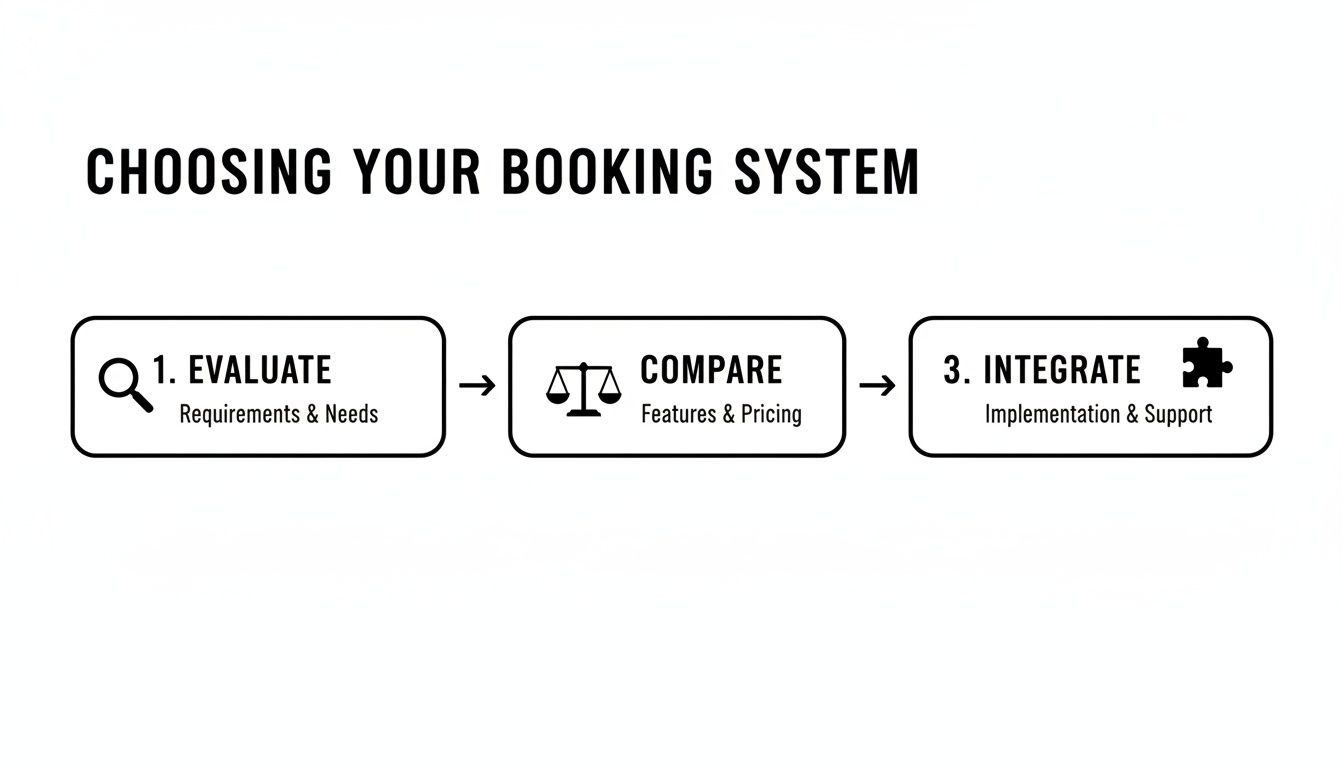
This flow—from evaluation to integration—is a good reminder that a smart setup is the final, crucial piece of the puzzle after you’ve made your choice.
Fine-Tuning the Client Experience
A basic setup works, sure. But it's the little details that make the whole experience feel professional and slick. This is where clever features like buffer times and custom forms come into play.
Buffer times are your secret weapon. They’re just small pockets of time automatically added before or after an appointment. A 15-minute buffer after each consultation gives you a moment to jot down notes, grab a coffee, and mentally reset before the next client arrives. It's a tiny setting that stops you from frantically rushing from one meeting to the next, helping you appear calm and prepared every single time.
Setting buffer times is one of the most impactful yet overlooked features. It’s a proactive way to build breathing room into your day, ensuring you deliver consistent quality without feeling constantly rushed.
Next up, let's talk about custom booking forms. The default form only asks for a name and email, but you can get so much more useful info upfront.
For a web designer: Add a field asking, "What is the URL of your current website?"
For a personal trainer: Include a question like, "What are your primary fitness goals?"
For a workshop host: Use a dropdown to ask about dietary requirements.
Getting this information right away saves you from sending a follow-up email and immediately shows clients you’re on the ball.
Finally, give your automated emails some personality. Ditch the generic "Your appointment is confirmed" message. Inject your brand's voice. A friendly, personalised reminder not only cuts down on no-shows but also builds a connection before the client even walks through the door. It’s these small, thoughtful touches that turn a boring transaction into a great client experience.
With your services defined, schedule protected, and client experience polished, you're ready to hook up your payment and calendar tools to get the whole thing running on autopilot.
Ready to take control of your schedule and create a booking experience your clients will love? Contact Baslon Digital today, and we'll help you configure the perfect online booking system for your Wix website.
Automating Payments and Syncing Calendars
This is where your online booking system for small business starts to feel like magic. When it begins talking to your other essential tools, you move past simple scheduling and into proper business automation. Let's focus on two of the most powerful connections you can make: payments and calendars.
Connecting a payment gateway like Stripe or PayPal is a complete game-changer. Seriously. By asking for a deposit or full payment right when someone books, you secure your revenue and weed out the time-wasters. This one move drastically cuts down on the frustration—and financial hit—of no-shows.
This isn't just about making things easier; it’s about protecting your bottom line. When a client has put some money down, their commitment level skyrockets. It ensures your valuable time is respected and makes your income far more predictable.
Securing Your Revenue Upfront
Setting up payments is surprisingly straightforward in most modern booking systems, and that includes Wix Bookings. You just connect your favourite provider, then decide how your services will handle payments.
Think about these options:
Full Payment: This is perfect for fixed-price services, like a one-off consultation or a workshop ticket. It simplifies everything because the transaction is done and dusted before the appointment even starts.
Deposits: A brilliant choice for higher-ticket services or appointments where the final cost might change. Taking a deposit locks in the slot and confirms the client is serious about showing up.
Save Card Details: For your regulars, this makes future bookings a breeze. It also lets you easily charge the remaining balance after a service is finished.
Eliminating Double Bookings with Calendar Sync
Next up is the calendar sync. This simple integration solves one of the biggest headaches of doing things manually. By setting up a two-way sync with your personal calendar—whether it's Google Calendar or Outlook—you create a single source of truth for your availability.
What does that mean? Any event you pop into your personal calendar, like a dentist's appointment or a day off, will automatically block out that time in your booking system. You’ll never again have to frantically cross-reference multiple calendars to see if you’re actually free.
Two-way calendar synchronisation takes the mental load off your plate. It makes sure your availability is always spot-on, preventing embarrassing double bookings and making you look effortlessly organised.
This kind of automation is becoming vital for UK SMEs, especially as the business world gets more hectic. Research shows that 55% of travel managers prioritise booking compliance, a principle small businesses can easily apply to their own scheduling to boost efficiency. By integrating payments and calendars, you create a smooth, reliable process that saves both time and money. You can learn more about how UK businesses are leveraging booking productivity on Booking.com for Business.
Putting these integrations in place is a key part of effective website automation strategies that give you back precious hours in your day.
Ready to build a seamless booking experience that works for you 24/7? Contact Baslon Digital today to explore how we can integrate the perfect online booking system for your Wix website.
Launching and Promoting Your New Booking System
Your shiny new online booking system for small business is built and ready to roll. But here’s a bit of tough love: your clients won’t use it if they don’t know it exists. Even worse, they won't use it if it's clunky and confusing. This final stretch—the testing and promotion—is what separates a tool that just sits there from one that actually fills your calendar.
Before you start shouting about it from the rooftops, you need to walk a mile in your client's shoes. I mean it. Run a full test booking from start to finish. Go to your website, find a service, pick a time, fill out the form, and see the whole thing through. This isn’t just about kicking the tyres technically; you're road-testing the entire client journey.
Your Pre-Launch Test Checklist
Did that confirmation email land in your inbox instantly? Was the language clear and friendly? And did the appointment block out the correct slot in your calendar? Even the tiniest bit of friction can be enough to make a potential client give up and head somewhere else.
Here’s what to look for:
Check the flow: Is that "Book Now" button blindingly obvious and easy to find?
Test the form: Are all the custom questions you added actually showing up?
Verify communications: Do the confirmation and reminder emails look professional? Are all the details correct?
Confirm sync: Did the booking pop up in your Google or Outlook calendar straight away?
Once you’re confident the experience is buttery smooth, it’s time to get people using it. Your main goal here is to make online booking the easiest, most obvious way for clients to schedule time with you.
Getting the Word Out
Start by making your booking option impossible to miss on your Wix website. Slap prominent "Book Now" or "Schedule a Consultation" buttons on your homepage, service pages, and even your contact page. It should be the main call-to-action everywhere a client might be thinking about getting in touch.
Next, take it to your other marketing channels. Your audience is already there, so go meet them where they are.
Don't just launch your system; embed it into every single client touchpoint. Your email signature, social media profiles, and local listings should all point directly to your new, easy booking process.
Announce the new, super-convenient way to book on all your social media platforms. A huge one: update your Google Business Profile with the direct booking link. This is a massive win for local SEO. You should also pop a link in your email signature; it’s a simple, passive way to remind every single person you email how easy it is to book with you.
For a deeper dive into getting your website noticed, check out our guide on the 10 proven methods for promoting a website in 2025.
With UK SMEs getting ready for a projected 12% rise in business travel spending in 2025, having efficient scheduling tools is becoming non-negotiable. This trend really shines a light on the need for a solid online booking system for small business to handle the extra demand without breaking a sweat. You can read more about how UK SMEs are increasing business travel spending at Travelling for Business.
Ready to make sure your booking system launch is a huge success? Contact Baslon Digital today, and let's put together a promotion strategy that gets your calendar filled.
Common Questions About Online Booking Systems
Making the leap to a new system is a big deal, and it’s smart to have questions. It’s a big step for your business, after all! We hear the same handful of concerns from small business owners all the time, so let’s tackle them head-on.
Lots of business owners worry about losing that personal touch you get with a phone call. But honestly, a well-set-up online booking system for small business can actually make your client experience better. It shows you respect their time by giving them a super quick, convenient way to schedule with you, 24/7. No more phone tag!
Can I Customise the Booking Form to Ask Specific Questions?
Absolutely. This is where modern systems like Wix Bookings really shine. You can easily create custom forms to gather essential info right from the start. Trust me, this saves you from a world of tedious follow-up emails and makes you look incredibly organised from the get-go.
For instance, a marketing consultant could add a field asking for the client's current website URL. A therapist could pop in a short intake question. This simple step means you walk into every appointment fully prepped and ready to deliver serious value.
How Does an Online Booking System Affect My Website's SEO?
Good news here—a well-integrated system can be a fantastic boost for your SEO. By offering a clear, simple path for people to book your services, you improve their experience on your site. This often leads to a lower bounce rate, which is a big thumbs-up to Google that your website is valuable.
You can also create dedicated service pages optimised for specific keywords, like 'Book a London Web Design Consultation', that link directly to your booking flow. Plus, adding a direct booking link to your Google Business Profile is a massive win for boosting your local search visibility.
What If I Need to Block Out Time for Personal Appointments?
This is a core, non-negotiable feature of any system worth its salt. You have complete control to block out time slots, entire days, or even weeks for holidays, personal stuff, or just catching up on admin. It’s ridiculously simple to do.
The best systems offer two-way calendar sync. This means any event you add to your personal Google or Outlook calendar—like a doctor's appointment—will automatically block that time off so clients can't book you. This seamless integration gives you total command over your schedule without any manual double-checking. It’s a game-changer.
Ready to see how an online booking system can be customised perfectly for your business? Get in touch with Baslon Digital, and let's build a seamless scheduling experience for your Wix website.
Ready to Ditch the Scheduling Headaches?
Let's be honest, setting up an online booking system is more than just a techy tick-box exercise. It’s a game-changing move that lets you finally get your time back, give your clients a slick, professional experience, and actually open the door to real business growth.
By letting a system handle your appointments, you're not just avoiding endless phone tag. You're building a business that can scale without you being chained to your inbox. This is how you go from being busy to being genuinely productive.
A slick booking system doesn't just fill your calendar—it builds trust with your clients and frees you up to do the work you actually love.
If you’re ready to create a flawless booking experience on your Wix website but feel a bit stuck on where to start, the team at Baslon Digital is here to get it sorted for you.
Take the first step towards automating your appointments and winning back your time. Contact Baslon Digital today to discuss the perfect online booking system for your business. Visit us at https://www.baslondigital.com to get started.


Excellent guide with practical tips for small businesses looking to streamline their booking process. A user-friendly website makes a huge difference, just like choosing the Best Beaches Near Barcelona can make a trip more enjoyable and hassle-free.